

Best Forex Demo Account
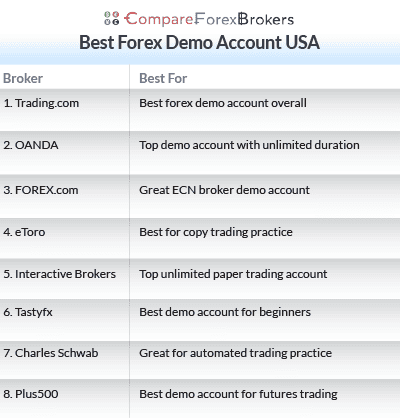
Opening a demo account with a forex broker lets you practice trading without risking real money. I tested demo accounts from 8 US-regulated brokers and matched them to different trading needs based on platform features, virtual funds, spread accuracy, and time limits.



Our broker reviews are reader supported and we may receive payment when you click on a partner site.
Best Forex Demo Accounts
- Trading.com - Best Forex Trading Demo Account
- OANDA - Great Demo Forex Trading App
- FOREX.com - Top ECN Broker Demo Account
- eToro - Good Copy Trading Demo Account
- Interactive Brokers - Best Unlimited Paper Trading Account
- Tastyfx - Top Practice Account For Beginner Traders
- Charles Schwab - Good For Demo Account With Automation
- Plus500 - Great Test Account For Future Trading

| Broker Review | Our Rating | Regulation | Raw EUR/USD Spread | Raw GBP/USD Spread | Raw AUD/USD Spread | Commissions (USD Base) | Standard EUR/USD Spread | Standard GBP/USD Spread | Standard AUD/USD Spread | MetaTrader 4 | MetaTrader 5 | cTrader | Execution Speed | Minimum Deposit | Currency Pairs | Crypto CFDs | Retail Leverage | Prof. Leverage | Visit Broker |
|---|---|---|---|---|---|---|---|---|---|---|---|---|---|---|---|---|---|---|---|
 | 50 | ASIC, FCA, CySEC, NFA/CFTC | - | - | - | - | 1.2 | 1.8 | 1.2 |  |  | ||||||||
 | 92 | NFA/CFTC | - | - | - | 0.99 | 1.64 | 1.45 | |  | | 120ms | $0 | 68+ (Spot) | - | 50:1 | 100:1 | | |
 | 73 | NFA/CFTC FCA,CIRO | 0.02 | 0.15 | 0.35 | $7.00 | 1.2 | 1.5 | 1.3 | | | | 30 ms (May 2023) | $100 | 80+ (Spot) | - | 50:1 | | |
 | 52 | FINRA,SEC ASIC,FCA,CySEC | - | - | - | - | 1 | 1 | - | | | | 120ms | $50 | 68 | 127 crypto coins + 106 other crypto options | | ||
 | 88 | NFA/CFTC | 0.2 | 0.4 | 0.3 | $2.00 | - | - | - | | | | 120ms | $0 | 105+ (Spot) | - | 30:1 | - | |
 | 77 | NFA/CFTC | - | - | - | $6.00 | 1.2 | 1.9 | 1.4 | | | | 174ms | $450 | 80+ (Spot) | - | 50:1 | 50:1 | |
 | 43 | SEC, NFA/CFTC FINRA | - | - | - | - | 1.4 | 1.3 | 1.2 | | | | 110ms | $2000 | 70+ (Spot) | 1 | 50:1 | 50:1 | |
 | 75 | CFTC | - | - | - | - | 0.8 | 1.6 | 1.0 | | | | 140ms | $100 | 68+ CFD forex pairs | 25+ | 30:1 | 300:1 | |
What is the best demo account for forex trading?
Trading.com offers the best forex demo account with a $0 minimum deposit, providing unlimited virtual funds and full access to the trading platform. Other US-regulated brokers were shortlisted based on their flexibility in demo accounts, ease of use, and suitability for traders’ testing strategies.
1. Trading.com - Best Forex Trading Demo Account

Forex Panel Score

Average Spread
EUR/USD = 1.2
GBP/USD = 1.8
AUD/USD = 1.2
Trading Platforms
MT5
Minimum Deposit
$50
Why We Recommend Trading.com
In my opinion, Trading.com stands out as one of the best demo accounts for US traders, as it offers unlimited practice trading in real market conditions using virtual funds, so there’s no need to risk your own money. The demo account is available on MetaTrader 5, the Trading.com WebTrader, and the Trading.com mobile app, making it easy to test strategies on desktop, browser, or mobile.
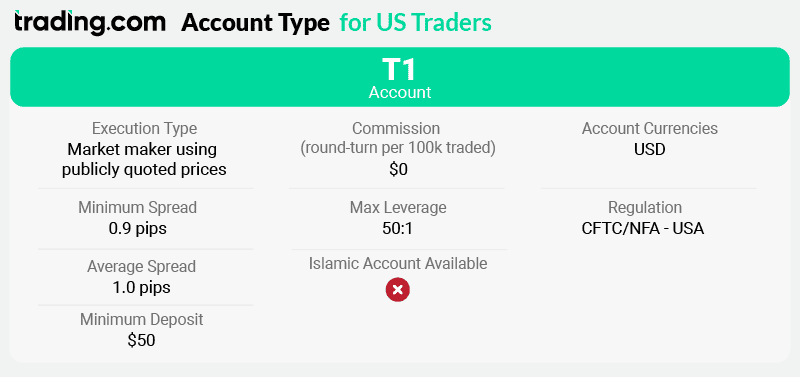
Trading.com offers access to 69 forex pairs with zero commissions through its T1 account. To open a live account, a minimum deposit of $50 is required, after which you can trade using MetaTrader 5, WebTrader, or the Trading.com mobile app. Average spreads start from around 1.0 pip on EUR/USD, with approximately 1.6 pips on GBP/USD and EUR/GBP, and 1.8 pips on USD/CAD and USD/CHF.
One feature that stands out for me is Trading.com’s Forex “Learn” and “Research” tools, which include tutorials, videos, walkthroughs, and daily market updates designed to help improve your trading skills.
While Trading.com doesn’t offer a RAW/ECN or swap-free account, its platform flexibility, unlimited demo access, and strong educational resources make it a top choice for traders looking for the best forex demo account.
Pros & Cons
- Unlimited demo account
- MT5 platform with advanced charting
- 69 forex pairs for spot trading practice
- No MT4 platform option
- Single spread-only account type
- No copy trading or social features
Broker Details
Trading.com Accounts and Spreads
Trading.com offers a focused product range for US-based traders, with access exclusively to spot forex across 69 currency pairs. I found its market-maker model delivers strong liquidity and fast execution, with over 99% of orders filled in under one second, which is particularly important when testing strategies on a demo account before going live.
| Currency Pair/Spread | Trading.com UK | Trading.com US | Average Trading.com US |
|---|---|---|---|
| EUR/USD | 1.8 | 1.1 | 1.0 |
| GBP/USD | 2.0 | 1.6 | 1.6 |
| USD/CAD | 2.8 | 1.9 | 1.8 |
| USD/CHF | 1.9 | 1.5 | 1.8 |
| USD/JPY | 2.5 | 1.6 | 1.5 |
| NZD/USD | 2.8 | 2.4 | 2.5 |
| EUR/GBP | 1.7 | 1.5 | 1.6 |
In my view, Trading.com’s spreads are competitive for the US market. Spreads start from around 1.0 pip on EUR/USD, while pairs like USD/JPY average closer to 1.5 pips. There are no per-trade commissions, which keeps costs transparent and makes it easier for newer traders to understand pricing when practising on demo or transitioning to live trading.
Trading Platforms With Trading.com
Platform choice at Trading.com is fairly limited, as you only get access to MetaTrader 5 and Trading.com’s proprietary platforms, with no MT4 available. That said, I found the overall platform quality to be strong, especially for demo trading.
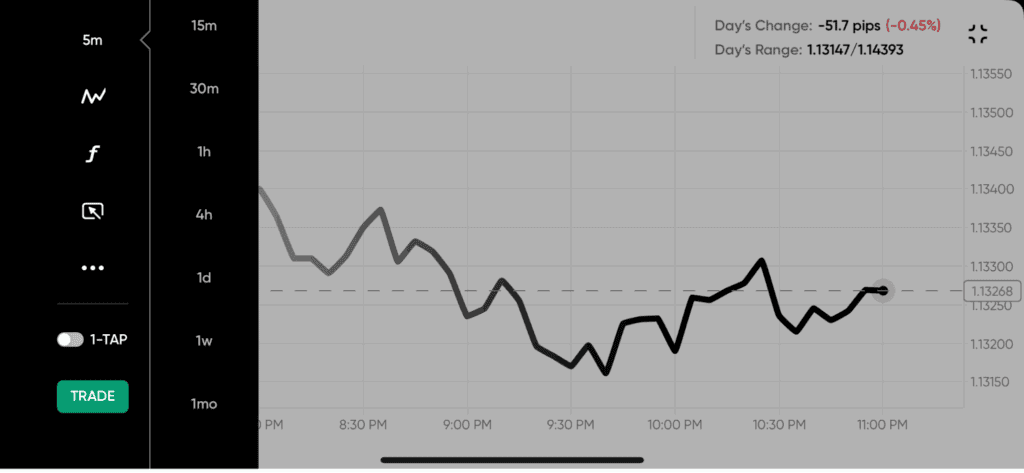
The Trading.com WebTrader stood out for me, as it uses TradingView-powered charts with more than 90 technical indicators and 50 drawing tools. This makes it particularly useful for testing strategies in a demo environment directly from your browser, with no downloads required. The Trading.com mobile app also offers solid functionality, including Face ID security, multiple order types, and advanced stop-loss features.
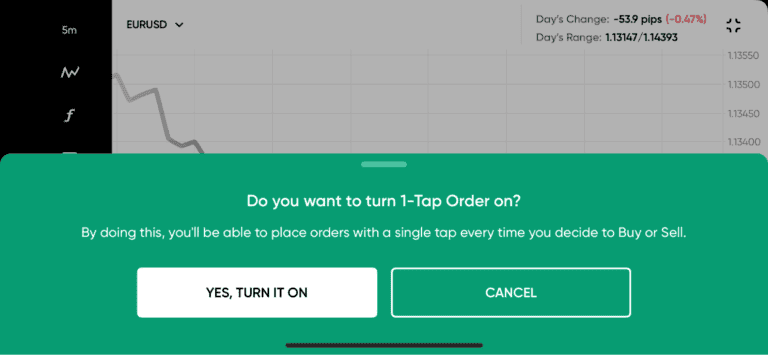
You also get access to one-click trading and real-time account dashboards across platforms. The demo account gives you a risk-free way to explore all these tools, making Trading.com especially appealing for traders who want hands-on platform experience before committing real capital.
Trading.com Education Products
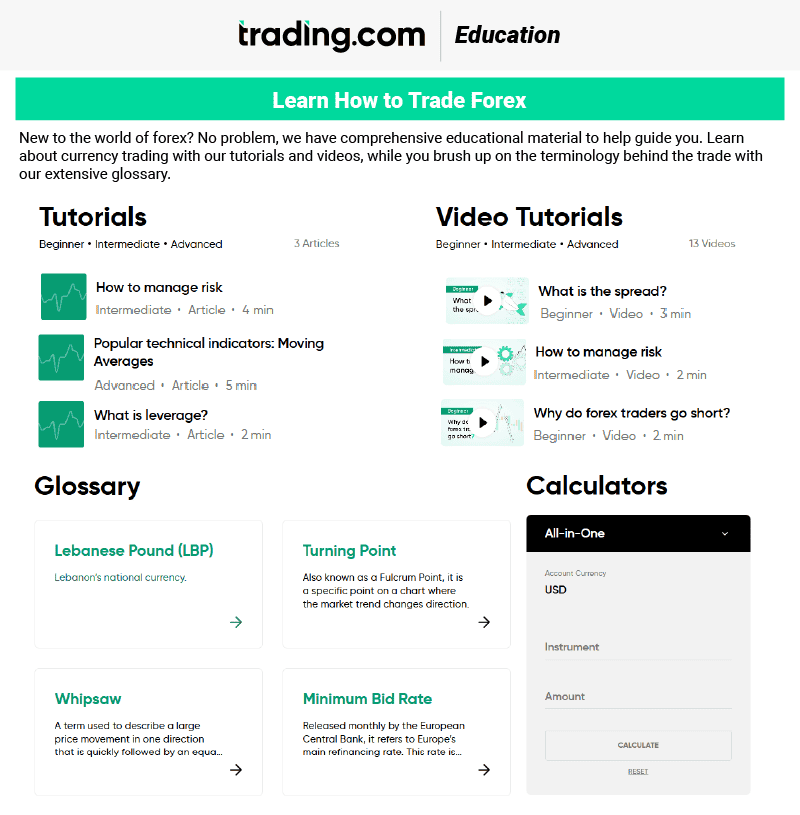
One thing I really liked about Trading.com is its structured forex education, which pairs well with its demo account. The education is broken down into seven easy-to-follow courses. The first two are ideal for beginners, covering the basics such as what forex is and how currency pairs work. Courses three, four, and five focus on intermediate topics like strategy development and risk management, while the final two courses are aimed at advanced traders and cover technical and fundamental analysis in more depth.
If video tutorials are more your style, Trading.com also offers video-based lessons that cover the same topics as the written courses. Additional learning tools include platform walkthroughs, glossaries, and forex calculators, which are especially useful when practising trades on demo.
Trading.com also provides a solid range of research tools. Daily Updates and News highlight key market movements and upcoming economic events, while the Research Portal offers technical analysis, trade ideas, market sentiment, and technical summaries. These tools work well alongside the demo account, helping traders apply market insights in real time without financial risk.
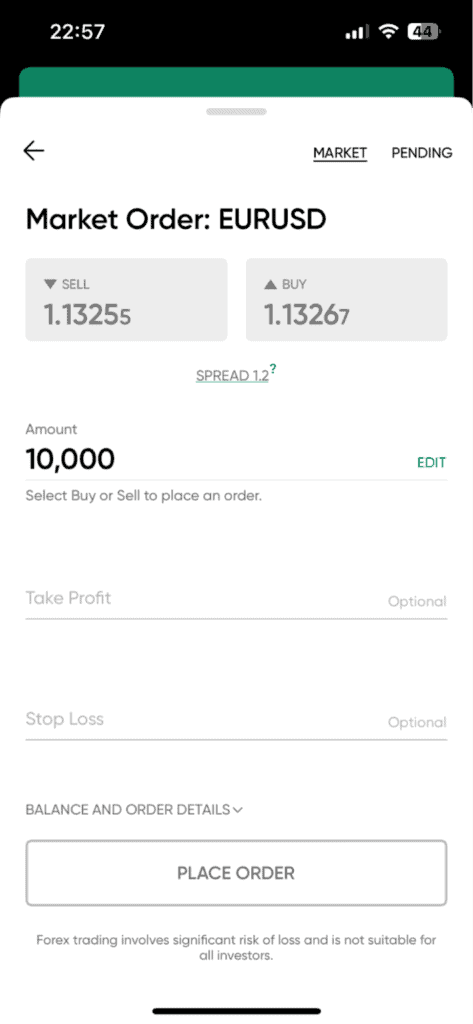
Broker Screenshots
2. OANDA - Great Demo Forex Trading App

Forex Panel Score
Average Spread
EUR/USD = 0.99 GBP/USD = 1.64 AUD/USD = 1.45
Trading Platforms
MT4, TradingView, OANDA Trade (FxTrade)
Minimum Deposit
$0
Why We Recommend OANDA
OANDA stands out as one of the best demo accounts for US traders because it allows me to practise trading on OANDA Trade (web and mobile), MetaTrader 5, and TradingView using an unlimited demo account. There’s no expiry, and the virtual balance can be adjusted to reflect realistic account sizes, which makes strategy testing far more practical before trading live.
What also adds value is that the demo closely mirrors OANDA’s live trading conditions, providing access to 68 forex pairs with spreads that reflect real market pricing and average around 1.5 pips on EUR/USD. For higher-volume traders, OANDA offers an Elite Trader Program that provides cash rebates based on monthly trading volume once you transition to a live account. Combined with real-time pricing, detailed performance tracking, and access to professional-grade platforms, OANDA’s demo account offers a realistic and scalable path from practice to live trading.
Pros & Cons
- Unlimited demo account
- $100,000 starting balance
- Three platform options
- Multiple sub-accounts in different base currencies
- 68 currency pairs
- API access for automated trading development
- Elite Trader rebate program
- Core Pricing is $10,000 minimum for tighter spreads
- MT4 limited to 90 days
- Average spreads 1.54 pips without Core Pricing
- Limited educational content
Broker Details
Unlimited Practice and Multiple Sub-Accounts
From my experience, OANDA’s demo account is designed to closely replicate live trading conditions rather than act as a basic practice tool. The demo provides $100,000 in virtual funds (but you can top up if needed), tracks profit and loss in real time, and generates full account statements, making it easier to analyse performance and refine strategies before trading live.
I can access the demo across OANDA Trade (web and mobile), MetaTrader 5, and TradingView. OANDA Trade offers strong charting with over 100 technical indicators, price alerts, and a clean interface that works well for discretionary traders. The mobile app, which we’ve also featured in our guide to the best app for forex trading in the USA, is particularly polished and makes it easy to monitor positions and manage trades on the go.
MT5 allows me to test Expert Advisors and automated strategies, while TradingView adds advanced charting tools and community-built indicators. Having all three platforms available in demo mode makes it easy to compare tools and find what suits my trading style before moving to a live account.
68 Currency Pairs and Competitive Spreads
OANDA offers access to 68 forex pairs, covering majors, minors, and a solid range of exotics. Demo pricing mirrors live conditions, with variable spreads starting from 0.6 pips and an average spread of around 1.54 pips on EUR/USD, which is competitive for the US market.
OANDA uses a spread-only pricing model with no commissions, and there is no minimum deposit, making it easy to transition from demo to live trading when ready.
OANDA Elite Trader Program
For high-volume traders, OANDA offers the Elite Trader Program, which requires monthly trading volume of at least $10 million to qualify. The program provides cash rebates per million traded, starting at $5 per million for volumes between $10M–$49M, increasing to $7, $10, $15, and up to $17 per million for traders exceeding $1 billion in monthly volume.
While the Elite Trader Program isn’t available in demo mode, I found it useful to estimate potential rebates by tracking simulated trading volume during demo trading. Additional benefits include a dedicated relationship manager, priority support, and potential platform-related perks, making it most relevant once moving from demo to high-volume live trading.
3. FOREX.com - Top ECN Broker Demo Account

Forex Panel Score
Average Spread
EUR/USD = 0.02 GBP/USD = 0.15 AUD/USD = 0.35
Trading Platforms
MT4, MT5, TradingView, FOREX.com Trading Platform
Minimum Deposit
$100
Why We Recommend Forex.com
FOREX.com provides $50,000 in virtual funds with 90-day demo access on their proprietary platform (90 days for MT4). As one of the best ECN brokers in the US, the demo showcases their ECN execution model with spreads as low as 0.0 pips plus $7 ($14.00 round-turn) commission per $100,000 on RAW Pricing accounts.
If you’re a US trader, FOREX.com gives you access to spot forex pairs and futures trading. Their proprietary platform integrates TradingView charts with over 80 technical indicators, while Performance Analytics (powered by Chasing Returns) uses AI to analyse your trading patterns and provide real-time improvement suggestions.
Standard demo accounts show typical spreads around 1.2 pips on EUR/USD without commission. You practice with full access to 80+ currency pairs and futures contracts.
*Your capital is at risk up to ‘75% of retail CFD accounts lose money with FOREX.com’
Pros & Cons
- RAW Pricing with 0.0 pip spreads
- 80+ forex pairs
- Performance Analytics
- TradingView and MT4/MT5 platform options
- 90-day limit on proprietary platform demos
- Renewal not available after expiration
- RAW Pricing requires larger account size
- Some advanced features require live account
4. eToro - Good Copy Trading Demo Account

Forex Panel Score
Average Spread
EUR/USD = 1.0
GBP/USD = 2.0
AUD/USD = 1.0
Trading Platforms
eToro
Minimum Deposit
$50
Why We Recommend eToro
I recommend eToro because its demo account lets me practise trading in a way that’s genuinely different from most US brokers. With $100,000 in virtual funds and no expiry, I can explore eToro’s social trading ecosystem without risking real money. What really sets it apart is the ability to demo copy trading through CopyTrader™, allowing me to follow real investors and automatically replicate their trades using virtual funds.
eToro also lets me test Smart Portfolios, which bundle stocks and cryptocurrencies into themed investment strategies such as technology, healthcare, or innovation. This makes it easy to practise diversified, long-term investing rather than just individual trades.
For US traders, eToro focuses on stocks and cryptocurrencies, all accessible through a single platform and wallet. Overall, eToro’s demo account stands out for anyone interested in social investing, copy trading, and thematic portfolios rather than traditional forex trading
Pros & Cons
- $100,000 virtual funds
- Copy trading available in demo mode
- Instant switching between real and virtual portfolios
- Crypto and stocks
- Can request additional virtual funds
- Analysis and News features locked in demo
- Platform pushes toward live account upgrades
- Limited advanced charting vs competitors
- Copy trading commissions not charged in demo
5. Interactive Brokers - Best Unlimited Paper Trading Account

Forex Panel Score
Average Spread
EUR/USD = N/A
GBP/USD = N/A
AUD/USD = N/A
Trading Platforms
IBKR Workstation, IBKR Global Trader, IBKR Mobile
Minimum Deposit
$0
Why We Recommend Interactive Brokers
Interactive Brokers offers unlimited paper trading with $1,000,000 in virtual funds through its Trader Workstation (TWS) trading platforms. To access paper trading, you need to open a live account, although no funding is required. The paper account works across desktop, web, and mobile, using the same tools available to live traders.
With over $426 billion in client equity, Interactive Brokers provides institutional-grade infrastructure and access to 150 markets across 33 countries, including stocks, options, futures, forex, bonds, and funds.
The paper trading environment closely mirrors live conditions, with realistic execution, 100+ order types, and full IB API access for testing automated strategies. For US stock trading, IBKR Lite offers $0 commission trades, while IBKR Pro charges around $0.005 per share (minimum $1). Professional tools like Options Analytics, Risk Navigator, and PortfolioAnalyst are also available in demo mode, making Interactive Brokers one of the most powerful paper trading platforms in the US.
Pros & Cons
- $1,000,000 starting balance
- Unlimited duration with no expiration
- Full TWS platform with advanced tools
- API access for algo trading development
- Multi-asset practice across 150 markets
- Daily paper account statements generated
- Requires live account opening first
- Complex platform has steep learning curve
- Market data subscriptions disabled in paper mode
- Some execution differences vs live trading
6. Tastyfx - Top Practice Account For Beginner Traders

Forex Panel Score
Average Spread
EUR/USD = 1.2 GBP/USD = 1.9 AUD/USD = 1.4
Trading Platforms
MT4, tastyfx Web Platform, tastyfx Mobile App, ProRealTime
Minimum Deposit
$250
Why We Recommend Tastyfx
Tastyfx delivers a straightforward demo with $10,000 in virtual funds. The platform is specifically designed for beginner traders with simplified interfaces and educational content integrated throughout. In addition to tastyfx, you can also trade with MT4, MT5, TradingView and ProRealTime.
The platform offers three live account tiers: Standard (0.8 pips commission-free), Zero+ (0.0 pips with $5/lot commission), and Prime (0.6 pips for $50K+ accounts with up to 8% APY on cash). Tastyfx also provides Demo accounts for practice trading and IRA accounts for tax-advantaged retirement trading.
If you’re new to forex, Tastyfx ranks among the best forex brokers for beginner traders with its educational resources and intuitive platforms. Their Volume Based Rebate program returns up to 15% of spreads for active traders, while the Trade Analytics dashboard tracks performance metrics helping you identify profitable patterns.
You automatically receive demo access when opening an account (no funding needed). The proprietary platform includes Signal Center for professional trading signals, 33 technical indicators, 19 drawing tools, and seamless integration with TradingView, MT4, and ProRealTime for advanced charting needs.
Pros & Cons
- Clean interface
- Signal Center with professional trade ideas
- 80+ currency pairs available
- MT4 demo also available
- 20+ online lessons for learning
- Only $10,000 in virtual funds
- More basic platform vs competitors
- Limited technical indicators (33 available)
- Smaller instrument selection overall
7. Charles Schwab - Good For Demo Account With Automation

Forex Panel Score
Average Spread
EUR/USD = N/A
GBP/USD = N/A
AUD/USD = N/A
Trading Platforms
thinkorswim desktop, thinkorswim web, thinkorswim mobile, Schwab.com, Schwab Mobile
Minimum Deposit
$0
Why We Recommend Charles Schwab
Charles Schwab’s paperMoney runs inside thinkorswim with $100,000 in virtual funds (fully adjustable). The platform excels for automated trading with thinkScript support for coding custom strategies, indicators, and studies.
Beyond forex, you access stocks, options, futures, bonds, and ETFs across US and international markets. The thinkorswim platform includes 400+ technical studies, sophisticated options analysis with Probability Analysis and Greeks calculations, and the Trade Flash tool showing real-time unusual options activity.
Their research center provides third-party reports from Morningstar, CFRA, Market Edge, and proprietary Schwab equity ratings.
Two access methods exist: Schwab clients get unlimited paperMoney access, while non-clients can use the Guest Pass for 30-day trials without opening an account. Both options provide full thinkorswim functionality across desktop, web, and mobile platforms including scanners that filter thousands of securities by custom criteria.
Pros & Cons
- $100,000 adjustable virtual balance
- thinkScript for automated strategy coding
- Guest Pass available without account opening
- Multi-asset (forex, futures, options, stocks)
- Advanced scanning and analysis tools
- Guest Pass limited to 30 days
- Complex platform overwhelming for beginners
- Futures and forex have specific requirements
- No MT4/MT5 platform options
8. Plus500 - Great Test Account For Future Trading

Forex Panel Score
Average Spread
EUR/USD = 0.8
GBP/USD = 1.6
AUD/USD = 1
Updated 27/03/2026
Trading Platforms
Plus500 Trading Platform
Minimum Deposit
$100
Plus500 disclaimer: CFD service. Your capital is at risk. 80% of retail CFD accounts lose money
Why We Recommend Plus500
Plus500 Futures focuses on exchange-traded futures and offers an unlimited demo account loaded with $50,000 in virtual funds. One feature I like is that the balance automatically replenishes whenever it drops below $200, so you can keep practising without interruptions or manual resets. The demo gives access to 60+ futures contracts across key markets, including forex futures, equity indices, commodities, interest rates, and cryptocurrencies, all traded on regulated US exchanges.
The proprietary Plus500 Futures web platform is well equipped, offering 114 technical indicators, advanced charting, and built-in risk management tools such as trailing stops, guaranteed stops, and price alerts. Demo conditions closely mirror live trading, with real-time pricing and realistic execution simulation, making it suitable for testing futures strategies before committing capital.
Pros & Cons
- Unlimited duration with auto-replenishing balance
- $50,000 starting virtual funds
- 60+ futures contracts across asset classes
- 114 technical indicators included
- No platform fees or data charges
- Futures-only focus (no spot forex)
- Proprietary platform only (no MT4/MT5)
- Limited educational content vs competitors
- Guaranteed stop orders incur fees (in live)
How to Choose a Forex Broker in US?
Start by matching the demo to your actual trading plan. Choose virtual funds similar to what you’ll deposit in a live account, so you practice realistic position sizing. Look for platforms that offer the currency pairs you want to trade and provide the technical tools you’ll actually use.
Consider whether you need mobile access, automated trading capabilities, or copy trading features. Demo duration matters too – unlimited accounts give you more flexibility than 30-day trials. Finally, ensure the broker is properly regulated in the US through the CFTC and NFA before spending time on their demo.




What Is the Best MT4 Demo Account?
OANDA offers the best demo MT4 account for US traders with 90-day inactivity tolerance (stays open as long as you trade monthly), $100,000 virtual funds adjustable through support, and 68 currency pairs. FOREX.com provides MT4 demos with a strict 30-day limit and $50,000 funds.
While MT4 isn’t as common among US brokers anymore, OANDA’s more flexible timeframe makes it ideal for testing Expert Advisors and automated strategies. Most US-regulated brokers have migrated to proprietary platforms or MT5 due to MetaQuotes licensing changes. Tastyfx also offers MT4 but with similar limitations.
What Demo Account Has Low Spreads?
As a trader, you can choose between two types of pricing, spread-only (with commissions in addition to the spread) or ECN/RAW. The latter has lower spreads as commissions are a separate cost. So which is best for low spreads or low costs?? Unless you are a high-volume trader, for most traders, spread-only trading will be cheaper. If you trade Forex in sufficient volumes, you can get access to rebates which may see your overall cost be lower than a spread-only account.
Standard Account Spreads | |||||
|---|---|---|---|---|---|
 | 1.00 | 1.20 | 1.60 | 1.60 | 1.50 |
 | 1.40 | 1.40 | 1.70 | 2.00 | 1.40 |
 | 1.20 | 1.80 | 1.60 | 1.70 | 1.60 |
 | 1.20 | 1.40 | 1.90 | 1.90 | 1.40 |
Avg. spreads are taken from each broker's website and updated monthly. Last update on 1 Aug 2026
What Demo Account Should Institutional Traders Use?
Interactive Brokers offers the most comprehensive paper trading for institutional forex brokers, supporting portfolio margin, algorithmic trading, and multi-account structures. Their TWS platform replicates institutional-grade tools including smart order routing, advanced analytics, and API connectivity.
The $1,000,000 starting balance accommodates larger position testing. OANDA’s unlimited demo works well for institutional forex strategies with its automated trading support. Charles Schwab’s paperMoney serves institutional futures traders through thinkorswim’s professional-grade platform.
What Forex Trading Demo Account Has AI Software?
No US broker currently offers dedicated AI trading platforms in demo accounts. FOREX.com provides the best AI features (Performance Analytics with real-time suggestions) but only for live accounts – their demo doesn’t include this functionality.
For demo environments, Interactive Brokers offers the closest alternative through API access, letting you integrate machine learning models with paper trading. OANDA’s MT5 demo supports automated Expert Advisors that can run AI algorithms. Charles Schwab’s paperMoney allows thinkScript custom indicators. True AI integration requires building external solutions that connect through broker APIs.
FAQ
What demo trading strategies can I test run?
Test scalping, day trading, swing trading, and position trading strategies. Practice trend following, breakout patterns, range trading, and reversal setups. Experiment with risk management including stop losses, trailing stops, position sizing, correlation trading, carry trades, and hedging techniques without risking real money.
What are virtual funds?
Virtual funds are simulated money provided by brokers for practice trading. They function like real money in the demo platform but have no actual value. Most brokers provide $10,000 to $100,000 in virtual funds. Understanding market hours helps you practice during active sessions.
What account types do brokers offer?
US forex brokers offer standard retail accounts, ECN accounts with commission-based pricing, managed accounts, Islamic swap-free accounts, IRA retirement accounts, and prime accounts for high-net-worth traders. Account types vary by minimum deposits, spreads, leverage limits, and features available.
What account features exist when trading forex?
Key features include stop loss orders, take profit orders, trailing stops, and pending orders. Advanced platforms offer price alerts, economic calendars, technical indicators, and US forex trading capabilities. Risk management tools include margin calculators, position size calculators, and real-time profit/loss tracking.
Can I practice trading without opening an account?
Charles Schwab offers 30-day Guest Pass access without account opening. Most US-regulated offshore brokers require basic registration (name and email) for demo access but no funding. Registration is quick and doesn’t require KYC documentation for demo-only use.
Background To Demo Trading Accounts
Demo accounts give you a risk-free way to learn forex trading before putting real money on the line. They’re designed to mirror live market conditions so you can build skills and test strategies without financial consequences.
The Purpose of Demo Accounts
A forex demo account simulates real trading conditions using virtual money instead of actual capital. You get access to the same platform, price feeds, and execution as live accounts, just without the financial risk. Most US brokers provide demo accounts with between $10,000 and $100,000 in virtual funds, letting you test strategies and learn platform features before committing real money.
Practice Like You’ll Trade Live
The biggest mistake traders make is treating demo funds recklessly because “it’s not real money.” If you risk 50% of your demo balance on a single trade, you’ll develop habits that’ll blow up a live account fast. I found the best approach is practicing with position sizes you’d actually use when trading real money – this builds the discipline you’ll need later.
Transitioning to Real Money
Don’t rush into a live account after one profitable week on demo. I recommend proving consistent results over at least 2-3 months before funding a real account. When you do make the switch, start small (your first live trades will feel different even if you’ve practiced extensively). The emotional component of risking actual money changes everything, and you’ll need time to adjust to that psychological shift.
Forex trading carries substantial risk of loss and may not be suitable for all investors. Practice with demo accounts before risking real capital.


