

Best MT4 Brokers In USA
To determine the best brokers offering MT4, I first shortlisted the providers with CFTC regulation. I then looked at the spreads each broker charged for MT4 traders, and the features provided. This helped me find the best provider for each trading type.



Our broker reviews are reader supported and we may receive payment when you click on a partner site.
The top regulated brokers offering MetaTrader 4 are:
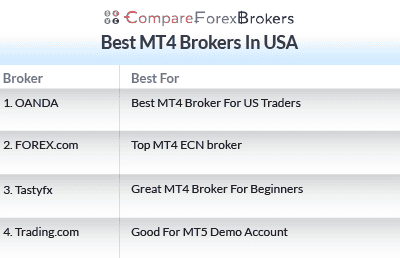
- OANDA - Best MT4 Broker For US Traders
- FOREX.com - Top MT4 ECN broker
- Tastyfx - Great MT4 Broker For Beginners
- Trading.com - Good For MT5 Demo Account
| Broker Review | Our Rating | Regulation | Raw EUR/USD Spread | Raw GBP/USD Spread | Raw AUD/USD Spread | Commissions (USD Base) | Standard EUR/USD Spread | Standard GBP/USD Spread | Standard AUD/USD Spread | MetaTrader 4 | MetaTrader 5 | cTrader | Execution Speed | Minimum Deposit | Currency Pairs | Crypto CFDs | Retail Leverage | Prof. Leverage | Visit Broker |
|---|---|---|---|---|---|---|---|---|---|---|---|---|---|---|---|---|---|---|---|
 | 92 | NFA/CFTC | - | - | - | 0.99 | 1.64 | 1.45 |  |  | | 120ms | $0 | 68+ (Spot) | - | 50:1 | 100:1 |  | |
 | 73 | NFA/CFTC FCA,CIRO | 0.02 | 0.15 | 0.35 | $7.00 | 1.2 | 1.5 | 1.3 | | | | 30 ms (May 2023) | $100 | 80+ (Spot) | - | 50:1 | | |
 | 77 | NFA/CFTC | - | - | - | $6.00 | 1.2 | 1.9 | 1.4 | | | | 174ms | $450 | 80+ (Spot) | - | 50:1 | 50:1 | |
 | 50 | ASIC, FCA, CySEC, NFA/CFTC | - | - | - | - | 1.2 | 1.8 | 1.2 | | |
Which Broker Is Best For MetaTrader 4 (MT4)?
OANDA is the best MT4 broker in the US offering no commission trading, full MetaTrader 4 support and tight spreads under CFTC regulation. Other MT4 regulated forex brokers were shortlisted based on pricing, platform stability and suitability for different MT4 trading strategies.
1. OANDA - Best MT4 Broker For US Traders

Forex Panel Score

Average Spread
EUR/USD = 0.99 GBP/USD = 1.64 AUD/USD = 1.45
Trading Platforms
MT4, TradingView, OANDA Trade (FxTrade)
Minimum Deposit
$0
Why We Recommend OANDA
OANDA is my top pick for MetaTrader 4 in the US, and I awarded them 92/100 in my tests. The broker provides excellent trading conditions on MT4, with fast execution speeds (sub-90ms) that are ideal for scalping and automated trading strategies.
The broker’s Standard account generated low spreads in my analyst’s test, saving you money on the broker’s 68 forex pairs. You can improve the MT4 platform with the broker’s 28 Premium Trading Tools. These include advanced indicators and plugins like Smart Lines, which are good for breakout trading.
Pros & Cons
- Easy-to-use, feature-rich mobile trading app
- Excellent selection of market research tools
- VPS hosting for the MetaTrader 4 trading platform
- Advanced charting and trading tools
- Higher-than-average trading costs
- Educational content focuses on trading platform how-tos
- A limited selection of platforms – no MetaTrader 5 inside the US
Broker Details

Best Standard Account
My head analyst, Ross Collins, conducted tests to find which brokers offer the lowest spreads in the region. To do this, Ross used the IceFX SpreadMonitor EA, which records the daily average spreads. He deployed this EA on his own MT4 platform, across the Asian, London, and New York trading sessions.
In his tests, he found OANDA had some of the lowest US spreads. An average of 1.06 pips on EUR/USD beat the tested industry average of 1.11 pips. OANDA finished top of the list for its Standard account spreads too, making it the lowest spread broker regulated by CFTC/NFA.
Standard Spreads Tested By Ross Collins | |||||
|---|---|---|---|---|---|
 | 1.06 | 1.00 | 1.86 | 1.55 | 1.75 |
Avg. spreads are taken from each broker's website and updated monthly. Last update on 1 Aug 2026
OANDA’s low spreads mean cheaper trading costs. So it is a top choice if lower fees are a priority.
Fast Execution Speeds On MT4
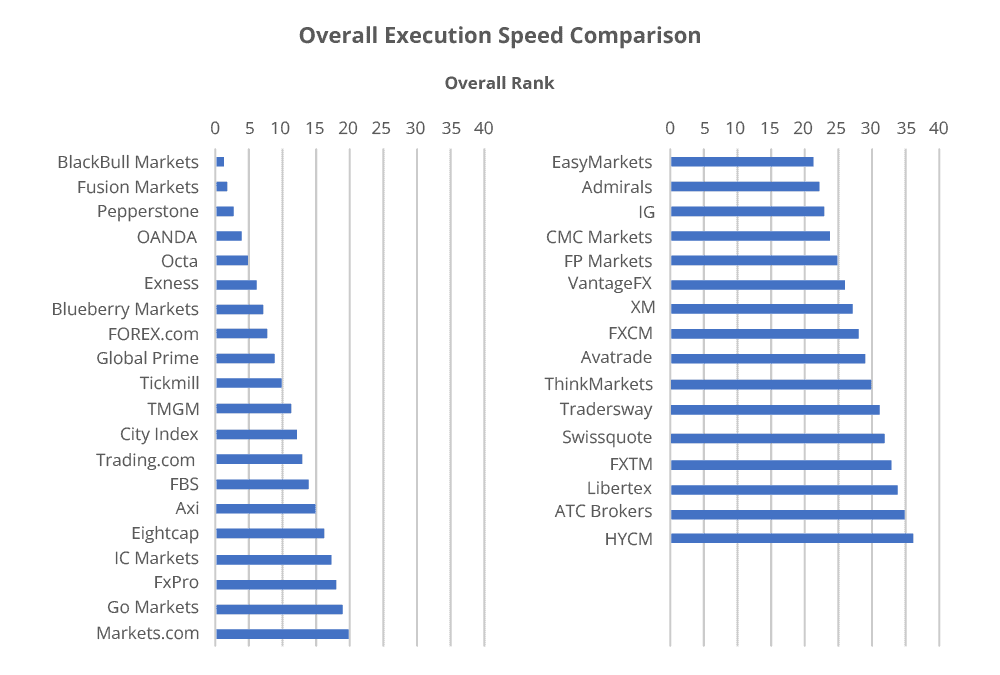
Another important factor is the broker’s trading conditions. Quick execution helps reduce the chance of slippage and requotes, which can negatively impact your trading costs. Ross tested the execution speed for US brokers to see who was the fastest.
In Ross’ tests, OANDA recorded excellent results, with a limit order speed of 86 ms and market order speed of 84 ms. This puts OANDA in first place among US brokers.
With both order types executing in below 100 ms, the trading environment is ideal. Both algorithmic traders and scalpers require fast market order speeds, and you’ll find that here.
OANDA Has Advanced Tools For MT4
OANDA gives access to MetaTrader 4 Premium Tools, offering you 28 plugins that I find improve MT4’s trading experience. For example, I like the Pivot Point and High-Low technical indicators that come in the bundle, as they are useful for breakout trading.
Exclusive 10% Cashback Offer Available (Terms and Conditions Apply)
2. FOREX.com - Best MT4 ECN Broker

Forex Panel Score
Average Spread
EUR/USD = 0.02 GBP/USD = 0.15 AUD/USD = 035
Trading Platforms
MT4, MT5, TradingView, Forex.com Trading Platform
Minimum Deposit
$100
Why We Recommend FOREX.com
I picked Forex.com as it has low spreads on its MT4 Account – 1.32 pips without commission across the major pairs. You can trade a solid range of markets too, with 80+ forex pairs and 2,500+ stock and futures markets.
FOREX.com has third-party trading tools that I found improved the overall MetaTrader 4 experience and Trading Central for automated technical analysis alerts.
On top of this, you have Performance Analytics, which provides suggestions on how to improve your trading skills in real-time.
Pros & Cons
- Multiple account types
- Minimum spreads as tight as 0.0 pips on Commission-Based Account
- Advanced Forex trading platforms
- High minimum deposit – US $100
- Limited product offering on MT4 – only 600 instruments
- Limited educational resources for American account holders
- No copy trading
- No crypto spot trading
Broker Details
FOREX.com Has Tight MetaTrader 4 Spreads
FOREX.com’s MT4 account is a Standard account. As far as I can tell, the spreads on this account are the same as they are for the broker’s Standard Accounts on other platforms. They average 1.20 pips on EUR/USD during the New York trading session, which is low for US brokers.
I analyzed the broker’s top 5 major pair spreads during the same market session. On these pairs, I found the spreads averaged 1.32 pips, beating the industry average by around 14%. This means Forex.com’s MT4 account offers cheaper spreads on EUR/USD, USD/JPY, GBP/USD, AUD/USD, and USD/CAD than most of its competitors.
| Top 5 Most Traded Average Spread | |
|---|---|
| Broker | Major Pair Average Spread |
| FOREX.com | 1.32 |
| OANDA | 1.12 |
| Trading.com | 1.56 |
| IC Markets | 0.93 |
| Admirals | 1.08 |
| Go Markets | 1.08 |
| eToro | 1.30 |
| IG | 1.38 |
| HugosWay | 1.42 |
| Markets.com | 1.10 |
| TradersWay | 2.04 |
| Industry Average | 1.53 |
Solid Trading Tools With MetaTrader 4
During my time using Forex.com, I liked that they offered extensions for the MT4 platform. The broker provides solid additional features such as technical analysis functions.
Trading Central is a solid tool if you day trade. It provides professional technical analysis alerts across the broker’s 90+ forex markets, using price action and chart pattern signals. I received around 15+ alerts a day during the New York session, giving me great value as I looked for trading opportunities.
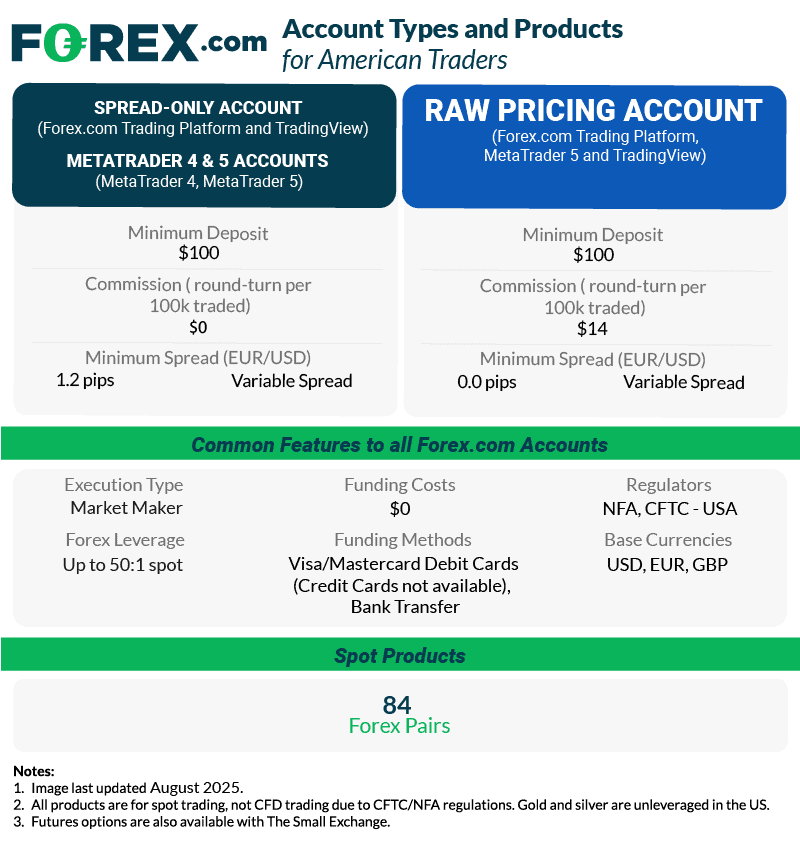
You also have access to Performance Analytics. Here, you’ll gain real-time strength and weakness analysis on your trading performance. I found it very useful for improving my strategies. For traders seeking best ECN brokers execution, FOREX.com’s RAW Spread account offers institutional-grade pricing with spreads from 0.0 pips plus commission.
75% of retail investor accounts lose money when trading CFDs and FX with this provider.
3. Tastyfx - Best MT4 Broker For Beginners

Forex Panel Score
Average Spread
EUR/USD = 1.2
GBP/USD = 1.9
AUD/USD = 1.4
Trading Platforms
MT4, tastyfx Web Platform, tastyfx Mobile App, ProRealTime
Minimum Deposit
$250
Why We Recommend Tastyfx
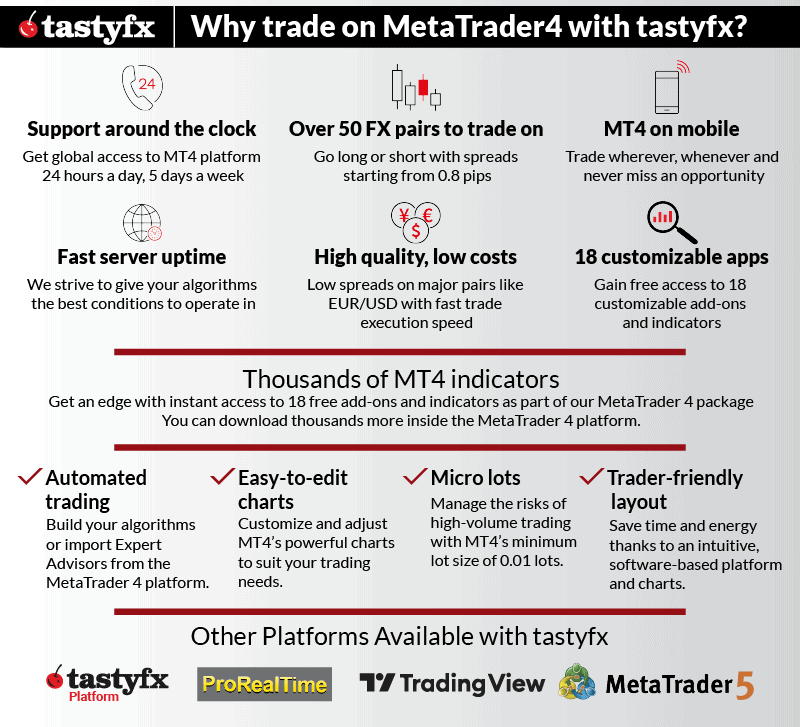
I chose Tastyfx as I found the broker provides an excellent demo account for the MT4 platform. You can trade with $10,000 in virtual funds on the demo, and can also access the Signal Centre for professional trading signals. This is a great opportunity to learn to trade in real-time.
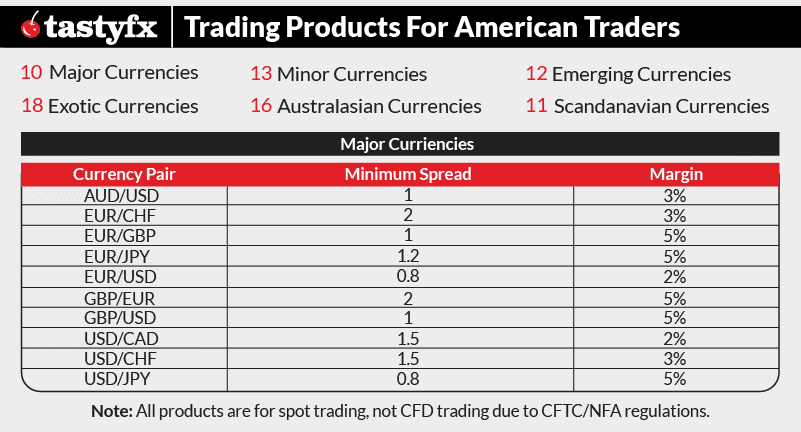
Tastyfx now offers three live account types: Standard (spreads as low as 0.8 pips, commission-free), Zero+ (spreads from 0.0 pips with $5/lot commission), and Prime (0.6 pips for $50K+ accounts with up to 8% APY). The broker also provides Demo and IRA accounts. MetaTrader accounts include free access to 45 additional indicators and Expert Advisors.
The educational material on Tastyfx is also decent. I found more than 20 online lessons, which go into detail on how to trade and build your own trading strategies. You’ll also have access to 80+ forex markets, and spreads from 0.8 pips on EUR/USD (commission-free). I found that the broker managed to simplify the pricing without increasing the spreads too much.
Pros & Cons
- Excellent global reputation
- Competitive spreads
- Wide range of financial markets to trade
- Great educational resources
- Award-winning proprietary platform
- Limited range of financial markets for MT4 accounts
- Americans are limited to spot forex trading
Broker Details
Generous MetaTrader 4 Demo Account With Signal Centre
If you’re looking for a demo account to try, Tastyfx has a solid option. The $10,000 of virtual funds and full range of features give you a complete trading experience while you practice with the broker.
As well as all of MetaTrader 4’s features, you have Tastyfx’s add-ons. For example, Signal Centre, which lets you receive real-time trading signals from Acuity, a top market-research firm.
I like that this provides clear open and target levels, and that you can filter by confidence rating. This means you receive only high-confidence ideas. If you’re a beginner, you can use these signals to help you understand trading opportunities in real-time.
In-depth Education Resources With Online Lessons
The broker provides a comprehensive educational area with 20+ online lessons. The lessons cover everything from the basics of forex trading, to the development of advanced trading strategies.
I found these lessons surprisingly decent, with plenty of knowledge covered in each session – most brokers offer only barebones content, from my experience.
Although there is no video to accompany the lessons, the illustrations, images, and diagrams are well-developed. This multi-media approach really helps reinforce the lessons in my opinion.
Learning from brokers themselves isn’t usually ideal, but with Tastyfx I think you can grasp the fundamentals. This is more than I can say for educational materials from other brokers I’ve seen.
If you’re just starting up, Tastyfx’s combination of educational resources, demo accounts, and user-friendly platforms makes it an ideal choice among forex brokers for beginners.
Low Minimum Deposit and Trading Costs
When opening my live trading account, the minimum deposit requirement was $1, which is one of the lowest for US-regulated brokers. This allows you to fund your account with a small balance when you are ready. The transition from the demo account to a live environment becomes much gentler.
There are no costs for depositing or withdrawing, and the broker’s Standard account has low spreads from 0.8 pips on EUR/USD.
4. TRADING.com - Best For MT5 Demo Account

Forex Panel Score
Average Spread
EUR/USD = 1.2
GBP/USD = 1.8
AUD/USD = 1.2
Trading Platforms
MT5
Minimum Deposit
$50
Why We Recommend TRADING.com
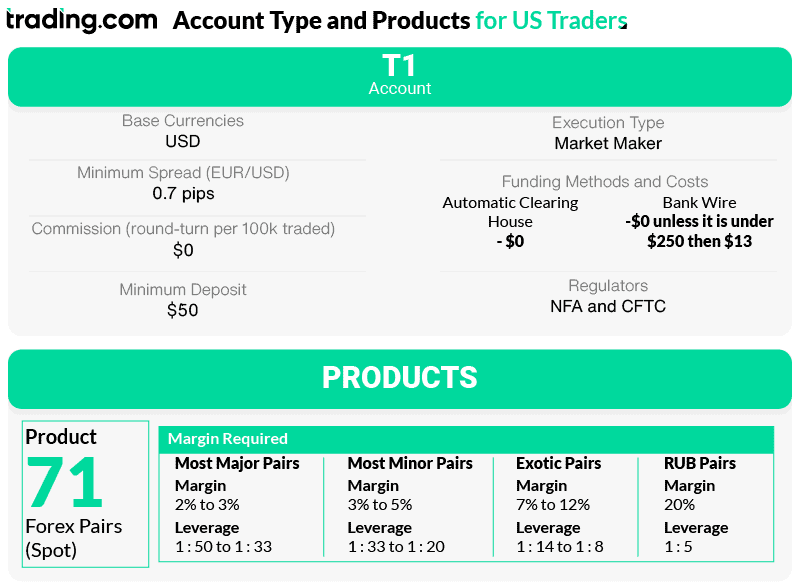
I found Trading.com offers solid trading conditions if you want to use MT5. The T1 account provides low spreads, averaging 1.20 pips EUR/USD. It also requires only a low $50 minimum deposit to get started.
Trading.com has 70+ currency pairs and solid research tools, which include trading signals and sentiment indicators. These tools pair nicely with the MT5’s Depth of Markets feature. With 24/5 customer support through Live Chat, you can access a human agent to answer your query quickly.
Pros & Cons
- Impressive range of currency pairs – 70+
- Access to the MT5 trading platform
- Easy account opening experience
- 24/5 customer support
- Limited charting and technical analysis from proprietary app
- No VPS execution for automated trading
Broker Details
Trading.com Offers MetaTrader 5
MetaTrader 5 offers almost everything MT4 has, plus additional technical indicators, bringing the number up to more than 38.
The developers have also improved the software’s infrastructure to provide a faster environment. This means improved functionality for EAs, although there are fewer EAs overall when compared to MT4. Of course, you still have one-click trading, custom indicators, and automated trading.
The platform has advanced tools like Depth of Markets and a native economic calendar. Depth of Markets lets you see the order flow of the liquidity provider, uncovering real-time blocks of orders for supply and demand analysis.
My favourite upgrade is the native economic calendar, which applies an upcoming market event overlay to your chart. This helps you to avoid price spikes from high-impact events. It also saves you from switching between chart and website to review the latest economic data releases – you can do it all in one platform.
If you’re an experienced trader, these tools can help you time your trades better.
T1 Account Has Tight Spreads
While using Trading.com, I found the T1 account had decent spreads. The T1 account is the broker’s Standard account, providing commission-free trading with spreads that start from 0.90 pips. However, while using the account, I found these spreads averaged 1.20 pips on EUR/USD, which puts them on par with most US-regulated brokers like Forex.com.
You can open a T1 account with a minimum deposit of $50. I found I could use 1:50 leverage, so the minimum gave me enough to open 2 micro-lots on EUR/USD. Before committing real funds, you can test the MT5 platform and refine your trading strategies using Trading.com’s best forex demo accounts, which provides virtual funds in a risk-free environment.
How to choose a MetaTrader broker
Choose MetaTrader brokers based on three factors that directly impact your trading costs and account security.



What MT4 broker has the best trading app?
OANDA offers the best MT4 mobile app for US traders. I use their iOS and Android apps regularly to monitor my Expert Advisors while traveling. MetaTrader 4 (MT4) is a widely used electronic trading platform developed by MetaQuotes Software, and OANDA’s implementation works flawlessly on mobile.
The MT4 mobile app includes all essential features – you can view charts, manage open positions, and even deploy new EAs remotely. FOREX.com also provides solid mobile trading on MT4, though I prefer OANDA’s interface. Just remember that technical analysis on small screens is harder than on a desktop.
Does the best forex broker offer MT4?
Yes, OANDA is one of the best forex brokers in the USA that offers full MetaTrader 4 support. I rated them 91/100 in my tests, and their MT4 implementation is excellent. They provide VPS hosting for Expert Advisors, sub-90ms execution speeds ideal for scalping, and access to 68 forex pairs.
OANDA enhances MT4 with 28 Premium Trading Tools including advanced indicators and plugins like Smart Lines for breakout trading. I’ve found these additions genuinely useful rather than gimmicky add-ons. Their Standard account averaged competitive spreads in my testing – 0.89 pips on EUR/USD with no commissions.
FOREX.com is another top-tier broker offering MT4 with both Standard and RAW spread accounts. Tastyfx provides MT4 access alongside their proprietary platforms, giving you flexibility. Most quality US brokers support MT4 because it’s what traders demand (the platform’s popularity means brokers must offer it to stay competitive).
Just verify any broker claiming to offer MT4 actually supports full EA functionality, as some restrict automated trading features.
Is MetaTrader 4 the best trading platform?
MT4 is the most popular forex platform globally, but ‘best’ depends on your specific trading needs. For pure forex trading with automation, MT4 excels through its combination of reliability, universal broker support, and extensive EA library.
1. Automation and customization capabilities
What makes MT4 special is the MQL4 programming language letting you code custom indicators or build Expert Advisors that automate your entire strategy. The platform includes 30+ built-in technical indicators and thousands of free/paid EAs available in the MetaQuotes marketplace. I’ve used MT4 since the early 2000s for automated strategies that would be impossible to execute manually.
2. Cross-platform accessibility
MT4 is free to download and works on Windows, macOS, web browsers, and mobile devices. This universal compatibility means you can monitor positions anywhere without being tied to a single device. The platform is highly adaptable for every trading style – scalping, swing trading, or running automated strategies continuously.
3. Platform limitations and alternatives
Other trading platforms might suit specific needs better. If you need advanced order types or want to trade stocks and futures alongside forex, platforms like cTrader or proprietary broker platforms offer features MT4 lacks. MT4 focuses exclusively on forex and CFDs, making it ideal for currency traders but limiting for those wanting multi-asset portfolios.
What MT4 broker is best for automated trading?
OANDA is the best MT4 broker for automated trading in the US. They offer VPS hosting so your Expert Advisors run 24/7 without interruption, even when your computer is off. I keep my EAs running on OANDA’s VPS to capture trades during Asian and London sessions while I sleep.
FOREX.com also excels at MT4 automation, providing nine proprietary Expert Advisors including Sentiment Trader. Their platform includes advanced backtesting tools and access to the MetaQuotes Marketplace with 1,700+ trading robots and 2,100+ technical indicators.
I’ve purchased several EAs from their marketplace and tested them thoroughly before deploying live.
Both brokers support full MQL4 programming if you want to code custom EAs. The key is fast execution speeds; OANDA’s sub-90ms and FOREX.com’s 30ms execution ensure your automated strategies execute at the prices you expect. Slow execution kills profitable EAs, so broker infrastructure matters as much as the platform itself.
FAQ
What MT4 broker offers low spreads?
FOREX.com offers the lowest spreads among MT4 brokers in the US. Their RAW account tightens to 0.0 pips on major pairs with a $7 commission per lot. The Standard account averages 1.2 pips on EUR/USD commission-free. Low spread brokers save you money on every trade, especially if you’re executing frequently.
What is the best institutional MT4 broker?
FOREX.com and OANDA both cater to institutional forex brokers on MT4. FOREX.com’s RAW account with 0.0 pip spreads and deep liquidity suits high-volume trading. OANDA provides competitive institutional pricing with volume-based benefits. Both offer API access for algorithmic trading alongside MT4, giving professional traders the infrastructure needed for advanced strategies.
Can you trade with AI using MetaTrader 4?
Yes, MT4 supports AI trading platforms through Expert Advisors coded in MQL4. I’ve integrated machine learning models into EAs for pattern recognition and trade execution. You can also connect external AI tools via MT4’s API.
The MetaQuotes Marketplace offers AI-powered EAs, though results vary. Building effective AI strategies requires programming knowledge and extensive backtesting before risking real capital.
What custom indicators does MT4 offer?
MT4 includes 30+ built-in technical indicators like Bollinger Bands, RSI, and MACD. Beyond these, you can code unlimited custom indicators using MQL4 programming language. I’ve created custom indicators tailored to my specific strategies.
The MetaQuotes Marketplace offers 2,100+ custom indicators you can purchase or download free. MT4’s flexibility lets you modify existing indicators or build completely new ones from scratch.
Do CFD brokers offer MT4?
MT4 is primarily geared towards forex and CFD trading, but US traders can’t access CFDs due to CFTC regulations. US brokers offering MT4 provide spot forex only, not CFDs. Offshore brokers offer MT4 with CFD access, but I strongly advise against them for regulatory protection reasons. Stick with NFA-regulated brokers offering MT4 for spot forex trading.
Is MT4 the most popular platform for forex traders?
Yes, MT4 is the most widely used forex platform globally. More brokers offer MT4 than any other platform, and it has the largest trader community. MetaTrader 4 is free to download for end users, although trading costs like spreads and commissions still apply depending on the broker. Its 20+ year track record, reliability, and massive EA library make it the standard for US forex trading.
Comparison of MT4 and MT5
One of the most common questions I get is about the differences between MetaTrader 4 and MetaTrader 5, and which platform is better suited for different trading needs. I’ve used both extensively, and here’s what separates them.
MT4 supports only a limited number of symbols, while MT5 supports thousands of symbols across multiple asset classes. MT4 uses the MQL4 programming language for custom indicators and Expert Advisors, while MT5 uses the more advanced MQL5 programming language with better backtesting capabilities.
For pure forex trading, I still prefer MT4’s simplicity and the massive library of existing EAs. MT5 offers more advanced features like economic calendar integration and additional timeframes, but most US brokers still focus on MT4 since it’s what traders know. MT4 is free to use, but traders may incur costs associated with trading activities, such as spreads and commissions, which vary by broker.
The choice comes down to trading needs – MT4 for straightforward forex automation, MT5 if you need multi-asset trading and advanced analysis tools.


MT4 Comparisons In Other Regions





Ask an Expert
Can futures markets be traded in the US on an MT4 platform?
The NFA/CFTC allows futures trading and MT4 can handle futures trading but at this time we have not covered any broker that offers futures trading on MT4.
wanting to learn the mt4 or mt5 trading platform. been using Nadex…..it is indicative and numbers do not match on tradingview charts…..I have no knowledge of what the leverage means on the mt4 broker…….I just need a broker with video to learn for a beginner trader of forex and indices.
While spreads between brokers should be similar, it will depend on the liquidity providers they are using. So it makes sense the NADEX platform doest not match those on other major trading platforms. to lead about leverage have read of “What is leverage in forex trading“
Can I trade using an off shore broker using the mt4 platform? I’m still unclear. It would be cedarfx which is Not regulated by any financial authority. Another caveat is it has to be funded with Bitcoin.
Most brokers will not accept clients from the USA. You are best to ask CederFX directly if they will accept you
Is crypto a part of Forex or a completely different thing?
Crypto isn’t Forex but like Forex you can trade with it. You can ‘invest in pure crypto by owning it or use derivative products like crypto cfds much like Forex.
Can I customise charts and indicators easily with these MT4 brokers, or do some have restrictions?
You can stick with the 30+ indicators, and customise their settings pretty easily. If you want to create custom indicators, you need to know how to code with MQL4. Alternatively, you can find custom indicators on the MetaQuotes Marketplace.