
Forex calculators on this page cover five working tasks: profit and loss, lot size, pip value, fee comparison, and margin. Start by choosing the tool that matches the calculation you need, then enter your trade inputs to see a modelled result. The tool descriptions were verified on October 3, 2026; that date covers the descriptions only, not the age of every saved rate.
Profit Calculator
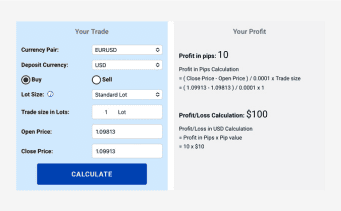
The profit and loss calculator takes six inputs: currency pair, buy or sell direction, entry price, exit price, position size in standard lots, and account currency. The result recalculates automatically whenever an input changes, and it models the entered-price scenario rather than forecasting a future price. The output is the price move's profit or loss in the chosen account currency, and it excludes separate trading costs such as broker commission, financing, or swap, so it is not an all-in realised outcome. I treat the figure as an entered exit-price scenario, not a forecast or an actual after-cost return, because the exit price is an assumption you supply rather than something the tool observes.
Lot Calculator
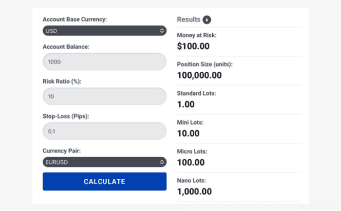
The lot size calculator takes account balance, account currency, risk percentage, stop distance, and pair, and returns a position size in standard lots along with units, pip value, and the modelled amount at risk. The calculator enforces its own minimum-size constraint, and the full tool flags when that minimum would exceed the entered risk budget. That constraint belongs to the calculator, not to any broker, and the result cannot guarantee losses stay within budget. I would read the modelled amount at risk in the full tool rather than the lot figure alone, since that is the number the calculation is actually built around.
Pip Calculator
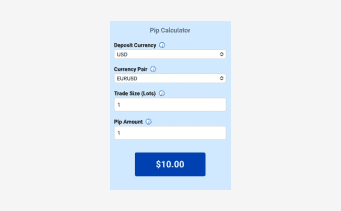
The pip value calculator works from a pair, a position size in standard lots, and an account currency, and returns the value of one pip for that position. The full tool also reports the point value separately, so the two measures stay distinct. I would confirm the unit before relying on the figure, because a scenario entered in the wrong one will not mean what was intended.
Fee Comparison
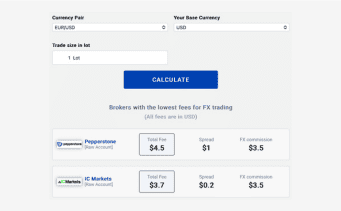
This tool compares stored published account terms captured from the saved widget dataset, whose dates are shown on the linked tool, rather than a live price feed. Controls are pair, account currency, and trade size in standard lots, and the rows scale the stored spread, commission, and total separately by size, showing Not stated where the saved dataset does not state a commission and none where a stored zero applies. The result does not establish which broker account or entity a reader actually holds, how that broker records its round-turn or account-basis commission, or its financing terms, so current broker account terms require a separate check with the broker. The saved total cannot settle every difference in cost basis, and it never completes the price P/L figure into an all-in realised result.
Margin Calculator
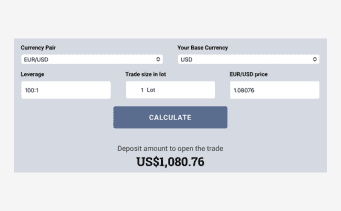
The margin calculator takes an instrument or pair, position size in standard lots, account currency, and the selected leverage rules. It applies the selected tier where caps apply and otherwise uses the entered leverage, reporting a modelled initial margin. That figure is modelled as an amount to set aside, and it is not a maximum-loss limit, a broker assurance, or an account eligibility result. I would compare this modelled estimate against the broker's actual margin requirement before relying on it, because a modelled calculation is not verification of the actual margin requirement on the broker's account.
Forex Market Time Zone Converter
The hub also links to a Forex Market Time Zone Converter inside the market-hours guide. That destination carries a session clock and session-hours tables with time-zone conversions, useful for checking when each session opens in local time.
How We Built Our Forex Calculators
Name the question first, because that decides the tool, and keep units and account currency consistent across the steps you chain together, since a result carried into a different tool unchanged can mislead. Entering a stop distance in points where a tool expects pips, or mixing account currencies between the sizing and pip-value steps, changes what the output actually means.
Once a result appears, treat it as an entered scenario rather than a prediction. In my view, changing one input at a time and watching what moves is the practical way to examine a trade idea before capital is at stake, because it shows which assumption the result actually depends on.
Calculation Inputs And Data Limits
The full calculators use saved exchange-rate inputs, which are replaced only where a valid newer rate is accepted; the provenance shown on each tool reflects what sits behind a given result, and the stored Malaysian ringgit rate date is unrecorded. The quick calculator uses its own build-stored rates throughout. A saved rate is not a promise of the rate you will get when you trade. The fee comparison is a saved snapshot of published account terms, and no result here covers execution, slippage, or eligibility for a specific account.
In my opinion, a modelled output is worth pairing with a current check of the broker’s own published terms before capital is committed, because the account you actually hold can differ from the saved snapshot in ways that change the cost. For how the site gathers and verifies the data behind tools like these, see our methodology. A modelled output is a planning aid, not a guarantee of what a trade will cost or return.
Tailored for Diverse Trading Strategies
Each calculation answers a different what-if about a single entered scenario. My priority when weighing a trade idea is changing one input while the others stay fixed, then comparing the two results by hand, because that manual comparison isolates the effect of the assumption being tested. No result can establish that a given strategy will be profitable, since each output models one scenario from entered inputs rather than predicting how a market will move.
We Welcome Your Feedback
If a calculation returns something that looks wrong for the inputs used, or a control does not behave as described, please reach out with the tool name, the relevant inputs, and what you expected. A suggestion for a calculator the hub does not yet carry is welcome as well.
Risk Warning
Please note that any information you receive from our calculators, or from any of our other tools, is for advisory purposes only. The CompareForexBrokers team does not guarantee any of the information we offer, and any action you take is at your own risk.
Individual brokers can change their spreads and fees at any time. This means the information you gain from our tools won’t necessarily be reflected when you trade for real.
Forex trading, and other types of CFD and derivative trading, always carry significant risk. Even the most experienced traders can suffer losses. We recommend that you trade conservatively and use risk management tools and features at all times.
Related pages
About the author

Justin Grossbard is the Co-Founder and CEO of CompareForexBrokers, which he established with Noam Korbl in 2014. He has over 20 years of professional experience in online marketing and holds a Master's in Marketing from Monash University.
Our reviews are reader-supported. We may receive payment when you click a link to a partner site. Learn how we make money.