
Which Is Better, cTrader or MT4?
cTrader and MT4 are excellent forex trading platforms that allow you to use technical analysis to find trading opportunities and execute trades through your broker. They both offer advanced features like automated trading through their cBots and Expert Advisors, while offering a solid range of trading indicators if you want to trade manually.
In this comparison, I’ll review the key differences (and similarities) I’ve found using both platforms.
| Feature | cTrader | MetaTrader 4 | The difference |
|---|---|---|---|
| Basic information | |||
| Developer | Spotware Systems Ltd Source, read 2026-09-18 | MetaQuotes Ltd Source, read 2026-09-18 | The two differ |
| Launch year | Not stated by the vendor | 2005 Source, read 2026-09-18 | Only MetaTrader 4 states this |
| Asset classes the vendor names | Forex and CFDs Source, read 2026-09-18 | Forex Source, read 2026-09-18 | The two differ |
| Availability | |||
| Desktop application | Windows 7, 8, 10 and 11; macOS 12.0 and up Source, read 2026-09-18 | Windows, Linux, macOS Source, read 2026-09-18 | The two differ |
| Web platform | cTrader Web, for browsers Source, read 2026-09-18 | Web Trading Source, read 2026-09-18 | The two differ |
| Mobile applications | Android and iOS, trading only (no Algo) Source, read 2026-09-18 | iPhone/iPad and Android Source, read 2026-09-18 | The two differ |
| Cost | |||
| Fee the vendor charges the trader | Not stated by the vendor | None stated; the vendor offers the download free Source, read 2026-09-18 | Only MetaTrader 4 states this |
| Trading features | |||
| Automated trading | cBots, in cTrader Algo Source, read 2026-09-18 | Expert Advisors Source, read 2026-09-18 | The two differ |
| Programming language | C# or Python Source, read 2026-09-18 | MQL4 Source, read 2026-09-18 | The two differ |
| Order types | Market, limit, stop and stop-limit, each with stop loss and trailing stop loss Source, read 2026-09-18 | 2 market orders, 4 pending orders, 2 stop orders and a trailing stop Source, read 2026-09-18 | The two differ |
| Execution modes | Not stated by the vendor | 3 execution modes Source, read 2026-09-18 | Only MetaTrader 4 states this |
| Position accounting | Hedging: margin is calculated on the larger side Source, read 2026-09-18 | Not stated by the vendor | Only cTrader states this |
| Charting | |||
| Built-in technical indicators | Not stated by the vendor | 30 Source, read 2026-09-18 | Only MetaTrader 4 states this |
| Analytical objects and drawing tools | Not stated by the vendor | 23 Source, read 2026-09-18 | Only MetaTrader 4 states this |
| Timeframes | Not stated by the vendor | 9 Source, read 2026-09-18 | Only MetaTrader 4 states this |
| Analysis | |||
| Backtesting | Yes, in cTrader Algo Source, read 2026-09-18 | Strategy tester, with a visual mode Source, read 2026-09-18 | The two differ |
| Trading features | |||
| Copy trading built in | cTrader Copy, cross-broker Source, read 2026-09-18 | Trading Signals Source, read 2026-09-18 | The two differ |
| Analysis | |||
| Alerts | Not stated by the vendor | Trading alerts on market conditions Source, read 2026-09-18 | Only MetaTrader 4 states this |
| Trading features | |||
| Marketplace for robots and indicators | cTrader Store Source, read 2026-09-18 | MetaTrader Market: 1,700+ trading robots and 2,100+ technical indicators Source, read 2026-09-18 | The two differ |
Every figure is the platform vendor’s own published specification, read on the date beside it. Where a vendor publishes no figure for a feature the cell reads “Not stated by the vendor”, which is not the same claim as the platform lacking it. 6 further features are compared elsewhere in this matrix and neither of these two publishes them, so those rows are not shown.
What Is MetaTrader 4?
MetaTrader 4 is a forex trading platform developed by MetaQuotes Software and was launched in 2005, providing a true trading terminal setup for retail forex traders.
Despite its age, the platform has the same features as modern-day platforms like technical analysis tools, custom indicators, and automated trading through its Expert Advisors. In fact, MT4 was one of the first platforms to allow algorithmic trading for retail traders.
What is cTrader?
cTrader is also a forex trading platform developed by Spotware Systems in 2011 that introduced many new features like direct market access (DMA), providing forex traders faster execution speeds.
Spotware designed cTrader to be fast with access to proxy servers for lower latency while adding one-click trading on the charts for quicker entries (ideal for scalping). You can access multi-markets (from forex to share CFDs) and even automate them by developing cBots for automated trading.
cTrader vs MetaTrader 4 Comparison
For this comparison, I tested cTrader and MetaTrader 4 using my Pepperstone Razor account to see how they perform in real-world conditions. Below are my findings.
Trading Platform Interface
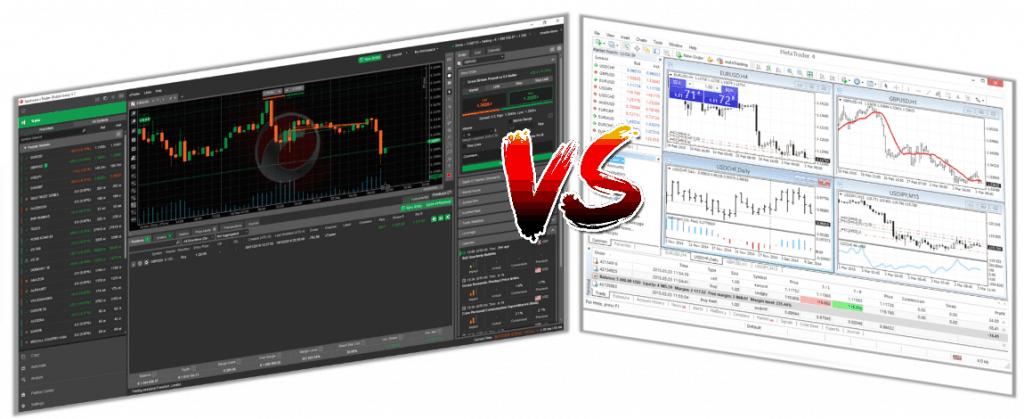
One of the first things you’ll notice is the interface. MetaTrader 4 is straightforward but feels outdated when you look at cTrader.
With cTrader, the interface is more appealing (in my opinion) and has most of its features ready out of the box through the side panels, making it easy to set up.
Plus, if your broker supports trading tools like Trading Central or Autochartist, the tools appear on the side panels automatically, saving you from switching between platform and browser.
Even though the aesthetics are different, fundamentally both platforms offer the same tools and features, just MetaTrader 4 is better supported through its community and availability from brokers.
My Verdict on Trading Platform Interface
cTrader is the clear winner when it comes to ease of access to its trading tools and in the looks department. I found cTrader’s interface clean and distraction-free, while its key features like one-click trading or direct market access are easy to set up.
Order Types and Management
Both platforms give you the option for multiple order types through pending and instant orders.
MetaTrader 4’s Order Ticket lets you choose from Market Execution (buy/sell at current market price) or with pending orders which include buy stop, sell stop, buy limit, and sell limit. The pending orders allow for price-based execution, which is excellent for breakout trading.
cTrader has a few more options like stop-limit orders (combines stop and limit orders so you can buy or sell at the best possible prices). I also notice that the platform allows for tighter stop-loss orders and trailing stop losses, which is a positive thing if you scalp the forex markets.
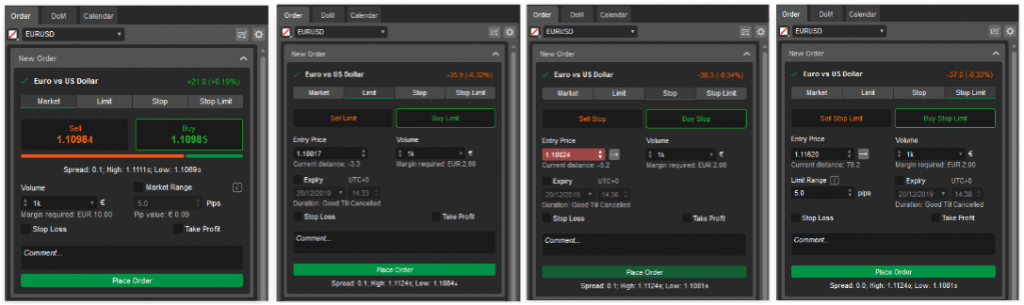
MT4 and cTrader both offer your standard stop loss and take profit orders, which is standard for every trading platform I’ve tried.
One area in which cTrader differs is with the order management once your trades are executed. The platform lets you close multiple open orders based on winners, losers, long or short positions. So if you open multiple trades, cTrader has a robust approach of managing multiple positions, while MT4 you have to manually close each one, potentially costing you profits (or losses).
My Verdict on Order Types and Management
I felt both provide solid options which most traders will be comfortable with including better risk management tools like trailing stop losses. Out of the two, I’d lean towards cTrader if you’re an advanced trader, as it has better trade management (saving you time) and more choice of entry types.
Charting Tools
MetaTrader 4’s charting tools are impressive overall (especially considering the platform is over 20 years old). The MT4 has:
- 3 types of charts, Bar, Line, Candlestick
- 9-time frames, ranging from 1 min to 1 month
- 24 analytical objects, lines, channels, shapes, arrows, Gann and Fibonacci tools
- 30 built-in technical indicators, more than 2,000 free custom indicators and 700 paid indicators (available in the Code Base)
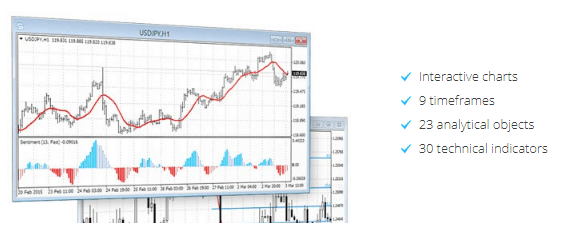
What I like about MT4 is that you can have unlimited technical indicators on a chart, while other platforms like TradingView are limited to 3 on their free subscription. So if you require multiple indicators, MT4 is one of the best options I’ve used.
I find that cTrader raises the stakes with 28 timeframes (including real tick charts) and 70+ indicators right out of the gate. The platform also offers 9 chart types, delivering multiple ways to read the price action with options that include:
- Bar
- Line
- Candlestick
- Heikin-Ashi
- HLC
- Dot
- Tick (27 settings)
- Renko bars (19 settings available)
- Range-based charts with 22 settings
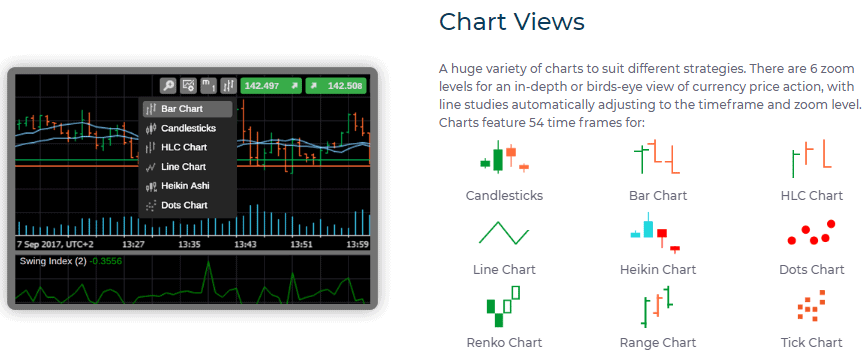
cTrader also supports multiple charts in a single window with its detachable charts feature, making it easier to compare different instruments. MT4’s multi-chart view feels more segmented and takes up more screen real estate.
Advanced Trading Tools
By default, MT4 lacks in this department. If you want access to advanced trading tools like screeners, economic calendars, or trade management tools, you’ll need to create them through MQL4 or download them.
Should you do this, MT4 matches (if not beats) most trading platforms when it comes to advanced trading tools like support and resistance level automation tools.
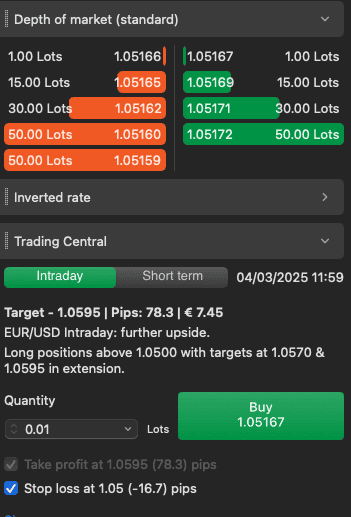
This is where cTrader stands out, offering multiple advanced charting tools like the depth of markets feature, which shows you all the buy and sell orders from the liquidity providers
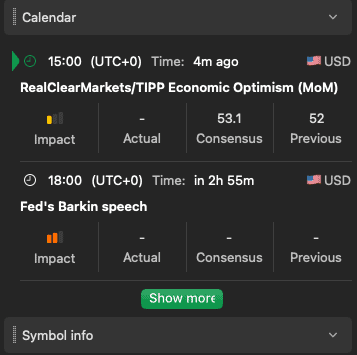
You also have a built-in economic calendar you can tweak to only show high-impact news events, protecting you from mistiming your trades.
On top of that, the platform has market sentiment indicators built in where MT4 users need to rely on third-party tools to achieve this. If you use brokers that have Trading Central or Autochartist, I like that cTrader has these services built in, and you can trade the signals with a single click.
My Verdict on Advanced Trading Tools
Comparing the two platforms makes cTrader the obvious choice with the advanced tools readily available by default. If you want advanced charting capabilities (and know how to code MQL4), you can improve MT4’s platform with third-party tools.
Automated Trading Features
One area that MetaTrader 4 is best known for is its automated trading features with its Expert Advisors (EAs) being one of the first programmable trading robots for retail traders. Compared to cTrader, MT4 has a larger community which has developed over 16,000+ EAs, giving you a solid variety to choose from.
Developed using the MQL4 language, you can make these EAs do anything, from signal alerts pushed via e-mail notifications or full-blown automated trading covering entry, exit, and risk management.
cTrader uses a similar approach with cBots but uses a more mainstream programming language called C#, making it more adaptable.
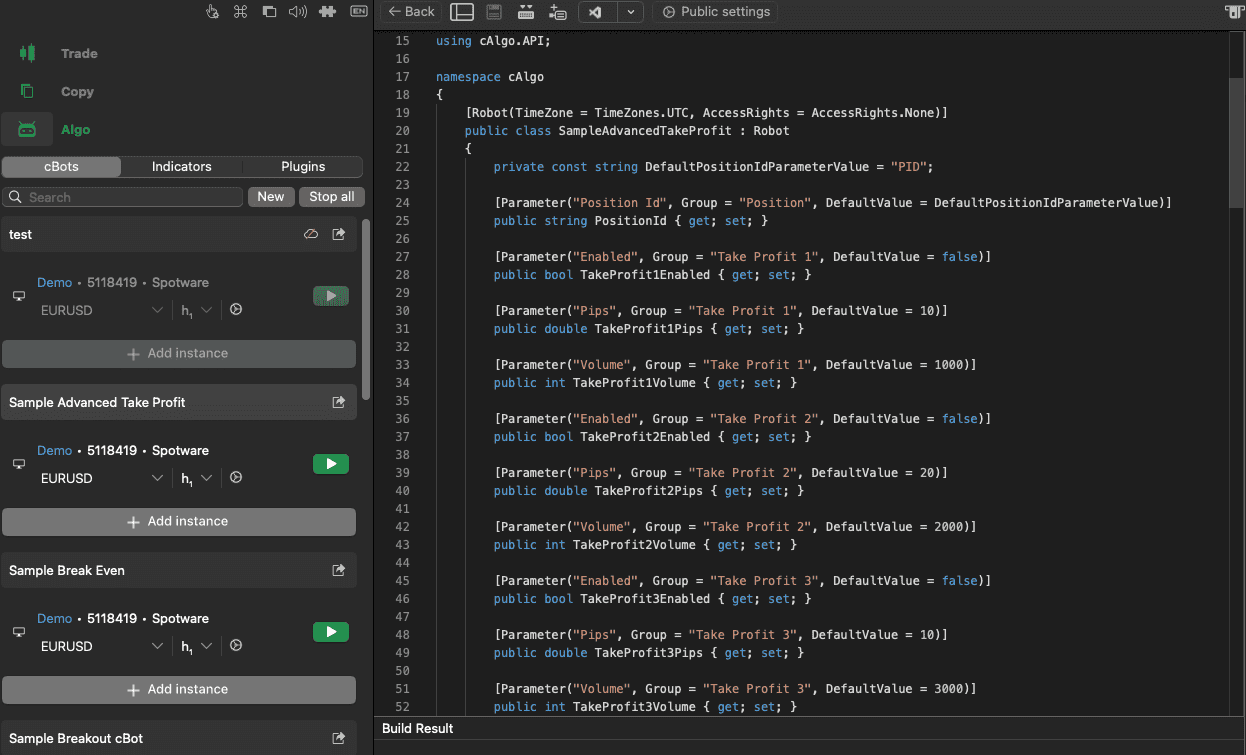
With live accounts on cTrader, you can add your cBots to the cloud, allowing for 24/5 trading across multiple markets, while MT4 requires a separate virtual private server (VPS).
Interestingly, you can manage your cBots on any device (including mobile), while MT4 can only be managed through the desktop platform.
My Verdict on Automated Trading Features
cTrader stands out as it provides a full service by default, which includes cloud-based automated trading, allowing you to scale your cBots and trade 24/5. Plus, C# is a popular coding language, making cBots easier to learn and develop.
MT4, on the other hand, has better options for beginners with the availability of no-code automation tools provided by the MT4 community.
Custom Indicators
MetaTrader 4 is a solid option for custom indicators. The platform has thousands of free and paid indicators from the MQL4 community, allowing you to test new tools to improve your strategy.
With the MQL4 language, any indicator can be created, including volume-based ones, which can appeal to advanced traders using scalping strategies.
Compared to MT4, cTrader’s community lacks sharing a solid library of indicators, forcing you to develop your own through the platform. Like I mentioned in the automated trading features, if you can use C#, then you too can build an indicator to help fine-tune your trading strategies.
My Verdict on Custom Indicators
For me, MetaTrader 4 is the winner when it comes to custom indicators. Not only can you develop advanced indicators to bolster the original 30+ indicators, but its community has the widest range from which you can get inspiration.
Copy Trading
MetaTrader 4’s options are limited on the platform, with access to MetaTrader Signals, where you can sign up to a selection of 3,200+ trading signal providers through the platform. Otherwise, you’ll need third-party providers like ZuluTrade or DupliTrade to provide the copy trading features, which use the MT4 as the execution platform.
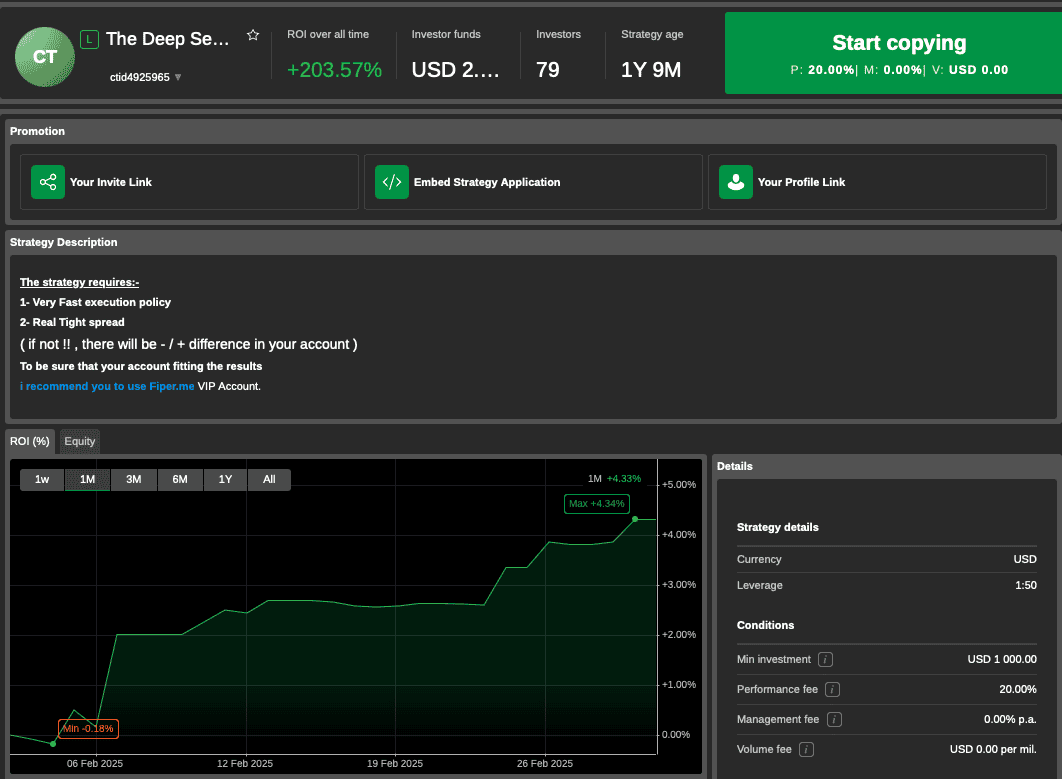
cTrader has cTrader Copy, which is a specialist segment on cTrader’s platform designed solely for copy trading. It gives you access to 900+ copy traders to follow and manage them from within cTrader, while the platform mirrors all trades in real-time.
With everything on one platform, you can see each copy trader’s performance, including how long they’ve been running, overall profit, and how many investors.
My Verdict on Copy Trading
For me, MetaTrader 4 is the winner when it comes to custom indicators. Not only can you develop advanced indicators to bolster the original 30+ indicators, but its community has the widest range from which you can get inspiration.
Trading Products Available
cTrader allows for true multi-asset trading by offering more financial products and markets compared to MetaTrader 4, as you can see in the table below:
| Product Type | cTrader | MT4 |
|---|---|---|
| Forex (Currency Pairs) | Yes | Yes |
| CFDs on Indices | Yes | Yes |
| CFDs on Commodities | Yes | Yes |
| CFDs on Stocks | Yes | No |
| CFDs on Cryptocurrencies | Yes | Yes |
The main difference between the two is that the infrastructure MT4 is built upon doesn’t allow pricing for share CFDs, which is why most forex brokers do not provide share CFDs on MT4.
In testing, brokers that offer cTrader tend to offer more markets on the platform (like more crypto or forex pairs) than on MT4.
My Verdict on Trading Products Availability
I’d call it a tie for trading products as you can easily access the most popular markets (like forex and indices) on both platforms.
Even though cTrader offers share CFDs, it’s not the most popular market for forex traders, and even then most forex brokers provide limited access to share CFDs.
This comparison sits inside our wider work on best forex trading platform.
Execution Speed
The MT4 platform’s order execution speed is about 100 ms on average. Still, it usually depends on the brokerage and the distance to some major data centres in London, New York, or Hong Kong.
I find that the top brokerages worldwide (such as Pepperstone) have an MT4 execution speed of less than 30 ms, while IC Markets boosts a 40 ms execution speed.
The graph below highlights the true speed using market orders with some of the best MetaTrader 4 brokers.
In comparison, the cTrader platform’s order execution speed ranges between 150 and 250 ms, but again, it depends on various factors. For example, leading brokerages such as FxPro ensure cTrader execution speed of about 50-65 ms.
cTrader also uses a proxy for everyone using their platform that aims to reduce your trading latency so that trades can be executed faster.
My Verdict on Execution Speed
I like that cTrader offers proxies to improve trading speeds, but due to MetaTrader 4’s popularity, most brokers place their servers next to the exchanges, helping MT4 achieve faster speeds.
Devices Availability
cTrader and MetaTrader 4 are available on all devices, which include:
- Desktop (Windows, MacOS, Linux)
- Table (iOS and Android)
- Mobile (iOS and Android)
Both platforms have excellent desktop software that lets you run all of the platforms’ features. The key difference is that MetaTrader 4’s mobile trading apps don’t offer much value other than managing your trades and receiving push notifications due to their limited features.
cTrader lets you run all of its features, including cAlgo and cTrader Copy services on all devices. This makes cTrader easily adaptable to your device while receiving advanced trading features for trading on the go.

My Verdict on Devices Availability
cTrader is the clear choice if you trade across multiple devices, as you can access all of the same services, regardless of device. MetaTrader 4’s desktop platform is the only option if you want custom indicators or automated trading; its mobile trading app is basic and lacks most of the desktop’s features.
Broker Access
MetaTrader 4 dominates this category, with thousands of brokers worldwide supporting the platform. Virtually every broker I test offers MetaTrader 4, while the platform provider boasts MT4 is available on over 1,600+ brokers (far more than cTrader).
I find that cTrader is available on brokers that offer ECN/STP execution that offer Raw pricing accounts as they can use direct market access with the platform. This makes cTrader a niche platform as most brokers are market makers, which is probably why many offer MT4.
My Verdict on Broker Access
As cTrader is tailored for ECN brokers and can use direct market access, its scope of forex brokers is limited compared to MT4. So for this category, MT4 is the most popular option and has the largest selection of brokers to choose from.
What Is The Difference Between cTrader Vs MT4?
There are a few differences between cTrader vs MT4, which is to be expected as cTrader was released 6 years after MT4 launched. Below I have summed up the main differences:
| Feature | cTrader | MT4 |
|---|---|---|
| User Interface | Modern and sleek | Retro style trading terminal |
| Market Depth | Direct Market Access / Level 2 pricing | Level 1 pricing (unless using third-party tools] |
| Programming Language | C# | MQL4 |
| Technical Indicators | 70+ technical indicators built-in | 30+ trading indicators |
| Platform Sync | Syncs templates/workspace across web, mobile, and desktop. | No platform syncing |
| Copy Trading | Native to cTrader | Requires 3rd Party Tools |
| Availability | Limited to ECN brokers | Available to all forex brokers |
cTrader vs MT4 Similarities
cTrader and MT4 have a lot of similarities when it comes to their charting tools, with the core difference being the design of the platforms.
They both offer solid tools that can support every trading style (from beginners to algo traders). Below are the core similarities between the two platforms:
- Automated trading strategies: You can develop your own automated trading strategies with both platforms using the cBot (cTrader) and Expert Advisor (EA) as trading robots to follow your instructions.
- Custom Indicators: Creating your own custom indicators is allowed on both platforms using MQL4 (MT4) and C# (cTrader) to program your own indicator, like adding a moving average over an RSI.
- One-click Trading: Both platforms have one-click trading, allowing you to open positions easier with its pre-set lot size. It’s also ideal for scalping as you can instantly execute your trades without confirming the trade.
cTrader vs MT4 For Beginners
Both options have a user-friendly interface with a low learning curve, focusing on charting, making navigating and executing trades easier.
You’ll find that each platform offers the basic technical indicators like moving averages and Bollinger Bands to help you develop your initial trading strategy. I like that if you open a demo account directly from MetaQuotes or cTrader, the account doesn’t expire, letting you learn the platform without time pressure (most expire within 30 days).
cTrader has some features that can help beginners become aware of market movements thanks to its built-in economic calendar, helping you avoid high-impact news announcements.
Which Broker Is Best For cTrader?
If you like the idea of cTrader, I recommend using IC Markets as the best broker for cTrader.
Our analyst, Ross Collins, tested the broker’s Raw account spreads and found IC Markets delivered the lowest overall spreads for the cTrader platform at 0.32 pips across the major pairs. Giving you a saving of roughly 34% against the industry-tested average (0.49 pips).
| Tested Raw Spreads | Tested Raw Spreads |
|---|---|
| Broker | Combined for the major pairs we tested |
| Fusion Markets | 0.22 |
| StoneX Trading | 0.25 |
| IC Markets | 0.32 |
| TMGM | 0.32 |
| Pepperstone | 0.36 |
| FP Markets | 0.41 |
| Blueberry Markets | 0.43 |
| GO Markets | 0.46 |
| ThinkMarkets | 0.46 |
| Tickmill | 0.47 |
| Eightcap | 0.5 |
| Axi | 0.73 |
| CMC Markets | 0.73 |
| Admirals | 0.79 |
| BlackBull Markets | 0.94 |
| Tested Average | 0.49 |
The Raw account can also offer zero-pip spreads from time to time based on my experience, further reducing your costs while only charging commissions at $3.00 per $100k traded.
By providing a true ECN environment, you can use cTrader’s direct market access with the broker’s fast execution speeds with servers located in the NY4 data centre in New York.
Which Broker Is Best For MetaTrader 4?
I like using Pepperstone when it comes to trading MetaTrader 4. It has zero-pip spreads on its Razor account while charging $3.50 per lot traded for forex pairs, which will save you money.
| Broker | AUDUSD | EURUSD | GBPUSD | USDCAD | USDCHF | USDJPY | Grand Total |
|---|---|---|---|---|---|---|---|
| Pepperstone | 100.00% | 100.00% | 100.00% | 100.00% | 100.00% | 100.00% | 100.00% |
The Standard account is also competitive with EUR/USD spreads from 1.10 pips and no commissions, providing a more straightforward charging structure.
| EUR/USD | USD/JPY | GBP/USD | AUD/USD | USD/CAD | EUR/GBP | EUR/JPY | AUD/JPY | Average Overall | |
|---|---|---|---|---|---|---|---|---|---|
| Pepperstone | 1.1 | 1.3 | 1.3 | 1.2 | 1.4 | 1.2 | 1.8 | 1.5 | 1.35 |
Pepperstone also provides excellent trading conditions with execution speeds averaging sub-100ms in our testing, excellent for scaling and algo trading.
With solid trading conditions, Pepperstone also delivers Smart Trader Tools, enhancing the platform’s capabilities with features like sentiment indicators and advanced risk management tools.
Additionally, Pepperstone provides Capitalise.ai which lets you automate your manual trading strategies without knowing how to code, making algo trading available for beginners.
cTrader vs MetaTrader 4: Which Should You Choose?
The bottom line is that both cTrader and MetaTrader 4 have the same core features when it comes to charting, custom indicators, and allowing automated trading tools.
I find MetaTrader 4 easier to start with, especially as a beginner, as you won’t have any sophisticated demands like experienced traders would, such as direct market access. Although it “lacks” features compared to cTrader, I think these features aren’t necessary for trading.
Additionally, it’s supported by most brokers, giving you a better chance to find a broker with low spreads to reduce your trading costs.
cTrader is a solid choice if you require more advanced tools like direct market access and require the fastest execution speeds through the platform’s proxy services.
This also pairs well when you choose to trade through an ECN broker, getting tighter spreads and faster speeds, lowering the chance of slippage and requotes.
FAQs
Is cTrader better than MT4
Is cTrader free to use?
What is cTrader Trading Platform?
Is MetaTrader 4 a good trading platform?
Is MetaTrader 5 better than MetaTrader 4 trading platform?
Which brokers offer MetaTrader 4?
About the author

Justin Grossbard is the CEO & Co-Founder of CompareForexBrokers established in 2014, along with Noam Korbl and works as Strategic Head Of Research.
Our reviews are reader-supported. We may receive payment when you click a link to a partner site. Learn how we make money.