
Our verdict on TabTrade
Pros
- Edge account average EUR/USD spread: 0.03 pips (April 2026)
- Raw spreads from 0.0 pips on Edge
- $0 minimum deposit on Standard
Cons
- FSC Mauritius licence belongs to TabTrade (Mauritius) Ltd only, no licence named for TabTrade Ltd
- No negative balance protection
- Can't Onboard AU, NZ, US clients
TabTrade score breakdown
| Area | Rating |
|---|---|
| Trading Costs | 10/10 |
| Trading Experience | 10/10 |
| Trust | 5/10 |
| Trading Platform | 6/10 |
| Customer Service | 10/10 |
| Range of Markets | 10/10 |
| Education | 4/10 |
| Funding | 6/10 |
The overall rating is based on review by our experts
How is our rating calculated?How safe is TabTrade?
TabTrade’s safety case rests on two things: operational practices that match industry standards, and the commercial experience of its founder.
Client funds are held in segregated accounts at partner banks, separated from TabTrade’s operating capital, with daily reconciliation. We treat this as baseline for any reputable broker rather than a differentiator. What matters is that TabTrade does it.
Benjamin Boulter previously held a senior role at BlackBull Markets and spent around four years at Pepperstone leading their global affiliate program. That commercial background likely informs TabTrade’s operational approach. We’d be direct though: experience working at regulated brokers is not the same as being regulated yourself.
Regulation
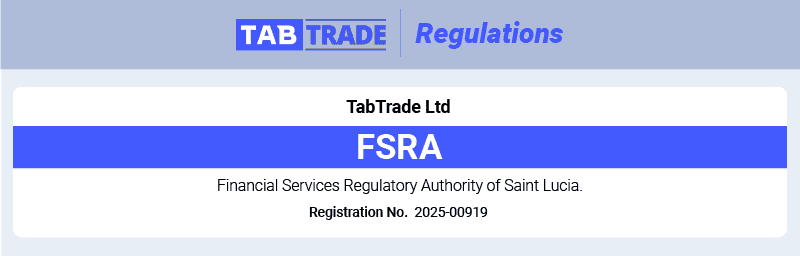
TabTrade operates two entities and names a financial licence for only one of them.
TabTrade (Mauritius) Ltd holds licence GB26206419 from the Financial Services Commission of Mauritius, a SEC-2.1B Investment Dealer (Full Service Dealer excluding Underwriting) authorisation dated 02/07/2026. You can verify this yourself in three steps: open the FSC Online Public Register, search for TabTrade, and open the entry. It returns a single record with no annotations against it. The other entity, TabTrade Ltd, is registered in Saint Lucia as an International Business Company (registration 2025-00919). That is a company registration, not a financial licence. Saint Lucia’s FSRA does not licence forex brokers at all. Per TabTrade’s own documentation the contracting entity is stated at signup, so check which of the two your account agreement names before you deposit.
Both Mauritius and Saint Lucia are offshore jurisdictions, which is exactly what allows TabTrade to offer 1:1000 leverage and zero minimum deposits, features that are often blocked under stricter regulators. Additional licences may follow as the broker grows.
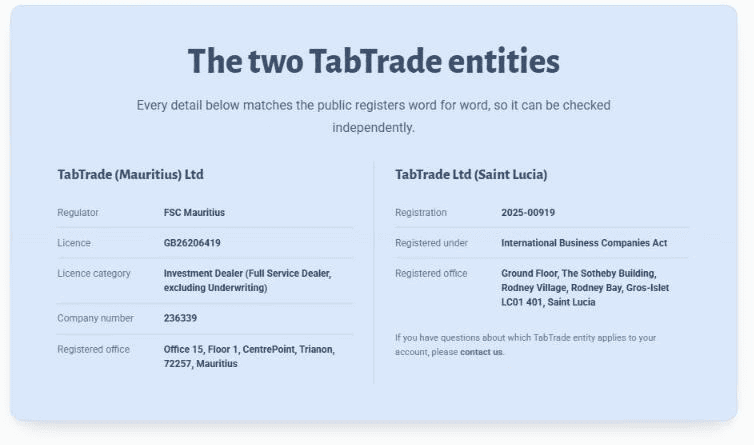
TabTrade’s team has prior commercial experience at ASIC and FCA-regulated brokers, which likely informs their operational practices. We made the same point in the Safety opener and it bears repeating here: experience at regulated brokers is not the same as being regulated yourself. Clients under the Mauritius terms, who include Canadian clients, contract with TabTrade (Mauritius) Ltd and get the protection the FSC Mauritius provides over it, and that oversight is materially less than ASIC, FCA, or CySEC oversight. Clients under the Saint Lucia terms contract with TabTrade Ltd, for which TabTrade names no financial licence. Neither company offers negative balance protection. Under the Mauritius terms TabTrade’s own risk disclosure says clients are not protected by any statutory compensation arrangement in Mauritius, and TabTrade names no compensation scheme for TabTrade Ltd.
TabTrade lists Australia, New Zealand, the United States, Iran, the DPRK and jurisdictions sanctioned by the FATF or the UN as restricted. The broker states that list is not exhaustive, and any jurisdiction where distribution would breach local law is also excluded. If you live in one of them you cannot open an account regardless of deposit amount or account type.
Some of the abbreviations on this page are expanded to the regulator's full name: a broker regulated by ASIC is regulated by the Australian Securities and Investments Commission; by FCA, the Financial Conduct Authority.
Reputation
TabTrade’s launch in March 2026 attracted coverage from established industry press including Finance Magnates and TradeInformer. Most coverage flagged the same combination we’ve discussed in this review: aggressive pricing and zero average spreads on one hand, offshore Saint Lucia regulation and short operating history on the other.
Other broker review sites including DayTrading.com, BrokerListings, and FXLeaders have all published TabTrade reviews since launch. Trust ratings across these reviews sit in the 2.8 to 3.5 out of 5 range, reflecting the offshore regulatory position. Where independent reviewers have tested execution and pricing, the published spreads and execution speeds we cover in this review have been consistently confirmed.
The broker has positioned itself around pricing transparency, which appeals to professional traders who value cost over the safety net of Tier 1 regulation. As a new market entrant, TabTrade is still building its long-term reputation.
Reviews
Our score for TabTrade is set against every other broker on our forex broker reviews.
What traders say about TabTrade
What other review sites say about TabTrade
These are ratings of TabTrade from other platforms, read on the date shown and expressed on each platform's scale, so you can weigh them against our own score.
| Platform | Rating | Volume | Read on |
|---|---|---|---|
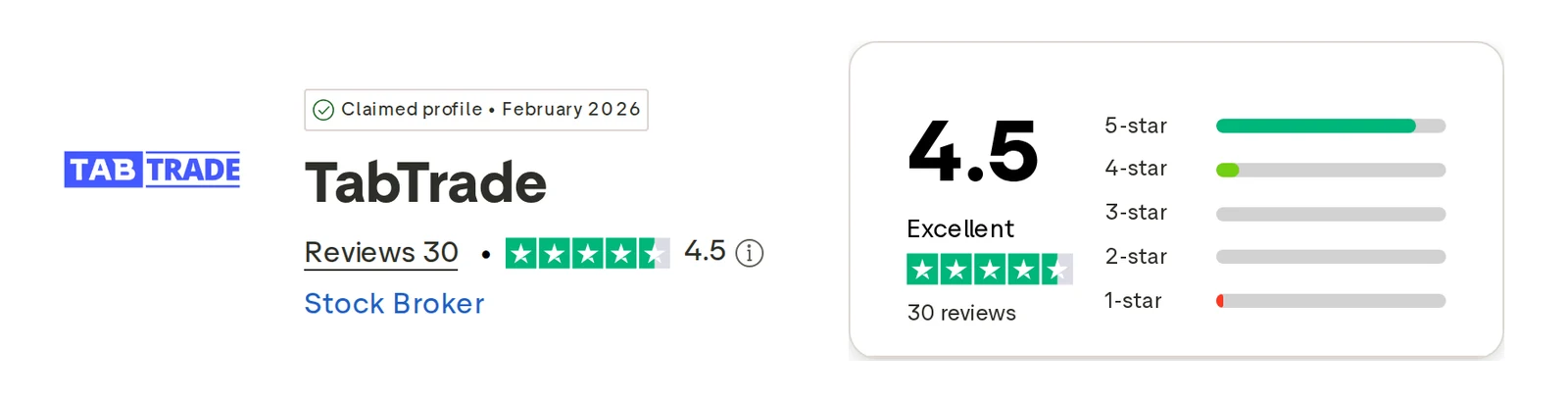
| Trustpilot | 4.5 / 5 | 30 | Oct 1, 2026 |
TabTrade holds a Trustpilot rating of 4.5 out of 5 from 30 reviews, checked Oct 1, 2026.
Our score is based on published criteria and is not influenced by these third-party ratings.
How popular is TabTrade?
TabTrade sits in the lower half for search interest, 55th of 61 on 980 branded searches in September 2026. Search interest measures attention, not quality; the score above is the review verdict.
- 980
- Brand searches, September 2026
- -25.2%
- vs August 2026
- 0
- Login searches
- 0.0%
- Share of all searches
Source: Google search volume, Worldwide, September 2026.
How this is measured
Google Ads reports how many times a month people searched each broker's brand terms, and the brokers are ranked on that figure alone.
A term counts for a broker only when that broker's own website holds the first organic Google result for it; bare brand words that any company could own are left out.
A month-on-month change prints only where the previous month reached 1,000 searches, because Google rounds smaller volumes.
The figures refresh on the 15th of each month with the newest month Google has published, and the first-result check repeats every quarter.
| Market | Rank | Brand searches | vs August |
|---|---|---|---|
| Worldwide | 55 / 61 | 980 | -25.2% |
| Canada | 9 / 10 | 20 | n/a |
| Malaysia | 14 / 16 | 30 | n/a |
Source: branded Google search volume, September 2026, covering Worldwide, Canada, Malaysia.
TabTrade at a glance
| 📊 Trading Platforms | MT5 (desktop, web, iOS, Android); cTrader and TradingView announced |
|---|---|
| 💰 Minimum Deposit | $0 (Standard), $250 (Edge), $25,000 (VIP) |
| 💰 Funding Fee | $0 |
| 🎮 Demo Account | Yes (Unlimited) |
| 🛍️ CFDs Offered | Forex, Indices, Cryptocurrency, Commodities, Shares |
| 💳 Funding Methods | Bank Wire, Credit/Debit Cards, E-wallets, Crypto |
Why Choose TabTrade
Choose TabTrade if you want zero average spreads on major FX pairs without chasing bonus offers or hidden conditions. TabTrade publishes a 0.03 pip average EUR/USD spread on its Edge account, a measurement made by the independent firm Datalyst over April 2026. The Edge account also carries a US$3.50 per side, per lot commission, with custom commissions for VIP accounts.
While the brokers selling points are strong, there are some cons to be aware of. You will not get negative balance protection, and TabTrade’s documents name no investor compensation scheme for either company. TabTrade assigns one of its two companies at application: clients under the Mauritius terms contract with TabTrade (Mauritius) Ltd, which holds the FSC Mauritius licence, while clients under the Saint Lucia terms contract with TabTrade Ltd, for which TabTrade names no financial licence. It is also worth noting that if you live in Australia, New Zealand, or the US, you will not able to open an account with TabTrade.
If you want to trade with MT5 (and soon cTrader and TradingView), 1:1000 leverage, 24/7 support, and access to 1,100+ instruments under one account, TabTrade is worth a look. Just go in knowing you’re trading the safety net of Tier 1 regulation for better pricing and higher leverage.
Across our review, TabTrade’s main strengths were its pricing and execution speed. Its main weaknesses are the offshore regulation and short operating history.
TabTrade spreads and fees
What trading TabTrade costs
One standard lot of EUR/USD on TabTrade's raw account costs US$7.30 for the round turn: 0.03 pips of spread (US$0.30) plus US$7.00 commission. One standard lot of EUR/USD on TabTrade's standard account costs US$0.60 for the round turn: 0.06 pips of spread (US$0.60), with no commission.
| Account | A month of trading | One round turn, 1 lot |
|---|---|---|
| Raw spread plus commission0.03 pips, published average, US$7.00 commission | US$146.00 | US$7.30 |
| One spread, no commission0.06 pips, published average | US$12.00 | US$0.60 |
A pip on EUR/USD is US$10.00 per standard lot, so the cost of a round turn is the spread in pips times that, plus any commission.
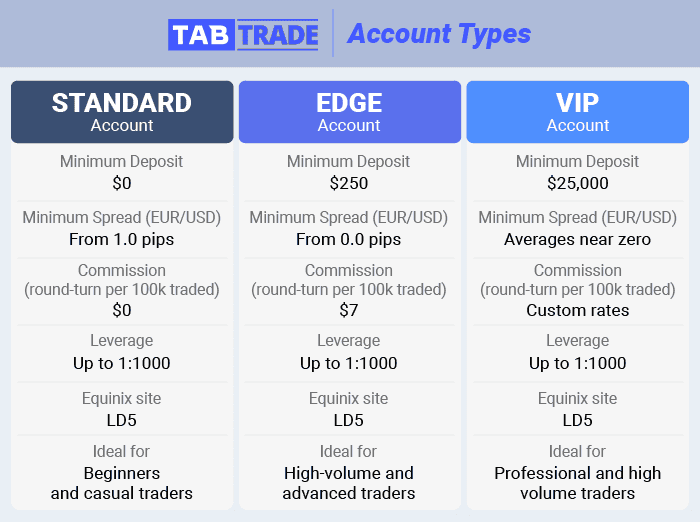
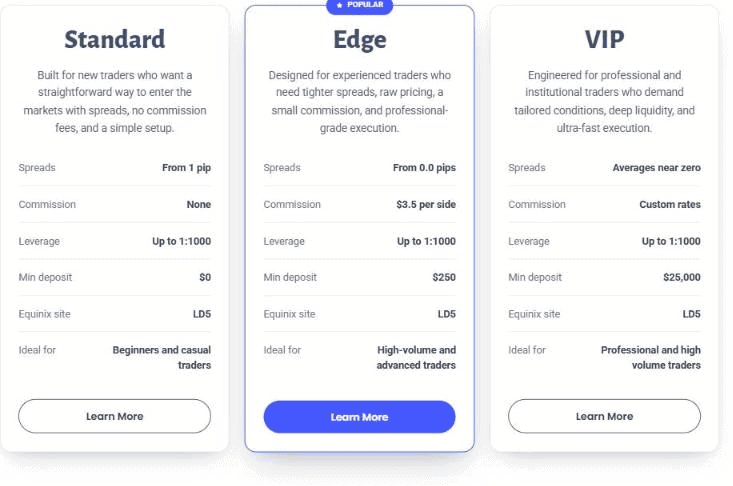
Pricing splits across five account types: Standard, Edge, VIP, Cent, and Swap-Free. Cent costs run from 1 pip with no commission, balances appear in US cents, and position exposure sits at 1/100 of Standard sizing, while Swap-Free carries spreads from 1.3 pips with no separate commission. The Standard account is commission-free with costs built into a spread of 1.0 pip or more. The Edge account offers raw spreads from 0.0 pips with a commission of $3.50 per side, per lot (Edge). The VIP account uses custom commissions negotiated based on monthly trading volume.
Across all three, there are no deposit fees, no withdrawal fees, and no inactivity fees on active accounts.
Standard Account
The Standard account is TabTrade’s entry-level option. It runs on a commission-free model where costs are built into the spread, with no minimum deposit required to open.
Edge Account
The Edge account is TabTrade’s main draw for active traders. It offers raw spreads from 0.0 pips with a commission of $3.50 per side, per lot (Edge), with a $250 minimum deposit to open. TabTrade’s spreads page, read September 27, 2026, states that the commission is charged per lot at $3.50 on each side of the trade, so a standard lot costs $7.00 to open and close. Average execution latency is under 30 milliseconds (see the Execution Model section).
IC Markets Raw and Pepperstone Razor, both on our list of lowest spread brokers in Malaysia, charge $3.50 per side. TabTrade Edge matches them rather than undercutting.
| Symbol | Average | Min | Max |
|---|---|---|---|
| AUDUSD | 0.02 | 0.00 | 4.50 |
| EURUSD | 0.03 | 0.00 | 5.00 |
| GBPUSD | 0.04 | 0.00 | 14.90 |
| USDJPY | 0.04 | 0.00 | 14.90 |
| USDCHF | 0.05 | 0.00 | 4.70 |
| XAUUSD | 1.81 | 1.10 | 10.60 |
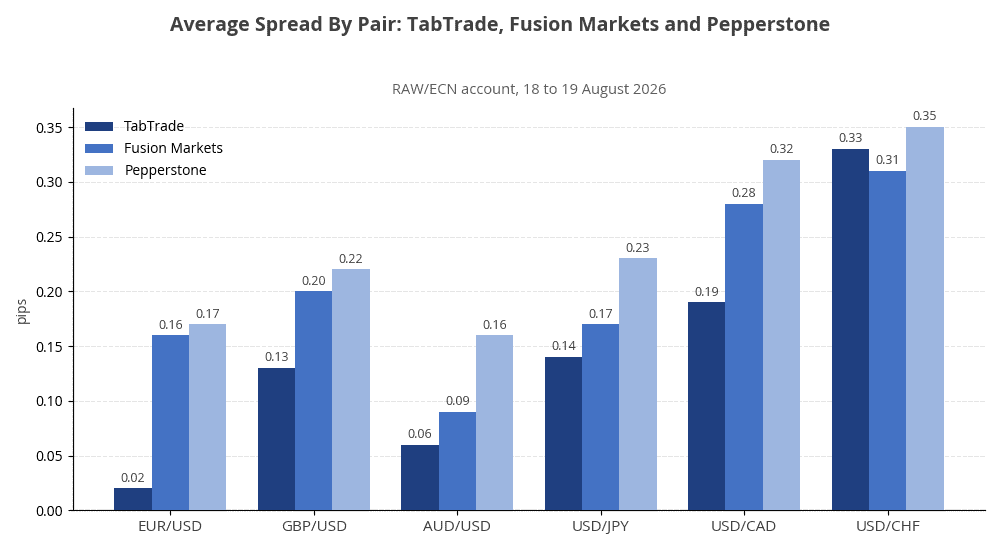
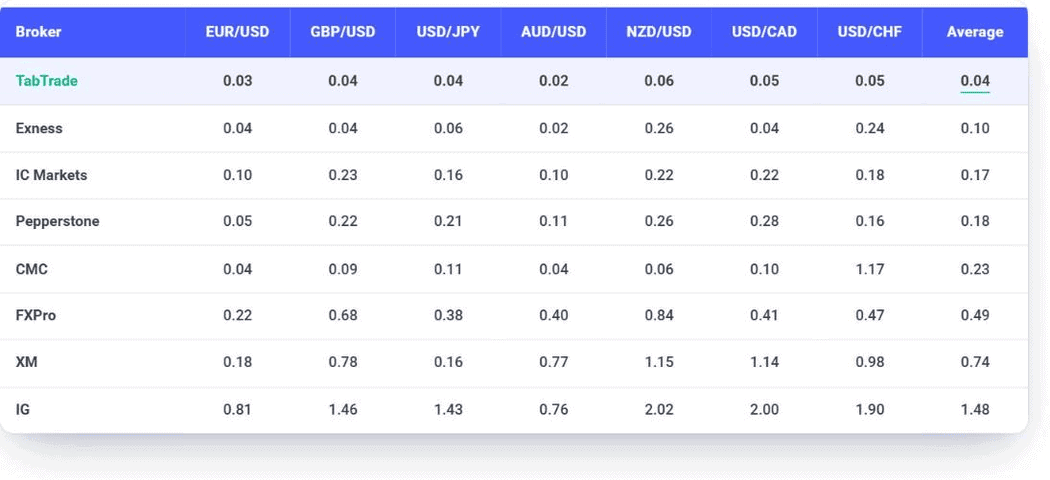
Measurement made by the independent firm Datalyst in April 2026 and published by TabTrade.
IC Markets Raw and Pepperstone Razor both charge $3.50 per side. TabTrade Edge matches them rather than undercutting.
| RAW Account Spread Comparison | EUR/USD | AUD/USD | EUR/GBP | EUR/JPY | USD/JPY |
|---|---|---|---|---|---|
 | 0.03 | 0.02 | 0.01 | 0.02 | 0.04 |
 | 0.03 | 0.03 | 0.21 | 0.51 | 0.08 |
 | 0.00 (min) | 0.30 | 0.40 | 0.44 | 0.29 |
 | 0.10 | 0.10 | 0.20 | 1.20 | 0.30 |
 | 0.1 | 0.38 | 0.37 | 0.73 | 0.40 |
 | 0.16 | 0.29 | 0.54 | 0.68 | 0.24 |
 | 0.44 | 0.57 | 0.71 | 0.90 | 0.39 |
 | 0.00 | 0.90 | 0.40 | 1.10 | 0.40 |
 | 0.60 | 0.60 | 0.50 | 0.80 | 0.60 |
Avg. spreads are taken from each broker’s website and updated monthly. Last update on 1 Sep 2026, corrected 12 Oct 2026
VIP Account
The VIP account is built for high-volume traders, with a $25,000 minimum deposit. It offers spreads averaging near zero on major FX and execution speeds below 20 milliseconds. Commissions are negotiated based on monthly trading volume rather than a flat per-side rate, so the actual cost depends on the deal you strike with TabTrade.
VIP is positioned for high-volume traders, fund managers, and institutional flow. The $25,000 minimum puts it out of reach for most retail clients, who’ll find Edge a better fit.
Swap Free Account
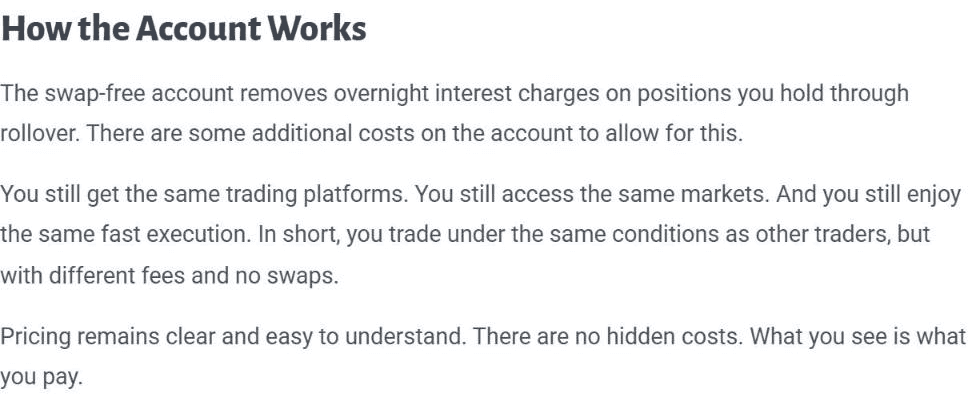
The Swap Free account is for traders who follow Sharia principles, removing overnight interest on positions held past the daily rollover. No swaps are paid or received, and a fixed US dollar service fee per average lot applies instead, charged after each full week of seven calendar days that a position remains open and again after every further week. Fees run from US$1 on shares to US$1,000 on XAGAUD, XAGEUR, and XAUAUD, with EUR/USD at US$50 and gold (XAUUSD) at US$500. To activate it, you contact support after completing standard account registration.
Other Fees
TabTrade is light on extra charges. We didn’t find inactivity fees on active accounts, deposit fees, or withdrawal fees. The only third-party costs to watch are bank fees on wire transfers, which any broker passes through.
Optional services can carry fees if you don’t hit certain volume targets. Free VPS hosting may become paid if your monthly trading volume drops below TabTrade’s threshold, for example. The TabTrade+ subscription is the other recurring cost worth knowing about (covered in the Customer Service section).
TradePoints Programme
TabTrade states that its TradePoints programme awards 1 point per US dollar on the first deposit, up to a maximum of 10,000 points, which unlock after 5 lots are traded. Active trading then earns 100 points per lot, capped at 10,000 points each month. Members can redeem accumulated points for rewards that include event tickets and frequent flyer points. Terms and conditions apply to the programme.

Deposits and withdrawals with TabTrade
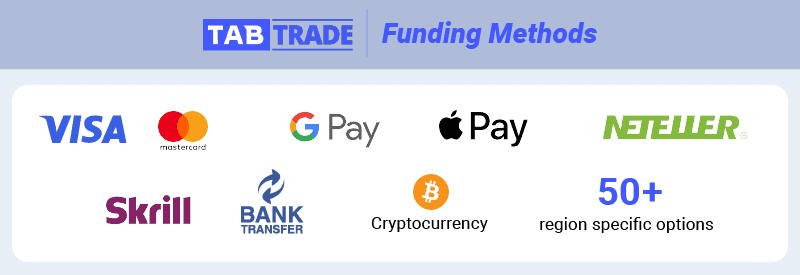
TabTrade supports a wide range of funding methods: Visa, Mastercard, Google Pay, Apple Pay, cryptocurrency, Skrill, Neteller, bank transfers, and over 50 region-specific options.
Most methods process deposits instantly: cards, Google Pay, Apple Pay, Skrill, and Neteller. Cryptocurrency deposits arrive within an hour depending on network conditions. Bank transfers take one to two business days, which is standard
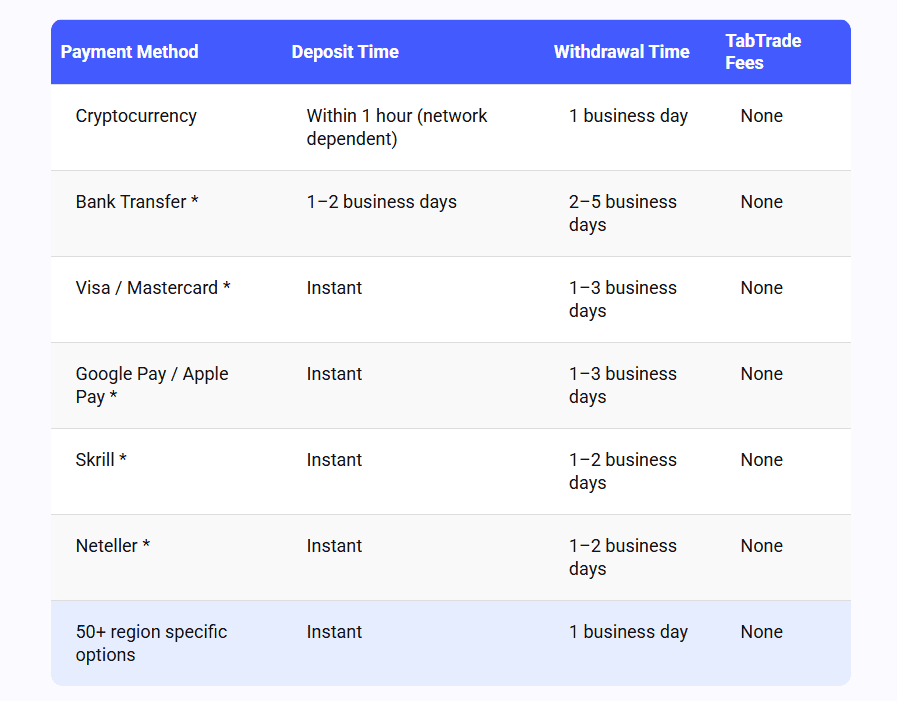
Withdrawals process on similar timelines: cards and e-wallets within 1-3 business days, crypto within one business day, bank transfers 2-5 business days. Withdrawal requests go through the Secure Account Portal.
Minimum Deposit
The Standard account has no minimum deposit, which is unusual at the entry level. Most brokers require at least $50 to $200 to open an account, so a true $0 minimum lets traders test the platform with any amount they’re comfortable with.
The Edge account requires $250 to open, which unlocks raw spreads and the $3.50 per side, per lot commission structure. This sits in the same range as raw-spread accounts at IC Markets and Pepperstone.
The VIP account requires $25,000, which puts it out of reach for most retail traders but is consistent with institutional-tier minimums elsewhere.
Account Base Currencies
TabTrade supports seven base currencies: USD, EUR, GBP, AUD, CAD, CHF, and SGD. Matching your account currency to your funding source avoids the FX conversion costs that banks tack on, which adds up over time on frequent deposits and withdrawals.
Deposit and Withdrawal Options and Fees
All of TabTrade’s payment options come with zero broker fees on both deposits and withdrawals. The only costs to factor in are third-party charges from your bank or payment provider, which are outside TabTrade’s control.
The full breakdown:
| Payment Method | Deposit Fee | Withdrawal Fee | Typical Processing Time |
|---|---|---|---|
| Credit / Debit Card | $0 | $0 | Instant / 1-3 Business Days |
| Bank Wire Transfer | $0 | $0 | 1-2 / 2-5 Business Days |
| E-Wallets | $0 | $0 | Instant / 1 Business Day |
| Local Payment Solutions | $0 | $0 | Instant / 1 Business Day |
| Cryptocurrency | $0 | $0 | Within 1 Hour / 1 Business Day |
Multi-Currency Wallet
TabTrade uses a wallet system that lets you hold multiple currencies in one account and move funds between trading accounts in different base currencies without re-depositing. Conversions happen inside the Secure Account Portal rather than requiring separate deposits for each currency.
For traders running accounts in different currencies (a GBP Edge account and a USD VIP account, for example) this removes a step that can cost days through traditional bank transfers.
TabTrade trading platforms and app
TabTrade’s main platform is MetaTrader 5, available on desktop, web, and mobile. MT5 runs on TabTrade’s Equinix LD5 (London) and NY4 (New York) infrastructure to keep latency low. cTrader and TradingView are on the roadmap, marked as ‘coming soon’ on TabTrade’s platforms page.
MetaTrader 5
MetaTrader 5 is the right choice for trading TabTrade’s full product range, though it has a learning curve if you’ve never used MT4 or MT5 before.
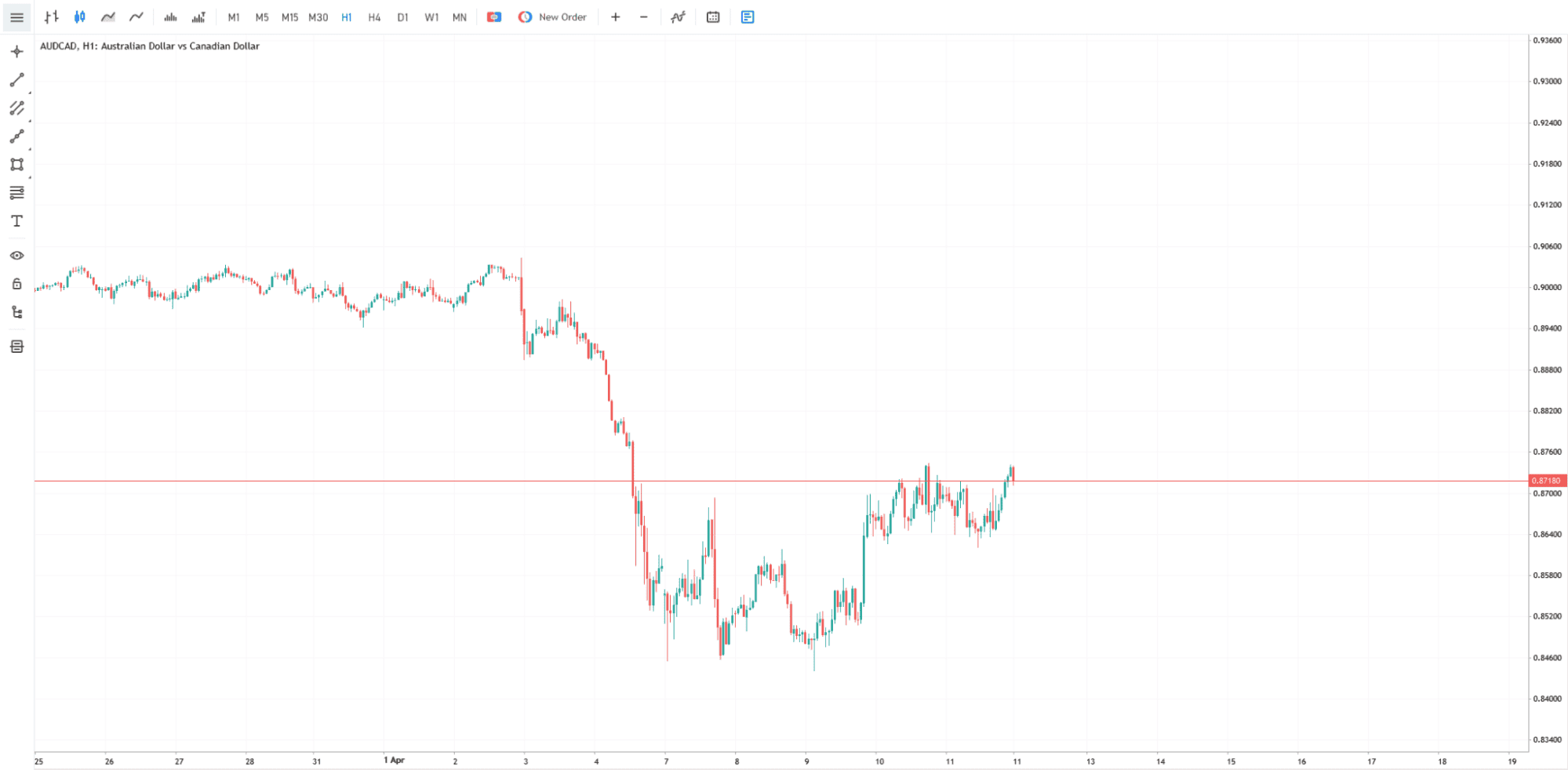
What MT5 does well on TabTrade:
- Multi-asset access. MT5 supports the full TabTrade product range including stocks, ETFs, and commodities. MT4 doesn’t.
- 38+ technical indicators and 21 timeframes for technical analysis, including down to minute-level price action for scalping.
- Depth-of-market data showing real order book liquidity, useful for execution-sensitive traders.
- MQL5 programming for Expert Advisors. More capable than MQL4 if you’re building automated strategies.
- Buy-stop-limit and sell-stop-limit orders for setting precise entry levels in volatile conditions.
Where MT5 falls short:
- The interface is dated. This is an MT5 design choice rather than a TabTrade issue, but it’s worth knowing if you’ve never used the platform.
- There’s a real learning curve, especially if you’re new to trading. The platform isn’t designed for beginners.
- Mobile MT5 is functional but cramped on smaller screens. Anything beyond basic order management is awkward.
TabTrade WebTrader For MT5
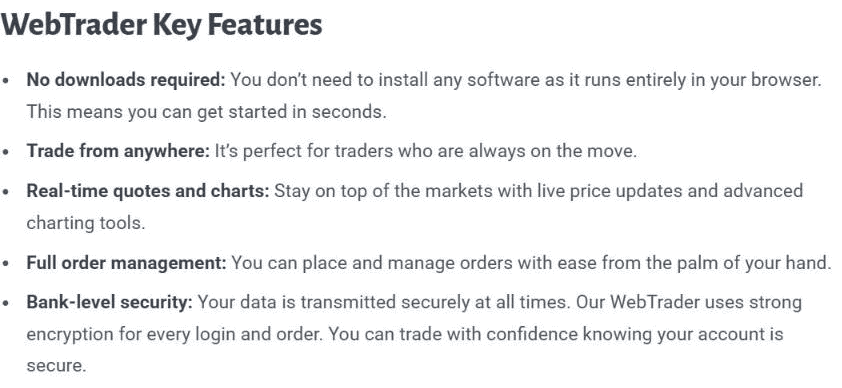
TabTrade’s WebTrader is the no-download alternative for traders who don’t want MT5 installed locally. It runs in any modern browser and connects to the same MT5 backend as the desktop client, so trades, history, and alerts sync between platforms.
What the MT5 WebTrader does well:
- No downloads or installations. Runs in Chrome, Safari, Firefox, or Edge on Windows, Mac, Chromebook, and tablets.
- Real-time quotes and responsive charting.
- Full order management including market orders, pending orders, stop loss and take profit modifications.
- Sync with desktop MT5. Alerts set on one platform appear on the other.
- SSL encryption on all sessions and orders.
Where the MT5 WebTrader falls short:
- Fewer indicators and drawing tools than the MT5 desktop client. Light technical analysis is fine, deep chart work isn’t.
- No EA support. Automated strategies require the desktop MT5 client.
Copy Trading
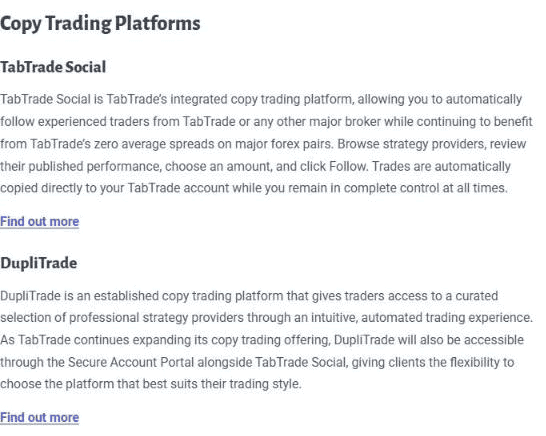
Pelican, a third party, independently runs TabTrade Social, the live copy trading service, and TabTrade’s involvement is limited to executing the copied orders in the client’s account. Access comes through the Copy Trading tab inside the Secure Account Portal, a web browser, or the iOS and Android apps, with a Windows app coming soon, and MT5 Signals sits inside MetaTrader 5, while DupliTrade, though announced for the portal, is not live yet. Once you select a strategy provider, their trades copy automatically into your TabTrade account based on the allocation you set.
The standard copy trading caveats apply. You can review historical performance and risk metrics before following any provider, but past performance doesn’t predict future results and any strategy provider can blow up an account just as easily as any other trader. TabTrade lets you stop copying or adjust allocations at any time, which is baseline for any reputable copy trading platform.
One thing TabTrade’s page doesn’t disclose: follower or provider fees. The cost structure isn’t clear from public information. We’d ask support directly before committing capital to a copy trading strategy.
Free VPS Hosting
TabTrade offers two VPS options. The first is a free MT5-integrated VPS managed from inside the platform (start, restart, cancel) and suitable for running Expert Advisors without keeping your own machine on 24/7.
The second is an external VPS through TabTrade’s partnerships with Beeks and NYC Servers. NYC Servers hosts near TabTrade’s NY4 infrastructure with sub-1ms latency, which matters for algorithmic strategies where execution speed is everything. External VPS is requested as an add-on through the Secure Account Portal with choice of provider and location.
Standalone VPS hosting for MT5 typically costs $15 to $30 per month at competing brokers, so bundling a free MT5 VPS is a genuine cost saving for anyone running automated strategies. The external VPS through partners has its own paid tiers.
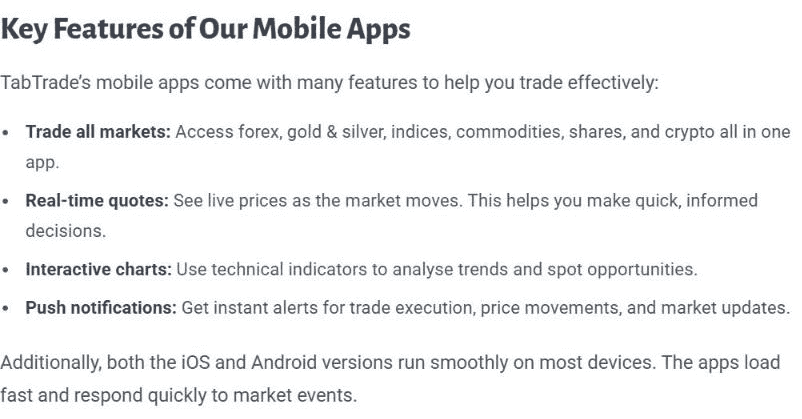
TabTrade app
Leverage and margin at TabTrade
TabTrade offers leverage up to 1:1000 on major FX pairs, though the actual maximum varies by instrument, deposit size, and region.
For most new accounts depositing under $500 USD, 1:1000 is enabled by default on FX majors at signup. For deposits above $500, the default drops to 1:500 unless you’re approved for higher leverage. Some regions have lower defaults regardless of deposit, and TabTrade reviews leverage policies over time, so the rules in place today may not be the rules in place when you sign up.
Maximum leverage by instrument:
| Products | Leverage |
|---|---|
| Forex (majors, minors, crosses) | up to 1:1000 |
| Forex (exotics) | up to 1:500 |
| Indices | up to 200:1 |
| Gold | up to 1:1000 |
| Silver | up to 1:1000 |
| Metals (Platinum and Palladium) | up to 1:1000 |
| Metals (Aluminium only) | up to 1:200 |
| Shares | up to 1:20 |
| Cryptocurrencies | up to 1:20 |
| Commodities (Oil) | Up to 1:1000 (spot), 1:50 (futures CFDs) |
| Commodities (Natural Gas) | Up to 1:20 (spot), 1:10 (futures CFDs) |
High leverage amplifies both gains and losses. Combined with TabTrade’s lack of negative balance protection, this means position sizing discipline is essential. Used carefully, 1:1000 leverage gives experienced traders significant capital efficiency. Used carelessly, it can wipe out an account and leave you owing money.
TabTrade’s margin requirements trigger a margin call at 100% margin percentage and automatic stop-out at 50%, which closes losing positions before they can push the account further into deficit. Maximum position size is 100 lots per trade and 500 open tickets simultaneously.
TabTrade execution speed and slippage
TabTrade’s marketing describes them as an “ECN/STP broker with no dealing desk.”
The Mauritius Terms and Conditions, dated September 4, 2026, state that TabTrade (Mauritius) Ltd acts as principal in its dealings with you and may place its own interests ahead of yours, subject to its obligations under those terms and the governing laws. TabTrade’s legal documents page, read September 27, 2026, also lists a Hedging Counterparties Policy, which it describes as setting out how the company manages market risk and interacts with counterparties.
Dealing as principal is standard across retail CFD brokers, including those regulated by ASIC and the FCA. Broker marketing often implies pure A-book STP execution, which is rarely the full picture.
What this means for you as a trader: not much, in practice. Principal dealing affects how your order gets filled, not the spread you pay. The spreads you see on the platform are the spreads you trade at. The execution model matters more for transparency and counterparty risk than for day-to-day pricing.
Execution is fully automated with TabTrade targeting sub-30 millisecond latency on Standard and Edge accounts, and around 20 milliseconds on VIP. Infrastructure runs through Equinix LD5 in London and NY4 in New York, with routing depending on the trader’s region and the instrument traded.
Markets you can trade with TabTrade
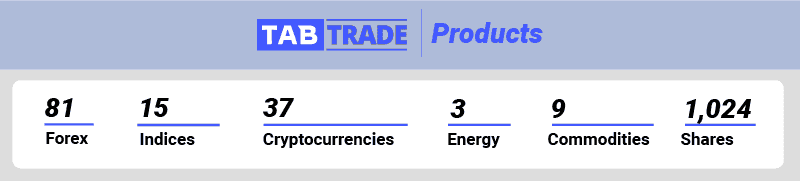
TabTrade offers 1,170 tradeable instruments across six asset classes. Share CFDs make up the majority at over 1,000 individual stocks, with the rest spread across forex, indices, commodities, and crypto.
The 81 forex pairs cover all the majors, minors, and a useful spread of exotics. With 35 crypto CFDs, the line-up holds up well by CFD broker standards, though it sits slightly behind Pepperstone’s 44, and none of them can be traded under TabTrade (Mauritius) Ltd or on the Swap-Free account. Coverage of indices sits at 22 instruments, split between 15 stock indices and 7 index futures CFDs, a range on the lighter side that includes the major regional benchmarks. At 1,009, share CFDs are the standout number, spanning 876 US, 111 Hong Kong, 12 German, 6 French, and 4 Spanish stocks.
TabTrade customer service, research and education
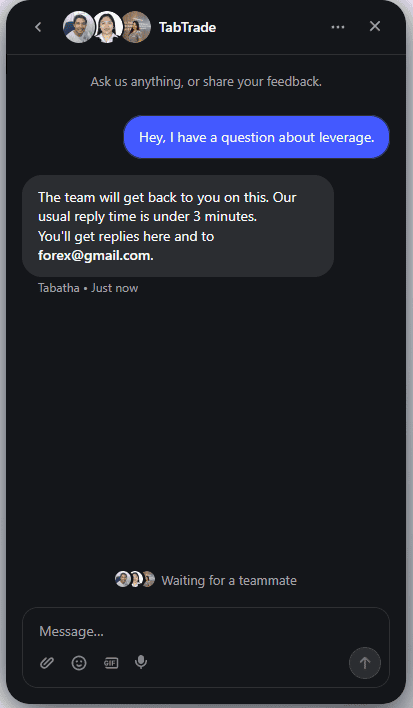
TabTrade runs support 24/7, with live chat in two places, on the website and inside the Secure Account Portal, plus WhatsApp, email, and a single phone number for both Sales and Support.
TabTrade+ Priority Support
For TabTrade+, only eligible Edge accounts qualify, Standard and VIP are excluded, and the service is not offered on Swap-Free. Subscribers get Priority Support Chat in the Secure Account Portal, plus a Personal Account Manager who can be phoned directly. Pricing starts at $29 per month for the first year (early adopter rate) or $59 per month standard.
The subscription also bundles other features (free VPS, AI insights, faster funding) we cover in the Free VPS Hosting and Other Fees sections. For active traders running EAs at the $29 first-year rate, the subscription roughly breaks even on VPS costs alone. At the $59 standard rate, you’d want to be using the priority support and other bundled features to make it worthwhile.
Research and education
TabTrade doesn’t run a structured research desk, daily market analysis, or an education program with courses and webinars. What you get sits inside the platform: an economic calendar, live spread data, and standard MT5 analytical tools like technical indicators and depth of market.
For newer brokers built around ECN-style pricing, this is a common gap. The working assumption is that traders using raw-spread accounts already have their own analysis workflow and source their education externally through YouTube, trading forums, and independent research providers. We’d say that assumption holds for most Edge and VIP account users. For Standard account beginners, it’s a more meaningful shortcoming.
If structured education matters to you, better-resourced brokers like Pepperstone and IC Markets run full education programs including webinars, trading guides, and market commentary. If you already trade independently and source your own analysis, TabTrade’s lack of in-house research probably won’t affect your decision.
Our final verdict on TabTrade
TabTrade delivers what it promises on pricing and execution. Raw spreads from 0.0 pips on the Edge account backed by $3.50 per side, per lot commission, low-latency execution through Equinix LD5 and NY4, up to 1:1000 leverage on FX majors, and a genuinely zero-deposit option on the Standard account. Deposits and withdrawals are fee-free and fast.
The qualifications are real. The regulation is offshore, with an FSC Mauritius licence under the Mauritius terms and no named licence under the Saint Lucia terms, and TabTrade offers no negative balance protection; its documents name no investor compensation scheme for either company. The broker launched in March 2026, so the long-term track record doesn’t exist yet. Standard account spreads at 1.0 pip are average, not exceptional. And AU, NZ, and US residents can’t sign up at all.
Our verdict: TabTrade is worth considering if you’re an experienced trader who values raw spreads and low latency over the safety net of Tier 1 regulation, and who can manage their own position sizing discipline. For beginners or anyone who prioritises regulatory protection, stick with a Tier 1 regulated alternative. At the $250 Edge minimum, it’s low-risk to test the execution quality for yourself.”
TabTrade FAQs
Does TabTrade offer negative balance protection?
Can Australians, New Zealanders, or US residents open an account with TabTrade?
Does TabTrade have a demo account?
How we reviewed TabTrade
| Check | Account or scope | Date | By or source | Status |
|---|---|---|---|---|
| Published EUR/USD spread | Raw or commission account | September 3, 2026 | Broker website | Read |
| Published EUR/USD spread | Standard account | September 4, 2026 | Broker website | Read |
| Trustpilot rating | tabtrade.com | October 2026 | Trustpilot | Read |
| Search interest | Worldwide monthly Google searches | September 2026 | Google Ads search volume | Read |
| Review published | This page | April 22, 2026 | CompareForexBrokers | Published |
| Last content change | This page | October 12, 2026 | CompareForexBrokers | Updated |
| Regulator register check of the primary licensed entity | Not yet read |
|---|---|
| Client terms: segregation and negative balance protection | Not yet read |
| Live account opened and funded | No test on file |
| Spreads measured on a live account with the entity that serves you | No test on file |
| Deposit and withdrawal test | No test on file |
| Customer support reply time | No test on file |
| Research and education | No test on file |
| Tax guidance | Not applicable, international audience |
| Risks and problems section | Withheld, no row on file |
| Client money and dispute schemes section | Withheld, no terms read |
| Comparison with alternatives section | Withheld, no comparison set on file |