
Is MetaTrader 4 Better Than MetaTrader 5?
Opening your trading account and wondering which of these popular platforms best fits your trading strategy? In this article, we’ll compare the key features of MetaTrader 4 and MetaTrader 5 to help you identify the platform to take your trading to the next level.
1. Popularity: MT5
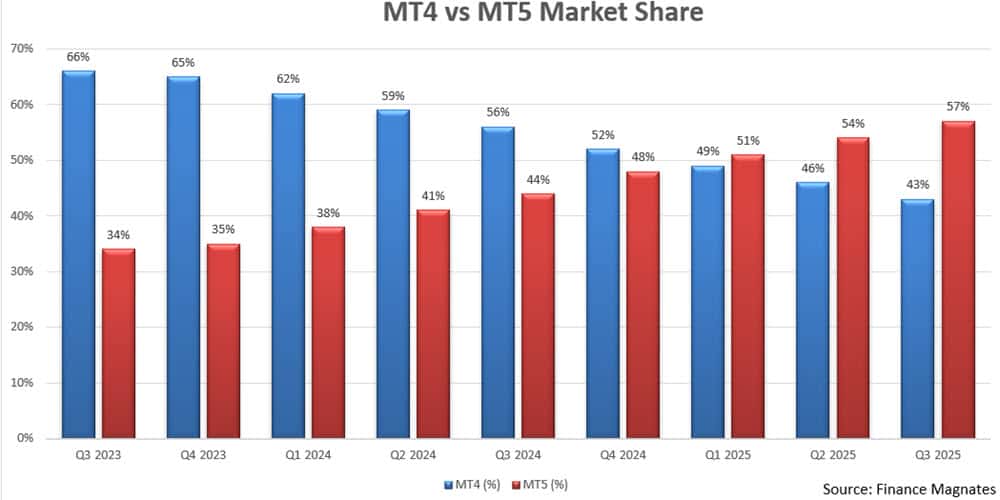
For the first time we are giving MT5 the edge in this category. While they just trial in Q4 2024 MT5 by 4%, the trend if clearly towards MT5 and there is no doubt that in 2026 it will be come the most popular trading platform. Therefore if your looking for the most used platform in the future, MetaTrader 5 is the logical option
A third comparison worth reading before settling on MetaTrader is MetaTrader 4 vs ProRealTime Comparison [Updated 2026].
2. Trading Products: MT4
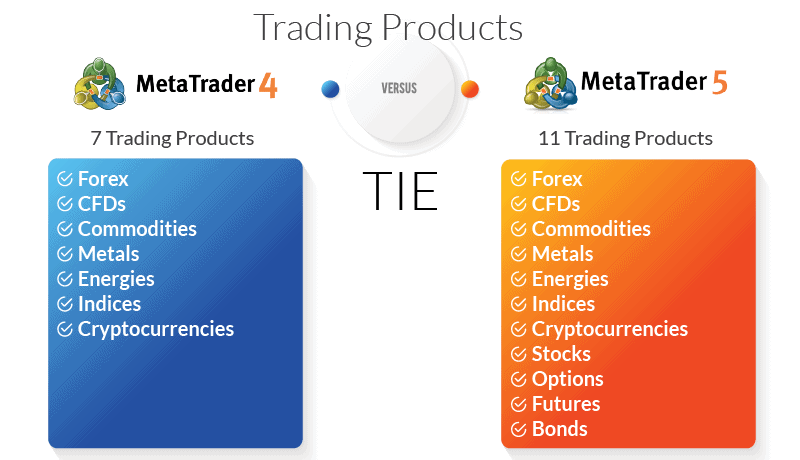
The most significant distinction between the MetaTrader platforms lies in the asset classes to trade and available markets. Developed primarily with forex trading in mind, MT4 allows users to trade other products as CFDs. It does not afford them access to multiple financial markets.
Capable of executing trades on centralised exchanges and in decentralised markets, MetaTrader 5 allows users to trade futures, stocks, options, and bonds in addition to forex.
MT4 Trading Products
MT4 traders have access to a single market: forex. That said, users can trade seven different types of popular assets:
- Forex
- CFDs
- Commodities
- Metals
- Energies
- Indices
- Cryptocurrencies
MT5 Trading Products
Developed as a multi-asset platform that would appeal to a wide range of traders and investors, MT5 encourages forex traders to branch out into other markets, particularly stocks. Users can trade 11 different assets across five markets:
- Forex
- CFDs
- Commodities
- Metals
- Energies
- Indices
- Cryptocurrencies
- Stocks
- Options
- Futures
- Bonds
Our verdict on best trading products is a MetaTrader 5
MT5 offers traders access to more financial markets and additional trading instruments, but MT4 remains the platform of choice for many forex specialists. Awarding just one the top spot would do a disservice to traders, regardless of their preferred asset class.
3. Order Type Comparison: MT5
Traders use different order types to maximise flexibility in their trading strategies while managing risk. Pending orders, in particular, can provide effective mitigation while empowering traders to reap the benefits of market volatility. Therefore, understanding which orders a platform supports matters greatly to ensure compatibility with your trading strategy.
- Market orders: A market order is an instruction to buy or sell a financial instrument at the current market price. Market orders are typically executed immediately, and liquidity availability determines the price the order fills.
- Limit orders: A limit order is an instruction to buy or sell a financial instrument at a specific price or better. Limit orders allow you to specify the price at which you want to enter or exit a trade, and they are typically used to take profits or to limit potential losses.
- Pending orders: A pending order is placed at a certain price level and triggers when the market reaches that price.Buy Limit, An order to buy provided the future “ASK” price equals a pre-defined value. In a Buy Limit order, the current price is higher than the price of the order placed. Traders place this type of order when they believe that the price will continue to increase after meeting a specific, pre-set value;Buy-Stop Limit, An order to buy provided the future “ASK” price equals a pre-defined value. In a buy-stop limit order, the current price is lower than the price of the order placed. Traders place this type of order when they believe that the price will continue to increase after meeting a specific, pre-set value;Sell Limit, An order to sell provided the future “BID” price equals a pre-defined value. In a sell limit order, the current price level is lower than the price of the order placed. Traders place this type of order when they believe that the price will continue to decrease after passing a specific, pre-set value;Sell-Stop Limit, An order to sell provided the future “BID” price equals a pre-defined value. In a sell-stop limit order, the current price level is higher than the price of the order placed. Traders place this type of order when they believe the price will continue to fall after passing a specific, pre-set value.
- Stop orders: A stop order is an instruction to buy or sell a financial instrument when the market reaches a specific price. Traders typically use stop orders to manage risk and protect profits. There are two types of stop orders: stop loss orders, which traders use to limit potential losses, and take-profit orders, which traders use to take profits at a predetermined price.Stop-loss, A stop-loss order is an order to sell a financial instrument when the market reaches a certain price. Stop-loss orders work to limit potential losses by automatically closing the trade when the market reaches a pre-determined level.Take-profit, A take-profit order is an order to buy a financial instrument when the market reaches a certain price. (Think of this as the inverse of a stop-loss order.) Take-profit orders help to lock in value from a position by automatically selling when the market reaches your ideal price.
MT4 Order Types
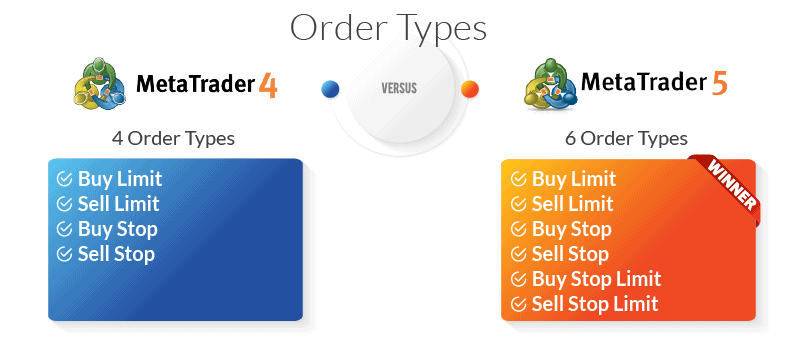
In addition to market and limit orders, forex traders using the MT4 platform can opt for four different types of pending orders:
- Buy Limit
- Sell Limit
- Buy Stop
- Sell Stop
MT5 Order Types
MetaTrader 5 includes standard market and limit order types, as well as two more pending order types than MT4:
- Buy Limit
- Sell Limit
- Buy Stop
- Sell Stop
- Buy Stop Limit
- Sell Stop Limit
MetaTrader 5 wins our verdict on order type
With two additional pending order types, MT5 offers more risk management options for traders implementing complex automated trading strategies. Algorithmic trading is possible with MT4’s more limited range of stop and limit order types. However, the absence of buy-stop and sell-stop limits makes it difficult for MT4 traders to take full advantage of market movements.
4. Execution Speeds: TIE
In trading, “execution type” refers to how a trading platform processes an order in the financial markets. Different types of order execution offer advantages and disadvantages, and platforms with a broader range may appeal to more experienced traders working in multiple markets.
- Instant Execution. The platform fills an order at the exact price quoted by the broker.
- Market Execution. The platform fills an order at the current market price based on aggregated liquidity sources. (Traders may experience slippage using this execution type.)
- Request Execution. The platform fills an order at a price pre-agreed by the trader and the brokerage.
- Exchange Execution. The platform fills an order directly on an exchange at the current market price as calculated based on depth of market data.
MT4 Execution Types
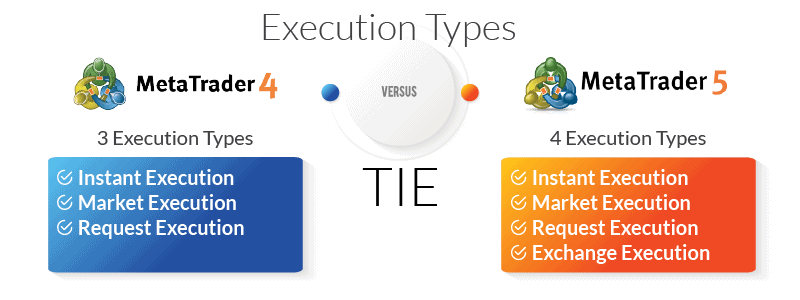
As a comprehensive platform dedicated primarily to trading forex, it should come as no surprise that MetaTrader 4 relies on the three primary execution methods when fulfilling trades. Exchange execution, which traders cannot use in forex trading, does not exist on the MT4 platform.
- Instant Execution
- Market Execution
- Request Execution
MT5 Execution Types
Due to the additional markets available to traders using MT5, the platform also offers Exchange Execution as an option for order processing.
- Instant Execution
- Market Execution
- Request Execution
- Exchange Execution
Our verdict on execution types is a tie
When you get down to brass tacks, neither platform has an edge regarding order execution. MT5 may claim one additional option, but as forex traders have no use for Exchange Execution, that’s insufficient to merit the top spot.
5. Order Fill Options: MT5
Traders use order fill options to control how and when their platform of choice executes an order. The larger the number of parameters a trader can place on an order, the greater the possibilities for maximising profits and minimising risk.
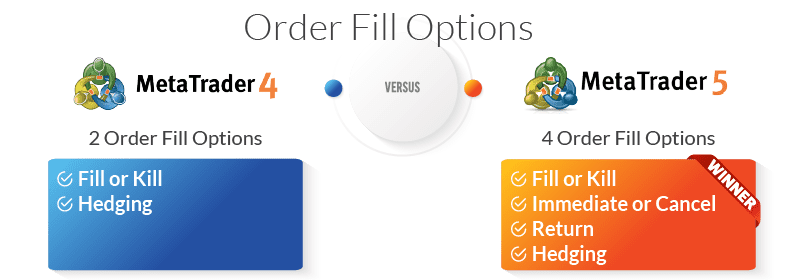
- Fill or Kill orders. The order must be filled immediately in its entirety or else canceled.
- Immediate or Cancel orders. Similar to a Fill or Kill order, but allows for partial fills. If the broker cannot fill the order immediately, it fills as much as possible and cancels the remainder.
- Return orders. Another type of partial fill order, a Return order allows the broker to fill a portion of an order while retaining the remainder for later execution when market conditions meet the trader’s parameters again.
- Hedging. Hedging orders allow traders to place simultaneous long and short positions on the same instrument to exploit market volatility.
MT4 Order Fill Options
MT4 keeps things simple when it comes to order fill options: fill-or-kill. Some traders may appreciate the ease of managing their transaction costs, while others might chafe at the lack of flexibility. By insisting that users fill an order immediately or lose out entirely, MT4 deprives traders of the opportunity to fulfill a portion of the order at a lower price.
MT4 allows hedging in jurisdictions that do not restrict the practice.
- Fill or Kill
- Hedging
MT5 Order Fill Options
For traders implementing strategies that require partial fills, MT5 has a clear advantage. In addition to the standard fill or kill, traders can also opt for immediate or cancel to take advantage of price changes during the execution process. Finally, those playing a longer game can use Return orders to push profits further by allowing the broker to gradually fill an order over time as pre-sent conditions are met.
Hedging is possible with MT5; however, the platform uses a netting position accounting system, which allows traders to open one position per financial instrument as a default setting. Brokers in jurisdictions where hedging is legal can offer this order type but are not required to do so.
- Fill or Kill
- Immediate or Cancel
- Return
- Hedging
MetaTrader 5 wins our verdict for order fill options
The added flexibility of partial fills combined with hedging gives MT5 users a powerful set of tools for maximising gains and minimising risk.
6. Technical Analysis: MT5
Based on the idea that past trends can accurately predict future movements, technical analysis in forex trading refers to the use of historical price data and chart patterns to anticipate movements in the forex market. Algorithmic trading systems, sometimes called automated trading, rely heavily on technical analysis for success.
MT4 Technical Analysis
While MT4 remains a respected forex trading platform with a comprehensive selection of technical analysis tools, some may find it less suitable for sophisticated trading strategies compared to MT5.
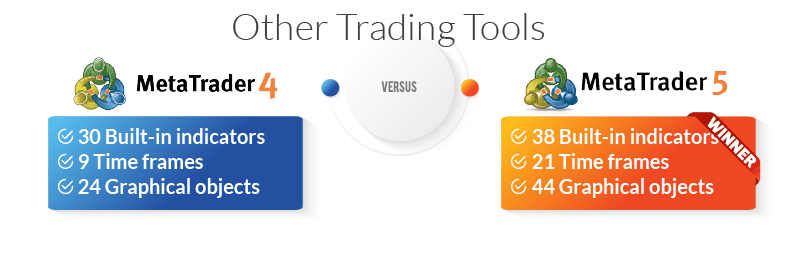
- Technical indicators. MetaTrader 4 includes 30 built-in indicators and offers users access to a collection of over 2,000 free custom indicators. Those with something specific in mind can also browse a market of 700 custom indicators available for purchase.
- Timeframes. MetaTrader 4 offers users 9 different timeframes. While each timeframe requires its own chart, MT4 allows users an unlimited number of custom charts.
- Graphical objects. MetaTrader 4 users have access to 24 graphical objects, including lines; channels; the Gann and Fibonacci tools; and shapes and arrows.
MT5 Technical Analysis
Given the importance of charting for successful technical analysis, MT5 has a definite edge in this category. The newer forex trading platform offers more sophisticated charting capabilities compared to its elder sibling, including a larger selection of technical indicators.
- Technical indicators. MetaTrader 5 boasts eight more technical indicators than MT4, including six important trend indicators and two additional oscillators.
- Timeframes. MetaTrader 5 includes 21 timeframes and allows users to plot multiple timeframes on a single chart.
- Graphical objects. Traders using MT5 have access to 44 graphical objects, including Regression Channels; Construction of Waves; and Buy and Sell signs.
Overall, the MT5 platform is generally considered to be more suitable for experienced traders and offers a wider range of charting and analysis capabilities compared to the MT4 platform.
MetaTrader 5 wins our verdict to technical analysis
In this case, more is definitely better. With 21 timeframes, 44 graphical objects, and 38 technical indicators, MetaTrader 5 offers a truly dizzying array of advanced charting possibilities.
7. Other Trading Tools: MT5
If charting gives users the granular, second-by-second insights needed to profit from microshifts in currency prices, the trading tools below provide big-picture context and ensure that traders benefit from the lessons of historical market data.
MT4 Trading Tools
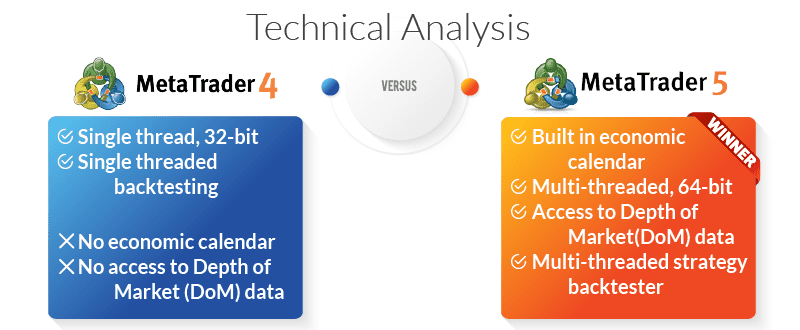
While it no-doubt represented the cutting edge of accessible trading technology in 2005, MT4 shows its age when it comes to supplementary resources. The platform does not offer a built-in economic calendar, nor do traders have access to DOM data. Backtesting is available, however, single-thread processing and system-created ticks may limit its accuracy.
- Economic calendar. MT4 does not include a built-in economic calendar, though a number of integrations exist for those who need this feature.
- Processing power. MetaTrader 4 is a single-threaded, 32-bit trading platform. (Note that iOS no longer supports 32-bit systems.)
- Depth of market (DOM). MT4 users do not have access to depth of market data.
- Backtesting. MetaTrader 4 includes a single-threaded strategy tester that uses generated ticks.
MT5 Trading Tools
Double the processing power means double the features. From a built-in economic calendar to DOM data to multi-treaded backtesting based on current market data, there’s not a lot MT5 doesn’t offer users.
- Economic calendar. The MetaTrader 5 platform offers users a built-in economic calendar with up-to-date news from the USA, Japan, and the EU.
- Processing power. MetaTrader 5 is a multi-threaded, 64-bit trading platform. While capable of executing multiple tasks simultaneously with little to no latency, the associated processing load can strain system and memory resources.
- Depth of market (DOM). MT5 users have access to depth of market data.
- Backtesting. MetaTrader 5 includes a multi-threaded strategy tester that relies on real-time ticks and live spreads.
MetaTrader 5 wins our verdict for trading tools
In this case, more is definitely more. Additional processing power means MT5 can offer users additional features that its predecessor doesn’t support.
8 Expert Advisor Comparison: MT4
Expert Advisors, also known as EAs or trading bots, play a critical role in any automated trading strategy and custom indicators. MetaQuotes offers an extensive marketplace of vetted EAs for purchase, but users can also purchase or code their own to meet the specific needs of a given trading strategy.
As noted elsewhere, MT4 and MT5 don’t use the same coding language. That means a trading bot that runs like a dream on MetaTrader 4 won’t work with MetaTrader 5 and vice-versa.
MT4 Expert Advisors
The MetaTrader 4 Market currently offers 1,700 EAs and 2,100 technical indicators compatible with the platform. Due to its long-term popularity and extensive user base, however, traders may have an easier time purchasing high-quality custom tools for MT4 than MT5.
MT5 Expert Advisors
The MetaTrader 5 Market maintained by MetaQuotes claims a combined total of 2,000 trading bots and indicators for use on the platform. Continued loyalty to MT4, particularly amongst forex traders, and slow adoption of MT5 may contribute to developers’ reluctance to commit to MQL5 apps.
MetaTrader 4 wins our verdict for expert advisors
With a broader selection of time-tested EAs and indicators, MT4 comes out on top, for now. As MetaQuotes continues to prioritise MT5 (and has stopped developing MT4), we expect to see changes in the near future.
9. Server Architecture: MT5
When it comes to servers, more sometimes does mean better. While a single, dedicated server does come with the advantage of easy set-up and administration, the limits on processing power can hamper trading activity. Distributed servers capable of sharing the processing load, conversely, require more work to configure and monitor, but can handle far more complex tasks simultaneously.
MT4 Server Architecture
MetaTrader 4 relies on a single dedicated server for all operations. While this does have the effect of simplifying and centralising operations, users may chafe at the processing restrictions. That said, MT4 includes all the elements needed for smooth execution: trade servers, access points, manager terminals, gateways, and data feeds.
MT4 generates all reports in .HTML format.
MT5 Server Architecture
A distributed system of four servers exponentially increases the processing load MT5 can handle compared to its predecessor. For traders, that means more orders executed faster across multiple markets at better prices. Between the trader server, the history server, the access server, and the backup server, MT5 has ample resources and a setup that optimises their use.
MT5 generates reports in .HTML and Open .XML formats.
MetaTrader 5 wins our verdict for server architecture
In an industry where milliseconds can mean the difference between a big win or a sizable loss, execution speed matters. While a broker’s server configuration has a role to play, efficiency at the platform level matters, too. MT5’s distributed servers can better handle large volumes of orders and high levels of activity.
Likewise, MT5’s ability to handle a larger processing load allows users to run more EAs across more timeframes.
10. Compatibility Comparison: Tie
Busy traders who manage their accounts across multiple devices need a platform that operates seamlessly whether they’re on mobile, desktop, or tablet. That goes double for those who migrate across operating systems.
MT4 Compatibility
MetaTrader 4 exists in multiple flavours suitable for any type of device. Recent compatibility issues with Apple and iOS, however, may give pause to traders loyal to their iPhones.
- Desktop. Some versions of the MT4 software won’t run natively on iOS. In these cases, MetaQuotes advises traders to download Wine, a free software package that allows Unix-based systems to run applications written for Windows. The platform is fully compatible with Windows.
- Mobile. Apple removed MetaTrader 4 and MetaTrader 5 from the app store in September 2022 citing concerns about security and user experience. Both apps remain available on the Google Play store.
- Tablet. See above.
- Web trader. Fully compatible with all browsers and operating systems, the MT4 web trading platform needs only an internet connection.
MT5 Compatibility
Easy-to-use interfaces and quick boot times have made Apple computers popular with day traders, but ongoing compatibility issues with iOS may prove problematic even for die-hards.
- Desktop. If you’ve upgraded your iOS to Catalina or later, you’ll need to download Wine to run MT5. The platform is fully compatible with Windows.
- Mobile. Apple removed MetaTrader 4 and MetaTrader 5 from the app store in September 2022 citing concerns about security and user experience. Both apps remain available on the Google Play store.
- Tablet. See above.
- Web trader. The MT5 web trader requires only an internet connection and is fully compatible with all operating systems and browsers.
MT4 and MT5 tie in our verdict for compatibility
Neither MetaTrader 4 nor MetaTrader 5 stands out in this category. Pending further developments from Apple, both platforms remain out of reach for iPhone and iPad users and require extra work to run on Mac computers.
11. Longevity: MT5
Is there anything more frustrating than investing in technology that becomes immediately obsolete? Or committing to a product only to realise that upgrading means losing significant amounts of data or custom tools? Understanding how MetaQuotes views its flagship platforms can help traders avoid these pitfalls.
MT4 Longevity
MetaQuotes officially ended the development of MetaTrader 4 in 2015 and stopped issuing new sales licences three years later, including additional servers for existing clients. Brokers with existing licences do have the option to purchase additional White Label terminals, however.
MetaTrader 4 no longer offers customer-side technical support for the MT4 platform. For now, users can turn to an active community of MT4 aficionados for technical help.
MT5 Longevity
MetaQuotes continues to develop and maintain the MT5 trading platform. Brokers can purchase both new licences and additional servers or terminals and enjoy comprehensive technical and customer support from the company.
MetaTrader 5 wins our verdict for longevity
Despite the loyalty of its customer base, it’s clear MetaQuotes sees MT5 as the platform of the future. New traders, particularly those who intend to pursue a fully automated trading strategy, may want to steer clear of MT4. Remember, any custom indicators or EAs created with the MQL4 language won’t run on MT5 in case of a future switch.
What is the best forex broker to trade with MetaTrader 4?
We consider Pepperstone as the best of the Best MT4 Brokers for a number of reasons:
- 3rd party platforms that work with MT4. These include Capitalise.ai, Myfxbook, DupliTrader and Smart Trader Tools.
- Low spreads, which average 0.1 pips for EUR/USD currency pair
- Range of trading products, including over 92 Forex pairs, 19 Crypto, 25 indices, 5 Metals including Gold and Silver, 4 energies, 16 soft commodities and 10,000 stocks.
- Fast execution speed of 77ms for limit orders and 100 ms (as tested by Ross Collins).
One unique feature of Pepperstone is that they have zero speeds for the EUR/USD 100% of the time (outside rollover), according to tests done by our colleague Ross Collins with their Razor account.
| Broker | Time at Minimum Spread | Minimum Spread |
|---|---|---|
| Pepperstone | 100.00% | 0.00 |
| StoneX Trading | 100.00% | 0.00 |
| Fusion Markets | 98.55% | 0.00 |
| TMGM | 97.83% | 0.00 |
| IC Markets | 97.83% | 0.00 |
| FP Markets | 97.83% | 0.00 |
| EightCap | 97.83% | 0.00 |
| Admiral Markets | 95.65% | 0.00 |
| ThinkMarkets | 94.93% | 0.00 |
| Blueberry Markets | 94.20% | 0.00 |
| Go Markets | 87.68% | 0.00 |
| Blackbull Markets | 86.96% | 0.10 |
| Tickmill | 86.23% | 0.00 |
| Axi | 82.61% | 0.10 |
What is the best forex broker to trade with MetaTrader 5?
We think IC Markets is the best forex broker for trading with MetaTrader 5. This is mostly because of their low spreads.
Ross Collins tested the spreads of 20 brokers and found IC Markets are constantly top 5 for the currency pairs tests. Results included an average of 0.23 pips for AUD/USD, 0.19 pips for EUR/USD and 0.27 pips for GBP/USD.
On top of the low spreads, we like that IC Markets offers a decent range of trading tools for the MT5, including social and copy trading tools, giving you versatile options on how to trade the markets.
This comparison sits inside our wider work on MT4, MT5, cTrader and TradingView.
| Average RAW Spread From Test Done By Ross Collins | Average RAW Spread From Test Done By Ross Collins | Average RAW Spread From Test Done By Ross Collins | Average RAW Spread From Test Done By Ross Collins | Average RAW Spread From Test Done By Ross Collins | Average RAW Spread From Test Done By Ross Collins | Average RAW Spread From Test Done By Ross Collins | Average RAW Spread From Test Done By Ross Collins | Average RAW Spread From Test Done By Ross Collins | Average RAW Spread From Test Done By Ross Collins | Average RAW Spread From Test Done By Ross Collins | Average RAW Spread From Test Done By Ross Collins |
|---|---|---|---|---|---|---|---|---|---|---|---|
| AUDUSD | Average Spread | EURUSD | Average Spread | GBPUSD | Average Spread | USDCAD | Average Spread | USDCHF | Average Spread | USDJPY | Average Spread |
| Fusion Markets | 0.09 | TMGM | 0.15 | StoneX Trading | 0.17 | StoneX Trading | 0.16 | Pepperstone | 0.39 | Fusion Markets | 0.22 |
| TMGM | 0.15 | Tickmill | 0.15 | Fusion Markets | 0.21 | Fusion Markets | 0.23 | Fusion Markets | 0.41 | IC Markets | 0.24 |
| Pepperstone | 0.19 | Fusion Markets | 0.16 | IC Markets | 0.27 | TMGM | 0.43 | StoneX Trading | 0.44 | ThinkMarkets | 0.25 |
| StoneX Trading | 0.23 | IC Markets | 0.19 | FP Markets | 0.31 | IC Markets | 0.45 | TMGM | 0.51 | StoneX Trading | 0.27 |
| IC Markets | 0.23 | Pepperstone | 0.19 | TMGM | 0.35 | Go Markets | 0.47 | Go Markets | 0.51 | TMGM | 0.33 |
| FP Markets | 0.31 | FP Markets | 0.2 | Pepperstone | 0.41 | Blueberry Markets | 0.5 | Tickmill | 0.52 | Pepperstone | 0.36 |
| Blueberry Markets | 0.32 | EightCap | 0.2 | EightCap | 0.44 | Tickmill | 0.5 | IC Markets | 0.57 | FP Markets | 0.39 |
| Go Markets | 0.37 | Admiral Markets | 0.21 | Blueberry Markets | 0.44 | FP Markets | 0.51 | Blueberry Markets | 0.63 | Blueberry Markets | 0.43 |
| Tickmill | 0.37 | StoneX Trading | 0.22 | Go Markets | 0.59 | ThinkMarkets | 0.56 | ThinkMarkets | 0.70 | Go Markets | 0.45 |
| ThinkMarkets | 0.42 | ThinkMarkets | 0.22 | Tickmill | 0.59 | Pepperstone | 0.61 | FP Markets | 0.71 | EightCap | 0.47 |
| EightCap | 0.48 | Blueberry Markets | 0.27 | ThinkMarkets | 0.62 | EightCap | 0.64 | EightCap | 0.76 | Admiral Markets | 0.58 |
| Axi | 0.67 | Go Markets | 0.38 | Admiral Markets | 0.73 | Axi | 0.74 | Axi | 0.94 | Axi | 0.64 |
| CMC Markets | 0.68 | Axi | 0.43 | CMC Markets | 0.90 | CMC Markets | 0.75 | CMC Markets | 0.94 | CMC Markets | 0.64 |
| Admiral Markets | 0.70 | CMC Markets | 0.44 | Axi | 0.95 | Blackbull Markets | 1.01 | Admiral Markets | 1.08 | Tickmill | 0.67 |
| Blackbull Markets | 0.85 | Blackbull Markets | 0.46 | Blackbull Markets | 0.96 | Admiral Markets | 1.46 | Blackbull Markets | 1.31 | Blackbull Markets | 1.04 |
Is MetaTrader 4 Or MetaTrader 5 Is Better?
So, which platform offers the best trading experience? In our view, multi-threaded, 64-bit processing and nearly infinite charting capabilities make MetaTrader 5 the stronger choice, especially for those devoted to trading robots and other forms of automation.
That said, MT5’s additional capabilities don’t necessarily make it the “better” choice for everyone. Beginners or traders who prefer a more streamlined approach may find MT4 better suited to their needs.
Overall, whether MT4 or MT5, we found Pepperstone to be the best-rated broker overall based on its spreads, trading environment, and customer support.
Risk Warning and Disclaimer
Forex trading can entail a high level of risk. The same market volatility and leverage that propel significant profits can also lead to catastrophic loss. Beginner traders are advised to start trading using a free demo account from a trusted brokerage licensed by the Financial Markets Authority (FMA) to better understand their trading needs before putting money into the financial markets.
CompareForexBrokers.com provides educational reviews of online trading products and services, including brokerages, trading platforms, and trading tools. CompareForexBrokers.com is not an investment adviser, financial adviser, or other financial services professional and does not offer investment advice. None of the content published on this page or elsewhere on CompareForexBrokers.com should be construed as investment advice or an inducement to invest.
What is MetaTrader 4? What is MetaTrader 5?
Launched in 2005 and 2010 by MetaQuotes Software Corp., MetaTrader 4 and MetaTrader 5 are among the best-known, most popular, and most powerful trading platforms available today.
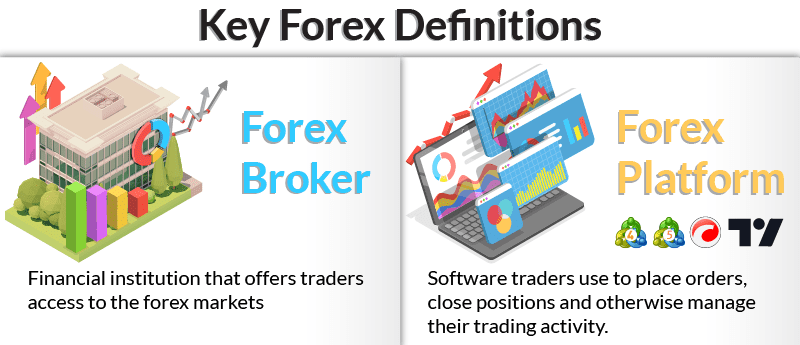
The developer remains tight-lipped about just how many forex traders use a version of either platform but did share that MT4 claims over 16 million users. MT5, on the other hand, recently became more popular with brokerages. According to MetaQuotes, the number of brokers offering MT5 officially surpassed those offering MT4 in June 2021.
Key Differences Between MetaTrader 4 vs MetaTrader 5
While both the MT4 and MT5 trading platforms enjoy wide popularity, they differ in terms of the markets covered, features offered, and the programming languages used.
- Broker Support: Both the MT4 and MT5 platforms are supported by a large number of brokerage firms. Due to its more extensive track record and forex trading-specific features, however, MT4 enjoys a slightly higher adoption rate among top forex brokers.
- Trading Products: MT4 is mainly used for forex and CFD (Contract for Difference) trading, while MT5 is more comprehensive and includes additional features for trading in futures, equities, and options.
- Order types: MT4 offers a limited range of order types, including market, limit, and stop orders. MT5 provides a wider range, including stop-limit orders, trailing stops, and multiple execution modes. In addition, MT5 traders can opt for either request execution or market execution when placing orders.
- Technical analysis: Both MT4 and MT5 offer a range of technical analysis tools and indicators. MT5 includes additional features, however, such as more advanced charting capabilities and custom timeframe functionalities.
- Algorithmic trading: Both the MT4 and MT5 platforms support algorithmic trading through the use of Expert Advisors. MT5 offers a wider variety of assets available to trade and more sophisticated technical indicators than its counterpart.
- Programming language: MT4 uses the MetaQuotes Language 4 (MQL4) programming language to create custom indicators and automated trading strategies. MT5 uses MetaQuotes Language 5 (MQL5).
- Compatibility: MT5 recently surpassed MT4 as brokers’ most popular trading platform among brokers.
FAQs
What are the costs associated with trading on MetaTrader?
Is it possible to use both MT4 and MT5?
Is the MetaTrader platform free to use?
Can I trade with MetaTrader without a forex broker?
Can I use MetaTrader on Android mobile?
Can I use MetaTrader as an iOS app?
Can I use MetaTrader on a demo account?
Does MT4 or MT5 have a guaranteed stop loss?
How does MT4 compare to cTraders?
About the author

Justin Grossbard is the CEO & Co-Founder of CompareForexBrokers established in 2014, along with Noam Korbl and works as Strategic Head Of Research.
Our reviews are reader-supported. We may receive payment when you click a link to a partner site. Learn how we make money.