

Best Automated Trading Software
Automated trading or algorithmic trading allows you to find more trading opportunities and execute them than is possible with manual trading. I looked at some of the best trading platforms to automate your trades.



Our broker reviews are reader supported and we may receive payment when you click on a partner site.
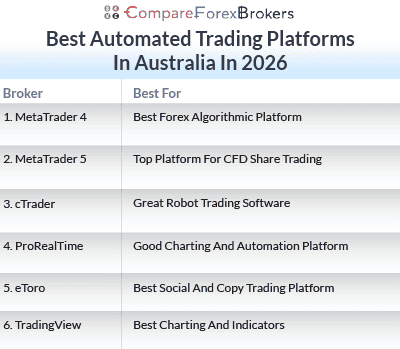
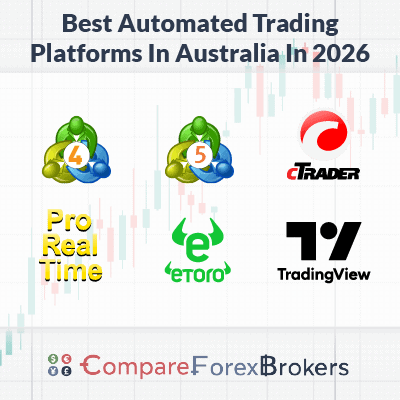
My August 2026 list of the best automated trading software is:
- MetaTrader 4 - Best Forex Algorithmic Platform
- MetaTrader 5 - Top Platform For CFD Share Trading
- cTrader - Great Robot Trading Software
- ProRealTime - Good Charting And Automation Platform
- eToro - Top Choice for Social and Copy Trading
- TradingView - Excellent Charting And Indicators

| Broker Review | Our Rating | Regulation | Raw EUR/USD Spread | Raw GBP/USD Spread | Raw AUD/USD Spread | Commissions (USD Base) | Standard EUR/USD Spread | Standard GBP/USD Spread | Standard AUD/USD Spread | MetaTrader 4 | MetaTrader 5 | cTrader | Execution Speed | Minimum Deposit | Currency Pairs | Crypto CFDs | Retail Leverage | Prof. Leverage | Visit Broker |
|---|---|---|---|---|---|---|---|---|---|---|---|---|---|---|---|---|---|---|---|
 | 98 | ASIC, FCA, DFSA | 0.10 | 0.20 | 0.10 | $3.50 | 1.10 | 1.20 | 1.10 |  | | | 77ms | $0 | 94 | 44 | 30:1 | 500:1 |  |
 | 90 | ASIC, CySEC | 0.01 | 0.04 | 0.02 | $4.50 | 1.0 | 1.2 | 1.0 | | | | 134ms | $0 | 61 | 18 | 30:1 | 500:1 | |
 | 57 | FCA, CySEC, DFSA SCB, FSC-M, FSCA, FSA-S | 0.64 | 0.54 | 0.54 | $3.50 | 1.44 | 1.92 | 1.85 | | | | 151ms | $0 | 69 | 28 | 30:1 | 200:1 | |
 | 77 | ASIC, FCA, FMA | 0.16 | 0.59 | 0.29 | $6.00 | 1.13 | 1.66 | 1.01 | |  | | 174ms | $0 | 97 | 30 | 30:1 | 200:1 | |
 | 52 | ASIC, CySEC, FCA MAS, MFSA, ADGM SEC, GFSC, FSA-S | - | - | - | - | 1.0 | 2.0 | 1.0 | | | | 130ms | $50 (Australia), $50-$100 (EU) | 68 | 127 crypto coins + 106 other crypto options | 30:1 | 400:1 | |
 | 94 | FMA, FSA-S | 0.1 | 0.1 | 0.2 | $3.00 | 1.10 | 1.40 | 1.20 | | | | 72ms | $0 | 67 | 16 | 500:1 | 500:1 | |
What is the best automated trading software in Australia?
Pepperstone offers the best automated trading software in Australia with our rating of 98/100, offering Expert Advisors on MT4, cBots on cTrader and algorithmic trading on MT5. With a 77ms execution speed and RAW spreads from 0.10 pips, Pepperstone supports advanced automation with no minimum deposit. We also shortlisted other brokers based on their copy trading features and trading bot compatibility.
1. MetaTrader 4 with Pepperstone - Best Forex Algorithmic Platform

Forex Panel Score

Average Spread
EUR/USD = 0.1 GBP/USD = 0.2 AUD/USD = 0.1
Trading Platforms
MT4, MT5, cTrader, TradingView, Pepperstone Trading App
Minimum Deposit
$0
Why I Recommend MetaTrader 4
I find MetaTrader 4 to be a solid choice for my algorithmic trading needs. The platform allows me to program my strategies using Expert Advisors that automatically follow my trading rules. I also appreciate that MT4 already have a huge community, and even if you’re relatively new to algo trading, it will be easy to find custom indicators and strategies from other traders. This wealth of shared knowledge has been invaluable in developing my automated trading approach.
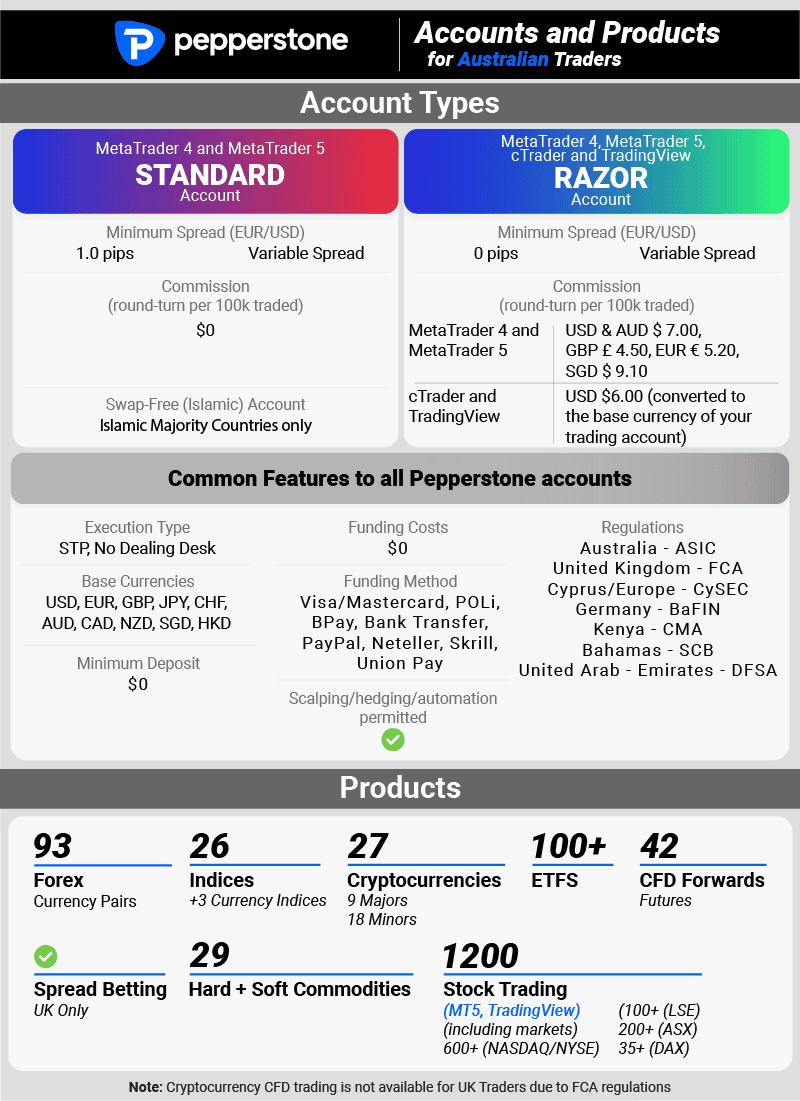
Pepperstone is my top pick for forex algorithmic trading. I’m impressed by the broker’s excellent automated trading capabilities when using Expert Advisors, combined with tight RAW spreads. In my tests, I found the average spread for EUR/USD currency pairs to be just 0.1 pips on the RAW spread account.
This aligns well with the tests done by our analyst Ross Collins, who reported an average spread of 0.38 pips. Pepperstone also achieved 100% zero spreads outside rollover in tests also done by Ross Collins, making them an ideal choice for trading algorithms on MT4.
Lastly, the broker’s low trading fees, particularly zero deposit and withdrawal fee policy, with free VPS services on MT4 trading platform sealed the deal. This makes Pepperstone an ideal choice for active traders interested in capitalising on low-cost trading, and faster trade execution.
Broker Details
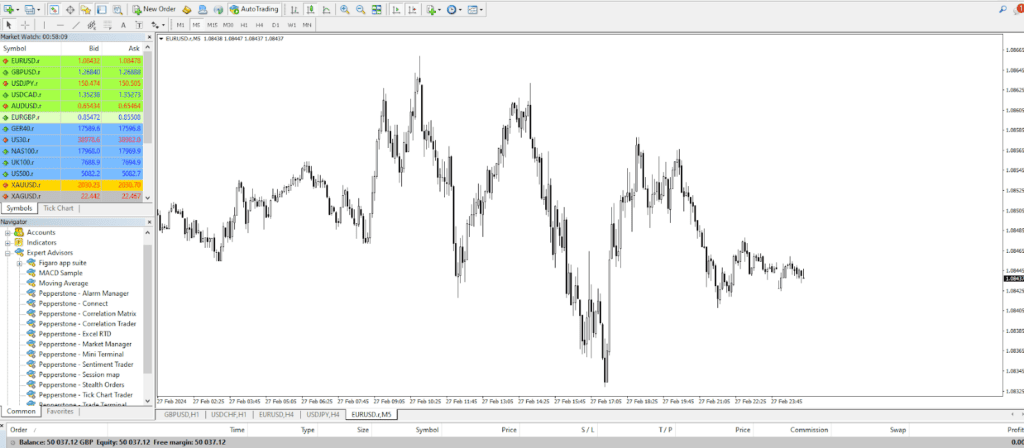
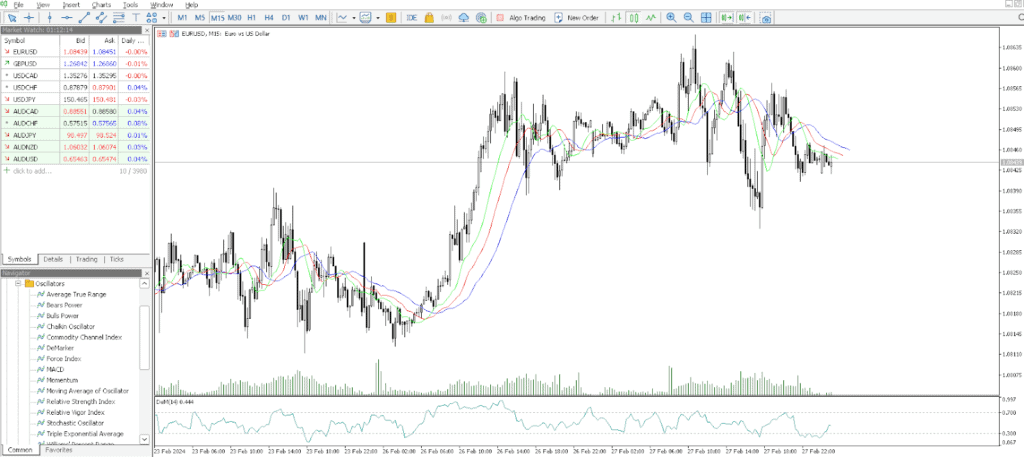
To test the MetaTrader 4 platform, I opened a Pepperstone account and downloaded the platform to my PC. I found that the MetaTrader 4 is a versatile trading platform offering a range of tools, including 30+ indicators, three chart types, nine timeframes, custom indicators, and automated trading bots.
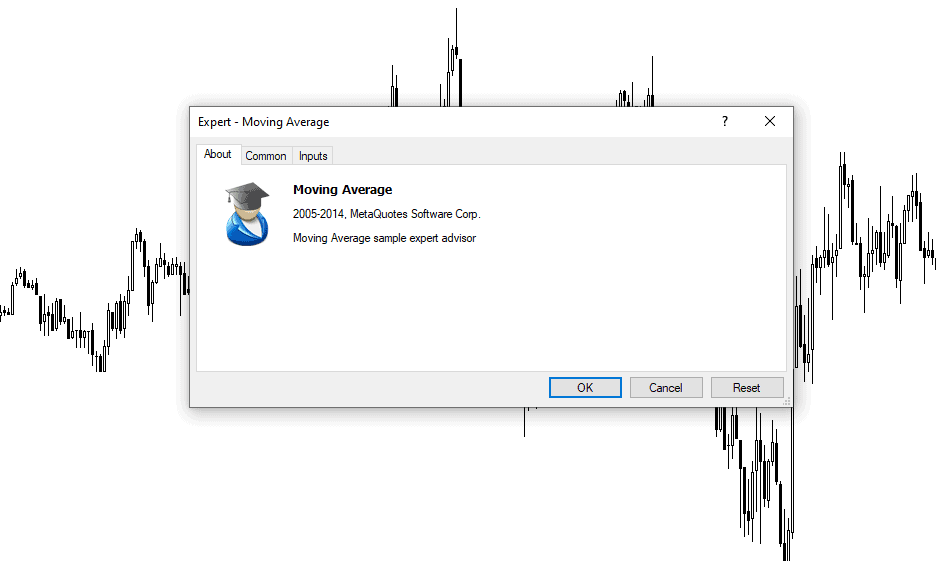
What stood out for me was the ability to create your own Expert Advisors (EA) to automate your strategies. I tested MetaTrader 4’s algorithmic capabilities by downloading a free Expert Advisor from MetaQuotes and installing it on a demo account. This process was simple; you can do it all from within the MT4 platform.
I was impressed by how easy it was to get started with the EA. Once installed, you can simply drag and drop the EA onto the chart, and it will start to run based on the rules set.
I Recommend Pepperstone For MT4
In my opinion, Pepperstone pairs well with the MetaTrader 4 platform as the broker offers low spreads on both of their accounts, which is perfect for automated trading.
To understand the spreads better, I opened a Standard and a RAW spreads account. The Standard account is Pepperstone’s spread-only account with no commission, and the average spread for EUR/USD came at 1.12 pips. For active traders, the RAW account has tighter spreads, averaging 0.1 pips on EUR/USD, but charges a commission of $3.50 per lot.
ECN Broker Spreads | |||||
|---|---|---|---|---|---|
 | 0.30 | 0.30 | 0.10 | 0.20 | 0.10 |
 | 0.14 | 0.18 | 0.90 | 0.14 | 0.13 |
 | 0.30 | 0.50 | 0.30 | 0.50 | 0.40 |
 | 0.00 | 0.20 | 0.00 | 0.20 | 0.20 |
 | 0.24 | 0.70 | 0.16 | 0.54 | 0.29 |
 | 0.30 | 0.70 | 0.20 | 0.50 | 0.40 |
 | 0.40 | 1.30 | 0.10 | 0.50 | 0.50 |
 | 0.60 | 0.60 | 0.10 | 0.60 | 0.50 |
 | 0.46 | 1.04 | 0.28 | 0.66 | 0.89 |
Avg. spreads are taken from each broker's website and updated monthly. Last update on 1 Aug 2026
Another benefit of RAW spreads is that they can go as low as 0.0 pips, so I tested how frequently Pepperstone would offer the major pairs at zero pips. I was impressed to find that the broker has a 100% uptime of 0.0 pips on major pairs, outperforming all other brokers apart from City Index.
| Zero Spread Testing | |
|---|---|
| Broker | Time At Minimum Spread |
| Pepperstone | 100% |
| Fusion Markets | 98.55% |
| ThinkMarkets | 97.93% |
| IC Markets | 97.83% |
| TMGM | 97.83% |
| FP Markets | 97.83% |
| Eightcap | 97.83% |
| Admirals | 95.60% |
| Blueberry Markets | 94.20% |
| GO Markets | 87.68% |
| BlackBull Markets | 86.96% |
Since spreads are this low on the RAW account, this makes Pepperstone a prime choice when automating your trades with MetaTrader 4. You’ll only pay the fixed commission of $3.50 for each trade and this will help keep your trading costs low and predictable.
Broker Screenshots
2. MetaTrader 5 with IC Markets - Top Platform For CFD Share Trading

Forex Panel Score
Average Spread
EUR/USD = 0.01 GBP/USD = 0.04 AUD/USD = 0.02
Trading Platforms
MT4, MT5, cTrader, TradingView, IC Markets Mobile App
Minimum Deposit
$200
Why I Recommend MetaTrader 5
I chose MetaTrader 5 as the best platform for CFD share trading as it offers access to global stock exchanges while maintaining the user-friendly interface of MetaTrader 4. What I like about MT5 is that it also offers novel features like the advanced Depth of Market tool and a native economic calendar. If you are a share trader, you’’ll get a combination of educational resources and deeper trading experience in one platform.
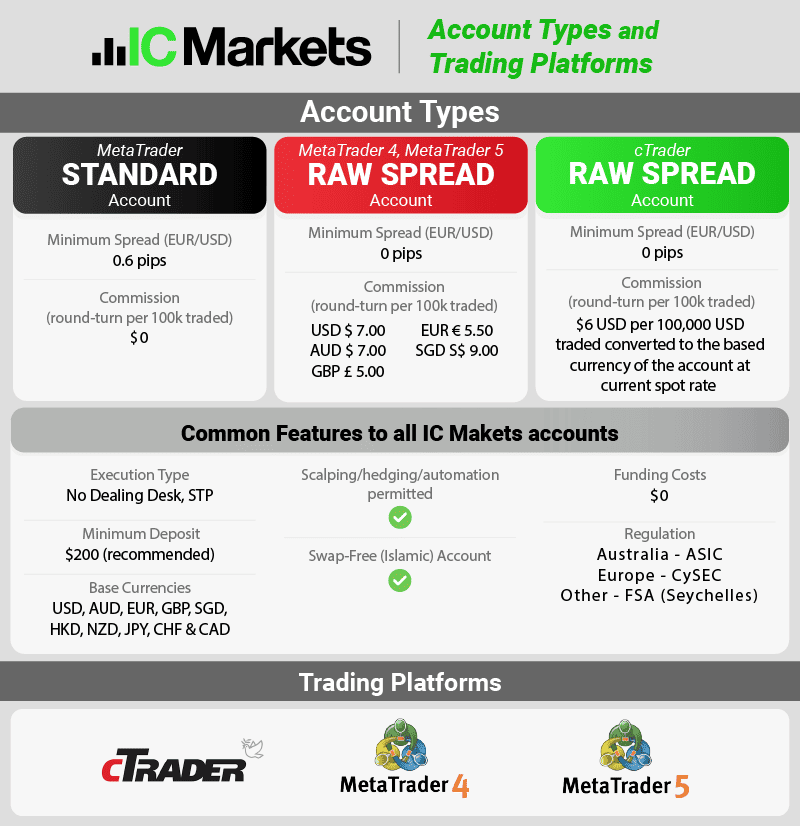
In my analysis of spreads, I ran a test and discovered that IC Markets offers impressively tight spreads. For EUR/USD currency pairs, I found that the broker offers 0.62 pips, and their major pair average spread is only 0.76 pips. This is significantly better than the industry average of 1.52 pips.
It is also worth mentioning that IC Markets has great VPS services powering MT4 and MT5 platforms while providing a proprietary platform.
Broker Details
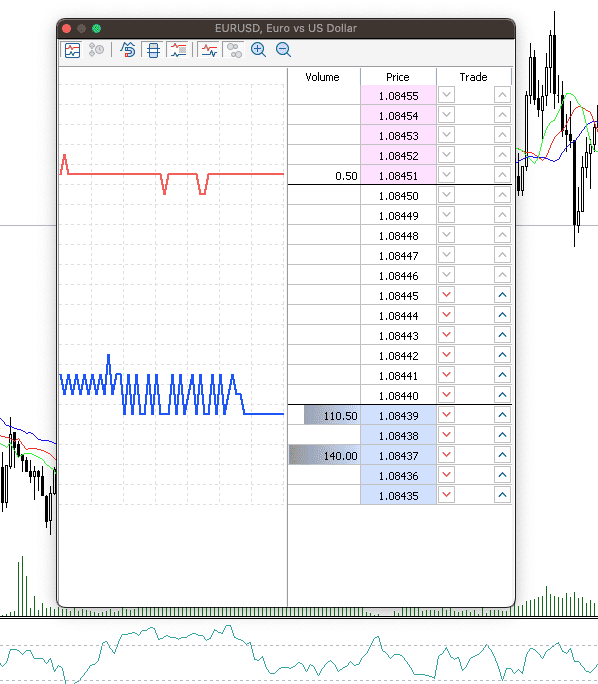
MetaTrader 5 on IC Markets improves on MetaTrader 4, extending the range of indicators to 38, 21 chart timeframes, and has new tools like Depth of Market.
I’m impressed by the Depth of Markets feature, which has been made possible by recent infrastructure upgrades. These upgrades have opened a direct connection to the liquidity provider which allows users to view the open order book.
I tested this tool and liked that I was able to get valuable insight into all the open and pending orders for each price levels. This way, you’ll get a complete idea of the demand’s direction, allowing you can make or adjust your trading ideas to reflect this.
In my opinion, this Depth of Markets feature will be a helpful additional indicator to support your technical analysis across various market conditions. It provides raw price action data, meaning that it shows actual demand, making it a powerful intel for making unfiltered trading decisions.
I Recommend IC Markets With MT5
IC Markets is my top choice when it comes to trading with MetaTrader 5. The broker offers a wide-selection of asset classes and 1,600+ share CFDs across several major exchanges, including the FTSE, ASX, NYSE, and NASDAQ.
If you like to trade different financial instruments in multiple markets, the broker offers 61+ forex pairs, 25+ indices, 26+ commodities, and 18+ crypto markets. In all of these markets, you can take MetaTrader 5s features to your advantage.
Our analyst, Ross Collins, conducted an analysis of EUR/USD spreads across various market sessions to determine the average spread that IC Markets offers. His findings revealed that the broker provides an average spread of 0.32 pips on RAW Trading account, significantly lower than the industry average of 0.49 pips.
RAW Spreads Tested By Ross Collins | |||||
|---|---|---|---|---|---|
 | 0.20 | 0.48 | 0.44 | 0.47 | 0.64 |
 | 0.19 | 0.19 | 0.41 | 0.36 | 0.61 |
 | 0.19 | 0.23 | 0.27 | 0.24 | 0.24 |
 | 0.46 | 0.85 | 0.96 | 1.04 | 1.01 |
 | 0.22 | 0.23 | 0.17 | 0.27 | 0.16 |
Avg. spreads are taken from each broker's website and updated monthly. Last update on 1 Aug 2026
As you can see, this placed the broker joint third, slightly behind City Index and Fusion Markets, which are well known for their low spreads.
Broker Screenshots
3. cTrader with FxPro - Great Robot Trading Software

Forex Panel Score
Average Spread
EUR/USD = 0.64 GBP/USD = 0.54 AUD/USD = 0.54
Trading Platforms
MT4, MT5, cTrader, TradingView, FxPro Trading Platform
Minimum Deposit
$0
Why I Recommend cTrader
cTrader is my top choice for robot trading software. It has allowed me to develop my robots (cBots) with C#, a standard programming language that automates any strategy. I am also quite impressed to find that the platform has extensive backtesting and optimisation tools, helpful if you want to improve your cBots without risking your funds.
FxPro is my recommended option for retail investors seeking brokers with robot trading software via cTrader Automate. cTrader comes with advanced charting and technical analysis packages, allowing you to conduct in-depth market analysis.
Based on my test of the Standard account, the EUR/USD currency pair showed an average spread of 1.44 pips and a fixed spread of 1.96 pips. Additionally, if you are starting out, FXPro does not require a minimum deposit to open an account.
Broker Details
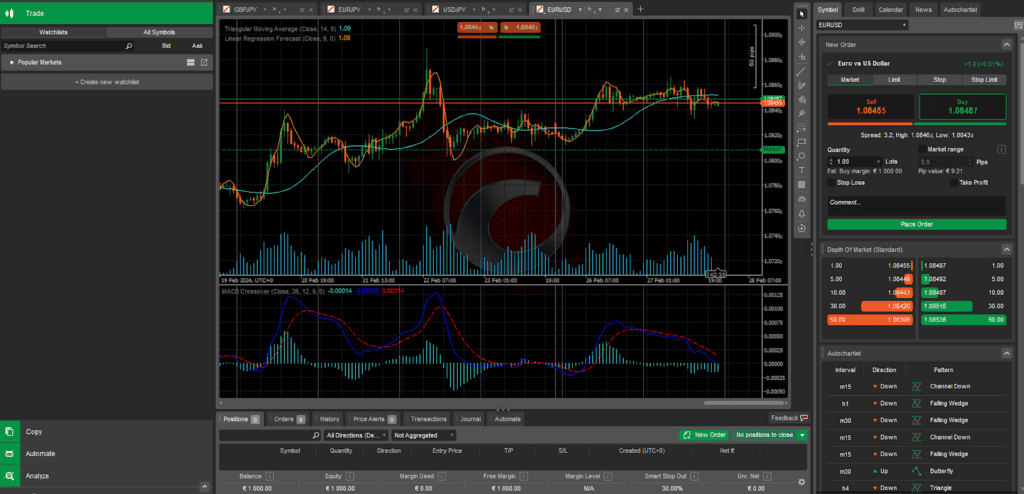
I like the cTrader platform and find it a cross between MetaTrader 5 and TradingView. It combines the automation features and depth of market tools of MetaTrader 5 with the excellent charting tools of TradingView.
After inspecting its nooks and cranny, I found that cTrader had 70+ technical indicators, 11 chart types, Depth of Market access, and tools that allow you to copy trade and automate your trades. Personally, I prefer having an extensive analysis tools, and this platform checked off many items on my list.
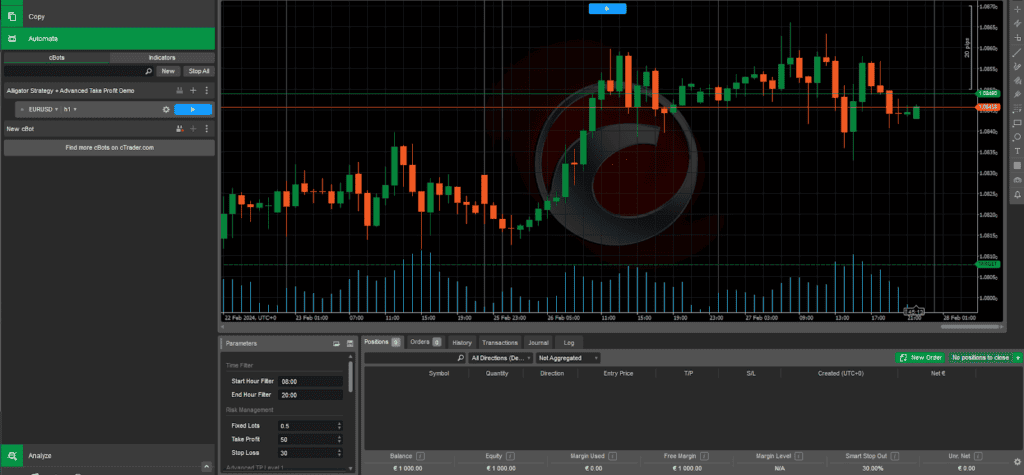
In testing the robot trading (cBot) feature, I downloaded a free cBot and installed it on the cTrader platform. Similar to installing new software, the cBot file handles everything and installs automatically. I found this to be easier than MetaTrader 4’s approach, and any other algorithmic trading platforms I tried in the past. Once installed, I simply clicked the blue play button, and it automatically opened a chart and started running. The process was quite straightforward.
Another point that stood out for me is connecting to the cTrader platform via a proxy. This means that trades are executed closer to the exchange, helping reduce the ping. This will be a significant advantage if you automate trades as it speeds up the platform’s execution.
FxPro Is A Good Choice For cTrader
From my testing, FxPro provided me with the best overall experience with cTrader. A key factor is that FxPro is an STP broker, allowing it to fully leverage the platform’s performance and tools, such as Depth of Market access.
I opened a FxPro cTrader account to test the spreads on the cTrader platform to see how affordable (or expensive) the rates are. To do this, I collected the average RAW spreads from the major pairs to generate an overall average, and this served as the yardstick on the cost of trading forex with the broker.
The spreads I gathered are:
| Pair | Avg. RAW Spread |
|---|---|
| EUR/USD | 0.32 |
| USD/JPY | 0.42 |
| GBP/USD | 0.37 |
| AUD/USD | 0.51 |
| USD/CAD | 0.74 |
| Overall Average | 0.47 |
I then compared this average with 40 brokers to see how they faired. Based on my findings, FxPro placed slightly above the industry average of 0.44 pips for the average spread on major pairs.
RAW Account Spread Comparison | |||||
|---|---|---|---|---|---|
 | 0.64 | 0.54 | 0.96 | 0.69 | 0.90 |
 | 0.00 | 0.20 | 0.10 | 0.10 | 0.20 |
| 0.01 | 0.02 | 0.50 | 0.27 | 0.30 |
| 0.10 | 0.10 | 0.90 | 0.20 | 1.20 |
 | 0.12 | 0.12 | 0.56 | 0.37 | 0.61 |
 | 0.11 | 0.30 | 0.47 | 0.40 | 0.44 |
| 0.90 | 0.13 | 0.17 | 0.14 | 0.14 |
| 0.16 | 0.29 | 1.50 | 0.54 | 0.68 |
| 0.30 | 0.40 | 0.50 | 0.50 | 0.50 |
| 0.00 | 0.20 | 0.50 | 0.20 | 0.40 |
| 0.20 | 0.40 | 0.60 | 0.50 | 0.70 |
Avg. spreads are taken from each broker's website and updated monthly. Last update on 1 Aug 2026
When it comes to using trading robots, I think RAW accounts are best as they have tighter spreads and fixed commissions. Simply put, your trading costs will remain comparable even when the markets are more volatile around news announcements because you’ll be paying the same commission, no matter what.
Broker Screenshots
4. ProRealTime with IG Group - Good Charting And Automation Platform

Forex Panel Score
Average Spread
EUR/USD = 0.16 GBP/USD = 0.59 AUD/USD = 0.29
Trading Platforms
MT4, TradingView, IG Trading Platform, L2 Dealer
Minimum Deposit
$0
Why I Recommend ProRealTime
ProRealTime provides a decent setup wizard that you can follow to automate your trading strategy (including risk management rules) without knowing how to code.
IG Group’s advanced charting, real-time analysis, and auto trading made possible with ProRealTime have positioned them as one of my top picks for auto trading. ProRealTime provides reliable market data and diversified analytic tools for improved trading efficiency.
With a tight RAW spread of 0.16 pops for the EUR/USD currency pair and a major pair average spread of 1.38 pips, IG Group allows you to maximise profits and minimise losses.
Broker Details
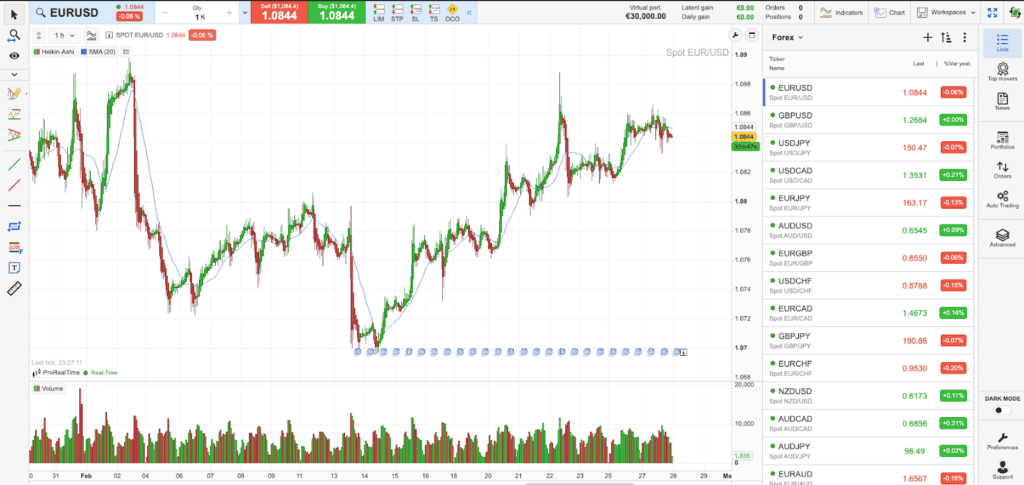
Clearly, ProRealTime isn’t as popular as MetaTrader 4 or TradingView, but in my experience, it packs a punch with features. While testing, I found that the platform comes with 53 technical indicators, 12 chart types including Heikin Ashi and Bar charts, and 20 timeframes ranging from tick charts to 1 year. Professional traders like myself will appreciate having such an extensive line-up.
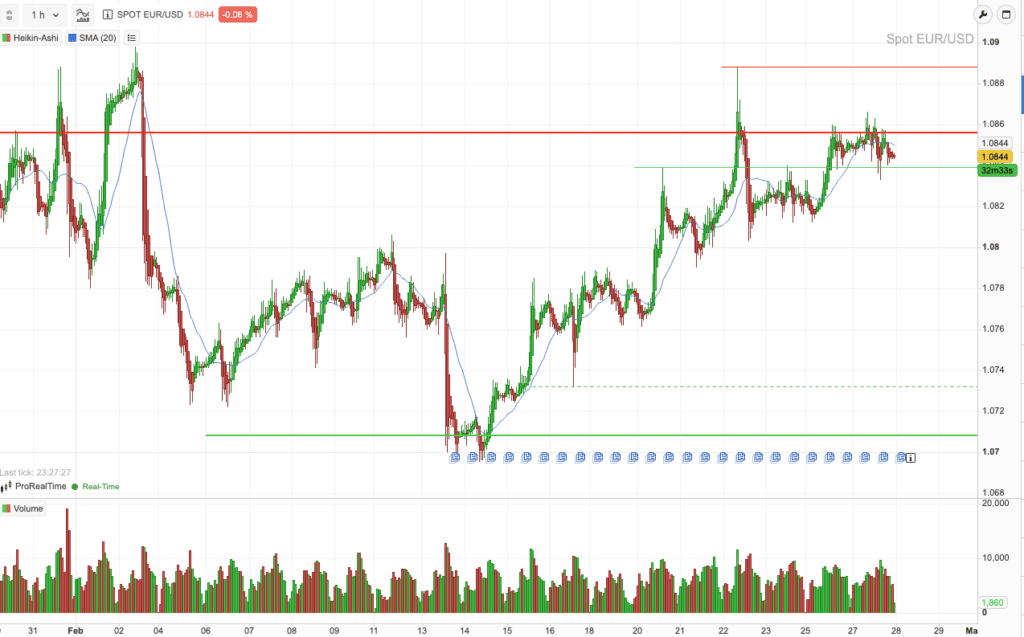
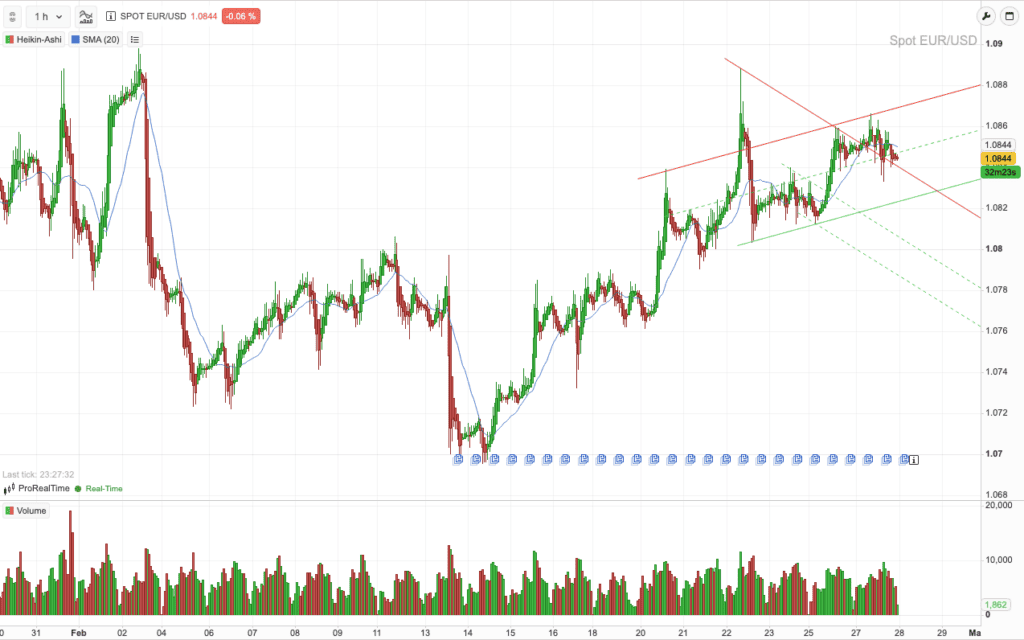
Another standout feature is the range of automation tools available. While exploring the platform, I discovered the ProRealTime Trend tools, which automatically generate support and resistance levels based on major price points and update in real-time. This tool can also automatically generate trend lines, allowing you to easily identify short and long-term trades with the click of a button. I find this making so much sense in a fast-moving and trend-following market like cryptocurrency trading.
IG Group Offers ProRealTime For Automation
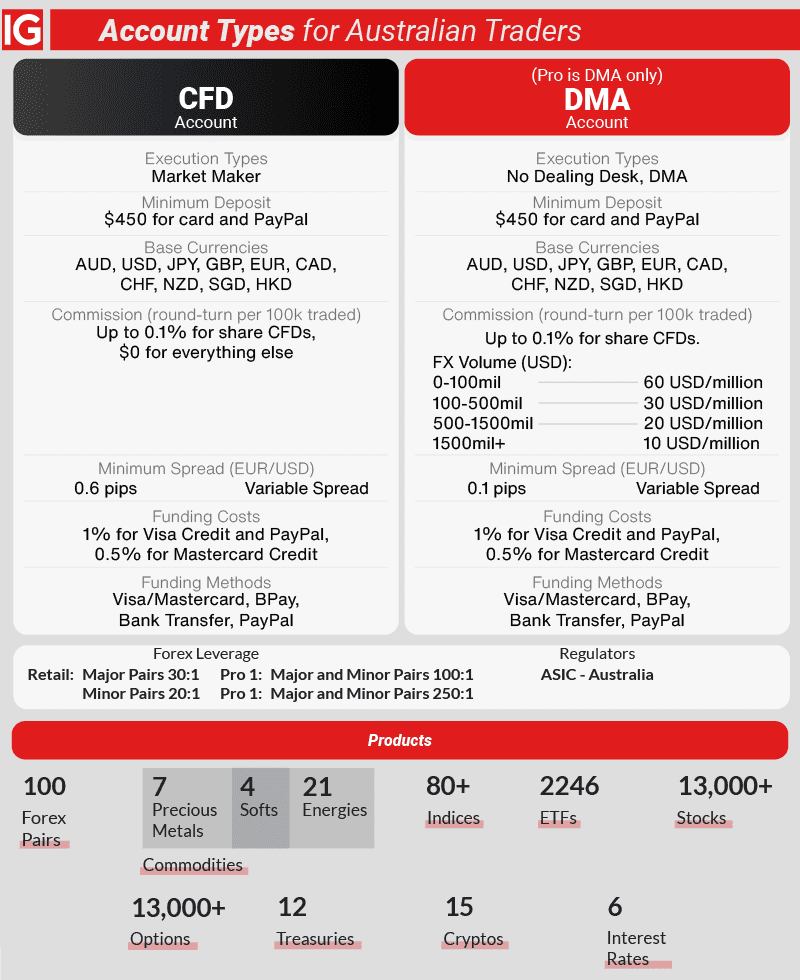
I am convinced that IG Group is a top choice for its extensive range of markets and low trading costs. While testing ProRealTime, I opened an account with the broker and explored the range of markets provided. It’s extensive, covering 100 forex pairs, 12,000+ shares, 130 indices, 41 commodities, 6,000+ ETFs, and 7,000+ options markets. I appreciate that you can access all CFD markets through ProRealTime, while other platforms IG Group offers, like MetaTrader 4, cannot access shares and most of the ETF markets.
However, one downside of ProRealTime is that you cannot access the options markets as it is only available on the IG Trading Platform.
I then opened a Standard account, since IG Group does not offer RAW spreads, which meant my account was commission-free. While trading, I recorded an average spread of 1.13 pips on EUR/USD, lower than the industry average of 1.24.
IG Group is one of the only brokers to provide the ProRealTime platform for free. If you do not want to sign up with them but want access to ProRealTime, it is still possible to subscribe to the platform directly for £24.00 per month.
Broker Screenshots
5. eToro - Best Social And Copy Trading Platform

Forex Panel Score
Average Spread
EUR/USD = 1 GBP/USD = 2 AUD/USD = 1
Trading Platforms
eToro
Minimum Deposit
$50
Why I Recommend eToro
eToro is my foremost recommendation for experienced and beginner traders looking for brokers with great copy trading features. In my opinion, having a great copy trading tool provides an easy entry point for those new to trading while enabling experienced traders to gain new strategies. There is also an excellent opportunity to diversify portfolios by observing other traders.
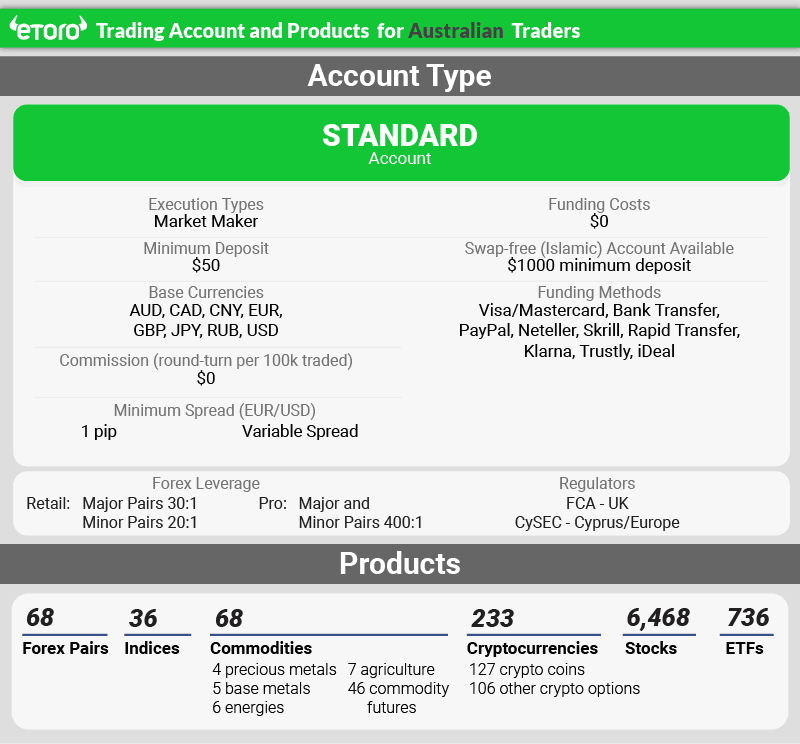
Using eToro means you can trade with decent standard spreads, that average 1 pip for the EUR/USD currency pairs. My tests found that the broker achieved an average spread of 1.30 pips for major pairs which is superior to the overall industry average of 1.52 pips.
Broker Details
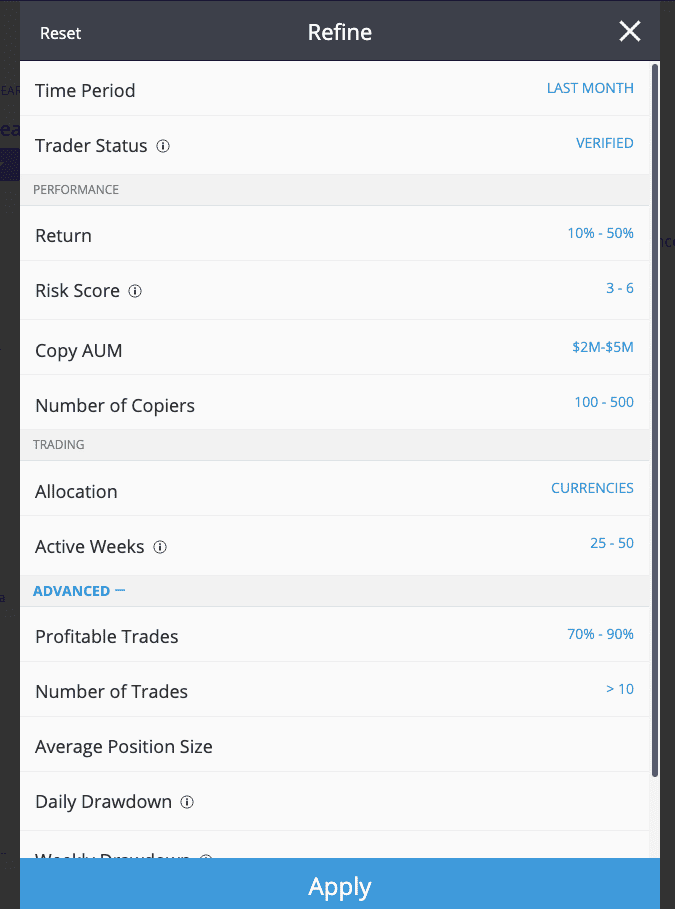
While exploring the CopyTrader platform, I found that it has a filter button that brings up a range of options to narrow down eToro’s 20,000,000 copy traders based on preferences.
Compared with other copy trading platforms like ZuluTrade, I like that eToro offers a more comprehensive filter for choosing traders. For example, you can choose traders based on:
- the markets they trade,
- how frequently they traded,
- what their success rate has been in the last 30 days,
- plus 11 other options
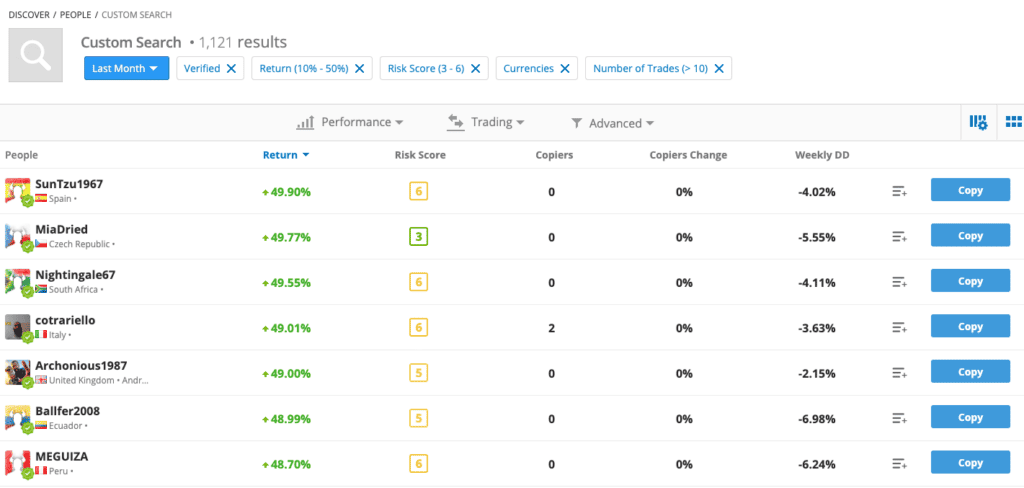
I selected my preferences based on my experience as a medium-to-high-risk investor seeking exposure in the forex markets. I traded ten times in the last month, which returned 1,121 potential traders. This allowed me to review each account before investing with a copy trader.
As part of my testing of the CopyTrader platform, I tested the spreads of eToro to see how expensive it is to copy trade. Like IG Group, eToro only offers spread accounts with no commission, so the spreads averaged one pip on EUR/USD in my experience, below the 1.24 industry average. I still find these spreads are competitive, considering eToro charges no commission.
Since the focus of using eToro is to copy trade, you may not have full control over what assets your copy trader chooses. So I thought it’s a positive thing that eToro didn’t charge commissions on assets like shares and ETFs, which other brokers like IC Markets charge. This helps keep trading costs simple and makes it easier to review your copy trader.
The broker has a solid selection of markets on its platform, offering 68 forex pairs, 6,468 stocks, 36 indices, 68 commodities, and 127 crypto markets. Personally, using eToro for stock trading is a smart choice, given the extensive choice of equities that can be traded with the broker.
Broker Screenshots
6. TradingView with BlackBull Markets - Best Charting And Indicators

Forex Panel Score
Average Spread
EUR/USD = 0.1 GBP/USD = 0.1 AUD/USD = 0.2
Trading Platforms
MT4, MT5, cTrader, TradingView, BlackBull Social, BlackBull Shares, BlackBull Trade
Minimum Deposit
$0
Why We Recommend TradingView
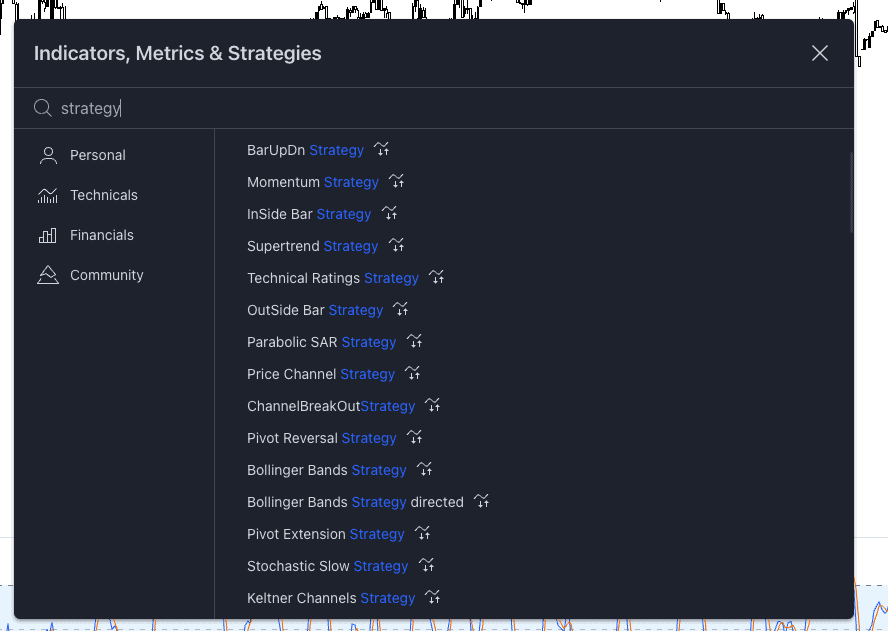
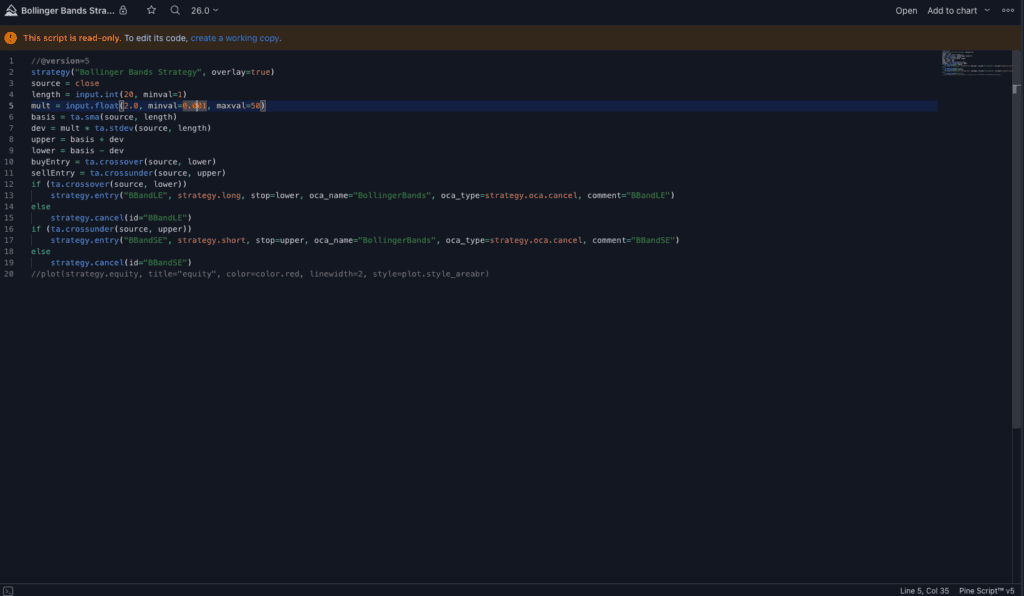
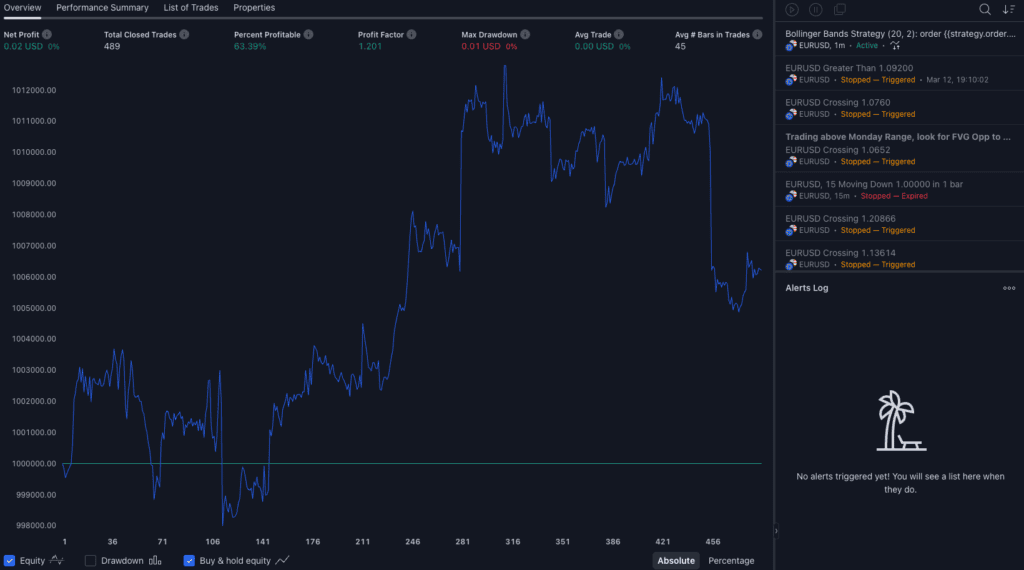
I highly rate TradingView for allowing users to develop an automated trading strategy which can run 24/7 without the computer turned on or any software running.
This is a game-changer compared to other platforms I’ve used, which typically require computers to be powered on to run automated strategies. I also find it convenient that my strategies sync across multiple devices, allowing me to monitor and adjust them from anywhere.
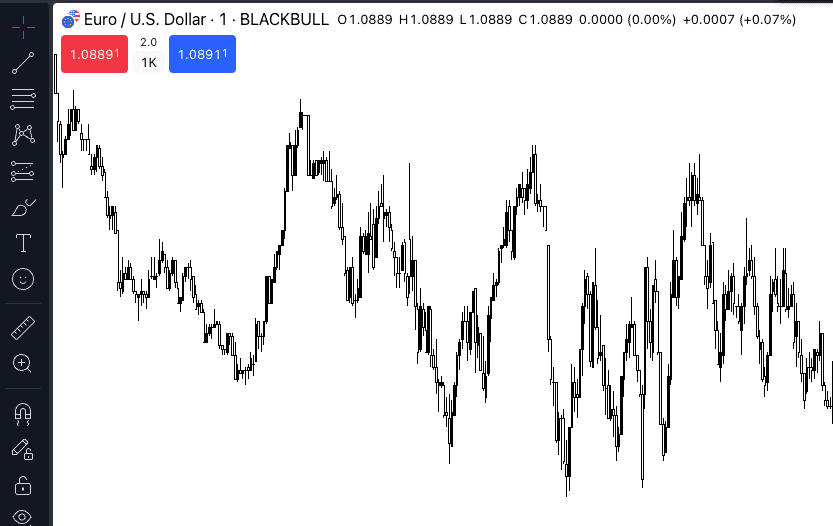
BlackBull Markets provides a solid foundation for automating your trades with TradingView, thanks to ranking number one in my execution speed tests, helping reduce slippage and improve trading costs.
The low trading costs are also echoed in RAW spreads, averaging just 0.23 pips on EUR/USD in my tests. Combining these low costs with fast execution speeds makes BlackBull an easy pick for automating trades with TradingView.
Broker Details
I highly rate TradingView for allowing users to develop an automated trading strategy which can run 24/7 without the computer turned on or any software running.
This is a game-changer compared to other platforms I’ve used, which typically require computers to be powered on to run automated strategies. I also find it convenient that my strategies sync across multiple devices, allowing me to monitor and adjust them from anywhere.
BlackBull Markets provides a solid foundation for automating your trades with TradingView, thanks to ranking number one in my execution speed tests, helping reduce slippage and improve trading costs.
The low trading costs are also echoed in RAW spreads, averaging just 0.23 pips on EUR/USD in my tests. Combining these low costs with fast execution speeds makes BlackBull an easy pick for automating trades with TradingView.
| Broker | Overall Speed Ranking | Limit Order Rank | Limit Order Speed (ms) | Market Order Rank | Market Order Speed (ms) |
|---|---|---|---|---|---|
| Blackbull Markets | 1 | 1 | 72 | 5 | 90 |
| Fusion Markets | 2 | 3 | 79 | 1 | 77 |
| Pepperstone | 3 | 2 | 77 | 10 | 100 |
| OANDA | 4 | 5 | 86 | 2 | 84 |
| Octa | 5 | 4 | 81 | 6 | 91 |
| Exness | 6 | 10 | 92 | 3 | 88 |
| Blueberry Markets | 7 | 6 | 88 | 7 | 94 |
| FOREX.com | 8 | 13 | 98 | 4 | 88 |
| Global Prime | 9 | 7 | 88 | 9 | 98 |
| Tickmill | 10 | 9 | 91 | 11 | 112 |
| TMGM | 11 | 11 | 94 | 13 | 129 |
| City Index | 12 | 12 | 95 | 14 | 131 |
| Trading.com | 13 | 14 | 98 | 15 | 138 |
| FBS | 14 | 17 | 135 | 12 | 118 |
| Axi | 15 | 8 | 90 | 25 | 164 |
| Eightcap | 16 | 19 | 143 | 17 | 139 |
| IC Markets | 17 | 16 | 134 | 22 | 153 |
On spreads, I found BlackBull Markets competitive, averaging 0.23 pips on the EUR/USD pair, closely matching the industry average of 0.22 pips. Admittedly, these spreads are not the tightest in the market, but I still find them reasonable, considering how fast you can execute your trades – a slight premium worth paying.
Additionally, I appreciate BlackBull Markets’ offer of free premium TradingView access for live account holders who place at least ten lot trades with them over a month. This is an excellent bonus, as it allows to increase the number of price alerts available so you can potentially capture more trading opportunities.
Broker Screenshots
What Are The Types of Automated Trading Platforms?
There are two main types of automated trading platforms: copy trading platforms and trading bots. I have explained each in more detail below.
Copy Trading Platforms
The Best Copy Trading Platforms allow you to automatically copy another trader’s trades in real-time using individually customised account settings and platform tools. People who make their trades available to be copied in real time are commonly known as signal providers.
The most common copy trading platforms include MetaTrader’s Trading Signals (which has a Signals market you can search for) and certain broker’s proprietary platforms. A good example is eToro’s excellent proprietary platform, which focuses on copy trading.
Trading Bots
Similar to copy trading, trading bots (or trading robots) are programs trained using algorithms that aid them in performing their designated functions. They are pre-programmed to collect market data, analyse trading signals, compute probable risks, and execute a trade based on your trading strategy.
Common trading bots you can use include MetaTrader’s Expert Advisors (EAs) and cBots on cTrader. Some third-party platforms, such as Capitalise.ai, offer trading bots, which allow you to automate your trading based on a pre-defined trading strategy.
Are Expert Advisors Automated Trading Software?
Yes, Expert Advisors are automated trading software which runs on the MT4 platform. Using algorithms to monitor and trade financial markets, EAs find opportunities according to the parameters you set, then either notify you or open a position automatically.
Expert Advisors are developed in the MetaQuotes programming language 4 (MQL4) and are created with the built-in “MetaEditor”, which then becomes available via MT4’s client terminal.
To access an Expert Advisor, you can choose one from the MetaTrader library or launch it directly by imposing it into the chart.
Which Are The Best MT4 Brokers To Use Expert Advisors To Automate Software?
Pepperstone is the best MT4 broker to use Expert Advisors to automate software based on my testing. I like Pepperstone’s 28 Smart Trader tools as useful market and technical analysis for your MT4 automated trading.
Pepperstone also offers fast execution speeds using MT4 (72ms for limit orders and 100ms for market orders) and enhanced automation tools like Myfxbook and Duplitrade.
Other MT4 brokers for EA automation I like include BlackBull Markets (best MT4 trading conditions), and IC Markets (lowest MT4 trading costs).
Benefits of Using an Automated Trading Platform
| Pros and Cons of Automated Trading Platforms | |
|---|---|
| PROS | CONS |
| Minimise Emotions | Connectivity Failures |
| Discipline | Still Requires Monitoring |
| Back-Test Strategies | Over-Optimisation |
| Achieve Consistency | No Guarantee of Success |
| Trade Faster | Not a Complete Substitute For Manual Trading |
| Diversify Trading | |
There are many benefits to using an automated platform but also disadvantages (highlighted in the table above).
I’ve laid out the six main benefits of automated trading below:
Accessibility
With the advances in online trading technology, the availability of automated trading platforms has never been easier or more accessible.
This has been bolstered by the growing popularity of social trading, with a surge in the number of automatic trading software available.
Removes Emotions
Using an automated trading platform removes emotions from your trading, which will help sharpen your decision-making while trading.
These platforms achieve this by strictly adhering to the strict parameters you set before activating the algo. This allows you to set and forget, letting the algo do the trading for you (with careful monitoring of course).
Discipline
Like any form of trading, algorithmic trading requires discipline. Using automated trading systems makes all the trading automatic, allowing you to stick to the plan you have laid out carefully.
This way, such platforms help you maintain discipline and achieve consistency in your trading, giving you a greater chance at success.
Increases Diversification
Using auto trading platforms helps you diversify your trading portfolio with the ability to trade a wide range of assets. This allows you to hedge your positions, spread your risk, and make money in different types of markets.
The best-automated trading platforms can also allow you to diversify your trading using different trading strategies, including arbitration, trend following, mean reversion, and momentum trading.
Backtesting
Before going live, you can backtest your automated trading strategy by implementing your rules on historical data. That way, through backtesting, you can fine-tune your trading idea before risking money in live trading and reduce the possibility of losses.
Faster Trading
While obvious, using an automated trading platform helps you trade faster. This is because once you set your trading parameters, you just let the algorithm do its thing. Automated trading strategies are designed to run smoothly and without much manual interference from you.
Automation FAQs
Which are the best forex brokers in Australia for MT4?
Pepperstone is my best MT4 forex broker in Australia due to its fast execution speeds, Smart Trader Tools to enhance the MT4 platform and diverse range of trading platforms, including third-party tools such as Myfxbook and Duplitrade for copy trading.
What are the best forex brokers in Australia for MT5?
IC Markets is the broker I picked as the best Australian forex broker for MT5. I like IC Markets for its low trading costs (for both RAW and Standard accounts), wide variety of trading products and easy account opening process.
Other MT5 brokers I like include Pepperstone (fast execution speeds), BlackBull Markets (margin trading) and Fusion Markets (lowest commission costs).
What are the best forex brokers in Australia for cTrader?
IC Markets is my pick for the best cTrader forex broker due to having the lowest trading costs based on my testing and a diverse range of products to trade.
Otherwise, I recommend GO Markets for beginners due to offering award-winning support (from Investment Trends), given how complex cTrader is as a trading platform.
Which are the best TradingView Brokers In Australia?
Once again, Pepperstone is the best TradingView broker in Australia. Providing free access to the best charting platform on the market, Pepperstone also offers fast execution, straightforward account setup, and a diverse range of markets to trade using TradingView.
I also like BlackBull Markets (for high leverage and fast execution), City Index (lowest spreads using TradingView) and OANDA (best range of Forex pairs).
Are automation robots good for day trading?
Yes, automation robots are suitable for day trading as they are much better at operating several tasks at the same time. Trading robots can implement trading processes, make trading decisions, execute stop-loss orders and take profits, all at the same time.
In addition, they can monitor the changes in the stock market more efficiently than a human can.
Are trading BOTs legal?
Yes, trading bots are legal. While some people may have objections to how automated trading impacts the markets, no rules or laws keep you from using trading bots as a retail trader.
Which automated trading software is the best?
I believe MT4’s Expert Advisors are the best-automated trading software out there. I like Expert Advisors because they revolutionised algorithmic trading when they were released by MT4 in 2005 and are highly sophisticated trading robots.
Particularly effective at trading cryptocurrencies, the best automated crypto trading platforms include eToro (copy trading) and IC Markets (social trading with ZuluTrade).
What is the best forex trading platform for beginners?
OANDA offers the Best Brokers for Beginners. I like the online broker because OANDA is highly trusted (multiple tier-1 regulators), offers user-friendly platforms (MT4 and OANDA TradeFx), and provides guaranteed stop-loss orders (GSLOs) for risk management.
What is the best AI-automated trading platform?
The best AI-automated trading platforms in Australia include MT4, MT5 and Capitalise.ai. Pepperstone is the best MT4 broker (using EAs), and IC Markets is the top MT5 broker (lowest trading costs).
What are the regulations in Australia regarding automated trading?
In Australia, automated trading is legal and regulated by the Australia Securities and Investments Commission (ASIC). ASIC oversees Forex brokerages that offer automated trading and ensures they comply with their guidelines. The ASIC Regulated Brokers in Australia are Pepperstone, IC Markets and GO Markets.
Automated Trading Platforms in Australia
Australian traders have a range of options regarding automated trading platforms and software. If you are new to forex, social or copy trading software provides an easy entry, while experienced traders can develop algorithmic strategies using trading robots. All retail traders are limited to the High Leverage Forex Brokers set by ASIC of 30:1 for major currency pairs.
Below, I review the top automated trading platforms available to Australian traders, with recommendations for the best brokers offering each solution and the most compatible trading styles.
Algorithmic vs Social-Copy Trading Software
Algorithmic Trading
- Expert Advisors (Forex) – MT4
- Expert Advisors (CFDs) – MT5
- cBots – cTrader
- ProOrder – ProRealTime
Social Trading
- eToro Social-Copy Trading
- MetaTrader Signals
Online Trading Robots
To fully automate your forex and CFD trading, you must develop trading robots (aka algorithmic trading strategies) to run on a trading platform like MetaTrader 4, MetaTrader 5 or cTrader. In the MetaTrader community, trading robots are referred to as Expert Advisors (EAs), while on cTrader, they are cBots.
Algorithmic trading strategies allow you to create programs that automatically monitor financial markets and enter and exit trades according to your pre-set parameters. Many experienced traders write their trading robots, while beginner traders may choose to download and purchase pre-designed Expert Advisors.
Social-Copy Trading
Social trading and copy trading are a variety of automation that enables you to follow and copy trading strategies developed by more experienced traders within the forex community. Rather than conducting your research and executing individual trades, you copy the trades of other, potentially more experienced investors. Different types of account mirroring software range from pure social trading platforms and communities like eToro to copy trading tools like MetaTrader Signals.
Benefits of Automation:
- Automation removes the human element from trading, meaning you are less likely to be swayed by psychological and emotional factors when trading.
- Automated software has a greater ability than an individual trader to monitor multiple financial markets at a time.
- Automated trading software can react more quickly than humans.
- Traders can save time and effort by forgoing lengthy technical analysis and manual trade execution.
Trading Forex in Australia
Trading forex in Australia has unique but not insurmountable challenges. While the Australian Securities and Investment Commission (ASIC) provides ample regulatory protection, time differences and geographic remoteness can make following the markets difficult – another reason to explore automated trading strategies.
Below, I explain why forex trading remains a popular retail investment activity in Australia and how to make the country’s unusual characteristics work for you in the markets.
Why Forex Is So Popular For Australian Investors
Australian traders seeking to capture profits from online trading currencies in foreign exchange currency markets (forex) face the issue that peak currency market activity times are out of sync with Australian time zones. Whilst the Forex market trades 24 hours per day for 5-1/2 days per week, there are many hours when price activity is quiet because of a lack of trader participation.
Four predominant forex sessions throughout one trading day are each based on the time in a major financial hub. Those sessions and locations are Sydney, Tokyo, London and New York, each overlapping to a certain degree. By far, the most critical session in which to take part is the tail end of the London Market and the beginning of the New York market. The four-hour period when those two sessions overlap is when the vast majority of trading activity, even related to the Australian and New Zealand dollars, occurs regarding currency pair price movements.
For someone living in the Australian Eastern Standard Time (AEST) zone, those prime hours when the London and New York Forex sessions overlap are 11:00 PM to 3 AM. Since you would prefer to sleep during those hours, choosing the best trading platform for Australian traders requires various order types and algorithmic trading functions.
Taking Advantage of Forex Orders Based on AEST
You do not have to forego sleep to participate in the forex markets. Instead, you can use particular order types to set up your trades in advance, go to bed, get yourself a good night’s sleep, and then have a look in the morning when you get up to see how your online trading strategies panned out.
Strange as it may sound, trading in this fashion is less stressful because price analysis, trade entries, exits and maximum acceptable risk are outside times of peak price activity, meaning your emotions will not get the better of you. A good trading platform for Australian traders will take the effect of time zones into account and offer tools to compensate for this.
Using “Limit” and “Stop” orders on your forex trading platform, as well as ”Stop-Loss” orders if available, can help you plan and automate your trades. You will be much more objective without watching trades go in your favour or against you, tick by excruciating tick. Likewise, you can determine logical entry and exit points and control your risk exposure. For new traders, this discovery is often a welcome revelation. For those with some experience, it is a solid reality.
Brokerage Fees When Online Trading
The best trading platform in Australia option should also factor in brokerage fees. There are two main brokerage fees:
- Spreads – the difference between bid-ask prices.
- Commission – the fee you pay the broker as compensation for their services.
The spread is more applicable to forex trading, with the difference between the buy and sell (bid/ask) price being the compensation to forex brokers facilitating trading. ECN-like forex trading accounts charge a round trip, flat rate commission fee, where you pay a fixed commission per trade, or more often, by the quantity traded. Commissions are more straightforward than spreads to calculate brokerage fees, so experienced traders prefer these online trading accounts.
Share Trading Options With These Platforms
For Australian investors searching for an online share trading platform, IG Markets and easyMarkets offer both forex and share trading on their primary platforms. Another retail brokerage that offers a forex and share trading hybrid is CMC Markets. Alternatively, many forex brokers, such as Pepperstone, offer CFD share trading on the MetaTrader 5 platform.


Ask an Expert
Is automated trading ultimately better than manual trading?
There is no simple answer to that, it depends on the quality of your algorithms but certainly automated trading does have the capability to monitoring more markets than possible manually and does remove emotions from trading.
How well does algorithmic trading usually work out?
This depends on a number of factors, your chose parameters for the algorithm you use and how the market is behaving. There is no simple answer to this as it varies from person to person and case by case basis.
Does TradingView allow automated trading?
While Pine script is available with TradingView and capable of being used for Automation, at the time you cannot directly automate your trading in TradingView. If you wish to automate your trading, you will need to use 3rd party tools and integrate them with TradingView via API.
What type of trading does eToro specialize in?
Contracts for Differences (CFDs)