
Using forex trading robots to automate trades means entries and exits follow a written set of rules. Robots can increase efficiency when trading, remove emotions when making decisions, and help find trading opportunities. Trading robots can scan a wider range of markets such as Crypto (cryptocurrencies), forex (foreign exchange), CFD (Contract for Difference) faster than is humanly possible but for longer, 24/7 even.
By the end of my essential guide, you will learn:
- How to automate Forex trades
- How to implement a Forex robot
- The basics of Forex trading automation
What is automated forex trading?
Automated forex trading refers to the use of trading software and algorithms to analyse financial market data and execute trades based on predefined criteria. It can also respond instantly to market conditions, which matters in the fast-moving Forex market.
These auto trading systems are effective ‘trading robots’ that can analyse the market, generate signals, and monitor multiple currency pairs across various timeframes.
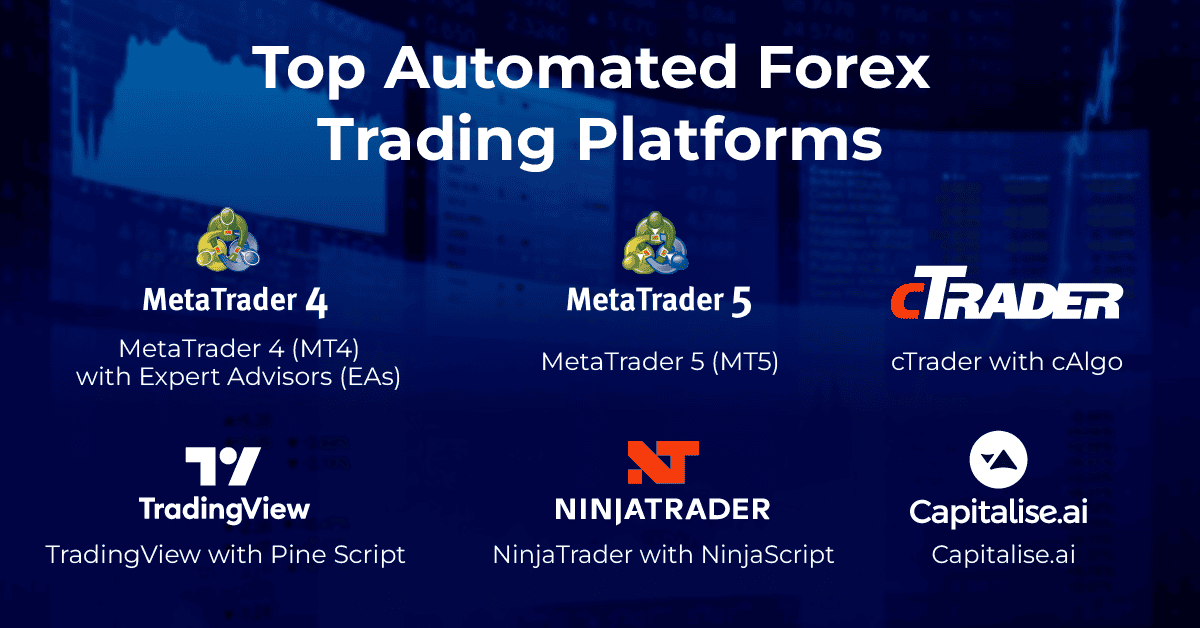
Popular automated trading platforms include MetaTrader 4 (MT4) and MetaTrader 5 (MT5), which run Expert Advisors (EAs) inside the terminal, cTrader with cTrader Algo, whose cBots can run locally or in the cloud, NinjaTrader with NinjaScript, and Capitalise.ai. TradingView with Pine Script is a different case: TradingView’s documentation states that Pine Script strategy trading is limited to backtesting, so live automation on that route needs an external option, such as webhook alerts sent to a receiver whose order handling still has to be verified.

Why do you need an automated trading strategy?
Automated strategies can improve trading results. Advanced trading platforms provide greater benefits than ever for all retail traders, even experienced traders.
From my perspective, they allow you to develop and manage trading programs that were once exclusive to large financial institutions. Here are some key advantages of implementing an automated strategy:
- Trade 24/5: Trading bots work non-stop, catching all market moves.
- Remove emotions: No fear or greed in trading decisions.
- Stick to plans exactly. They don’t get distracted, confused, or hesitate like humans can.

Key Components of Automated Forex Trading
Effective automated trading systems rely on several critical components:
1. Trading Platform
- Examples: MetaTrader 4 (MT4), MetaTrader 5 (MT5)
- Key feature: Must support automation
2. Expert Advisors (EAs) or Trading Robots
- Purpose: Execute an automated trading strategy
3. Trading Algorithm
- Function: Core of automated trading
- Basis: Can use technical indicators, price action, or machine learning models
4. Risk Management Strategy
- Importance: Protects capital and manages exposure
- Tools: Trailing stops, take-profit levels, position sizing
5. Backtesting Software
- Purpose: Test algorithms on historical data
6. VPS (Virtual Private Server)
- Benefit: Supports 24/7 operation as a runtime capability, not a guarantee of uninterrupted uptime
Why Use Algorithmic Trading Strategies
From my viewpoint, an automated system is only as good as its algorithmic strategy, because the software executes the rules it is given and nothing more.
Algorithmic trading, or “algo trading,” refers to using automated computer programs for trade execution based on predefined rules or algorithms.
Algo trading tools are ideal for executing a high volume of trades and capitalising on short-term market opportunities. While it requires technical skills and significant computing power, it offers precision and speed that many forex traders find advantageous.
Things to Consider When Starting Algo Strategies
Any Forex trading strategy needs to consider the following six elements:
- Risk
- Leverage
- Time Frame And Market Conditions
- Trading Platform
- Goals
- Personal Time Available
Risk
Risk is the amount of money you put at risk in a trade compared to your total capital. You might profit or lose the amount of money that you are risking in a trade.
For example, If I put up $100 of my $1,000 trading account into a trade, I’m risking 10% of my total capital. Managing this risk is key to a successful trading strategy, helping protect your capital and avoid large losses.
Leverage
Leverage allows you to control multiples of your money for trade. Leverage uses the concept of borrowed funds, it increases both potential gains and losses. In some cases, you could owe more than your initial investment.
For example, A leverage of 1:100 on a trade of $1,000 means you have the control of $100,000 of buying power.
Time Frame And Market Conditions
Using charts and time frames helps identify market trends and uncover trading opportunities.
However, focusing too much on short-term charts can make you lose sight of broader market trends and key opportunities.
Effective trading requires analysing multiple time frames, like using daily charts for trends and 30-minute charts for momentum. Balancing different time frames shows both short-term changes and the overall market trend when making trades.
Trading Platform
Not all trading platforms support algorithmic trading, so ensure both the broker and platform are compatible.
MetaTrader 4 (MT4) is widely used and supports automation with Expert Advisors (EAs). It connects to servers in major data centres like Sydney, London, and New York. Other platforms include MetaTrader 5, cTrader and Capitalise.ai which has machine learning or AI capability.
Goals
Knowing what the goals are when trading can help determine what the trading strategy will be. You should define goals with specific targets and deadlines, like making $500 by May or completing 30 trades this month.
Once the goals are clearly defined, you can build and adjust trading algorithms to help achieve them.
Personal Time Available
Lastly, it’s important to consider the amount of time that can be dedicated to the project. If you work a full-time job, trying to manage a day trading system can be difficult if not impossible.
The time and effort it takes to program and evaluate an algorithm also needs to be considered. Anyone not proficient in the programming languages necessary to run the system will need to engage an outside programmer.
Five Types Of Trading Algorithms
To get started, here are five common strategies used to create Forex algorithms.
| Strategy Type | Description | Key Points |
|---|---|---|
| News-Based | Trades based on news and economic events. | Short trades; watch for slippage. |
| Trend-Based | Follows market trends using tools like moving averages. | Good for trends; be aware of reversals. |
| Mean Reversion | Buys low and sells high, expecting prices to return to average levels. | Risk of prices staying extreme; manage risk. |
| High-Frequency Trading | Makes many quick trades to profit from small price changes. | Requires significant capital; mainly for big firms. |
| Arbitrage | Exploits price differences between markets for profit. | Hard to find opportunities; not common for retail traders. |
Getting Started with Automated Forex Trading: Key Questions
Automated Forex trading is gaining popularity due to its numerous benefits. It uses bots to execute trades without human intervention. However, getting started requires careful planning.
- Which Forex pairs are best suited for automation?
- How much capital should you allocate to your automated system?
- Which Forex brokers offer reliable API access for automated trading?
- What time frames work best for your automated strategy?
- How will you manage risk in a 24-hour market?
Automated Forex Trading Software Purchase Checklist
Without knowledge of programming languages, purchasing a ready-made trading robot to automate trading might be worth considering. When buying automated forex trading software, keep these key points in mind:
- Currency Pairs: Ensure the software handles major currency pairs with high volumes and liquidity, such as USD/EUR, USD/CHF, USD/GBP, and USD/JPY.
- Trading strategies: Look for software that allows you to choose between different trading strategies, from scalping small gains to making larger trades.
- Customer Reviews: Read online reviews to get insights into the software’s performance and reliability.
- Pricing: Compare prices but focus on quality over cost.
- Support: Opt for software with strong technical and customer support.
Getting Started with DIY Automated Forex Trading
I would settle the runtime route first; the language, hosting, and checks follow from it.
Choose a Trading Platform
- Select a user-friendly platform that supports automated trading (e.g., MT4, MT5, cTrader).
- Check that the broker supports automated trading on the chosen platform.
- Check the route: an Expert Advisor trades inside the terminal; a webhook route needs an external receiver.
On MT5, automated trading is controlled at platform level and individually for each EA; a disabled platform permission stops an EA from trading even when its own setting allows it (MetaQuotes MT5 documentation).
cTrader cBots run locally, while the app remains open, or on a cloud instance that does not need the app open or online (Spotware cBot documentation). Cloud execution applies to cBots, varies by broker, includes demo runtime limits, can stop on an error, and synchronisation is not execution (Spotware cloud features documentation).
TradingView states that Pine Script strategy trading is limited to backtesting and native automated strategy trading with a brokerage account is not available (TradingView autotrading documentation). Webhook alerts send a message by HTTP POST to an external application’s URL, and delivery can fail (TradingView webhook documentation).
| Runtime route | Where it runs | What to check |
|---|---|---|
| MT4/MT5 Expert Advisor | In the client terminal | On MT5, platform and per-EA settings; the broker’s records for trades |
| cTrader local cBot | On the machine, while the app stays open | The cBot instance’s status in the app |
| cTrader cloud cBot | On a cloud instance, independent of the local device | The instance’s status for the account and bot |
| TradingView webhook route | Backtests in TradingView; alerts go to an external receiver | Webhook status as a delivery check; the broker’s records for acceptance or fill |
Develop Trading Rules and Code Your Strategy
- Create your strategy based on technical indicators and consider various timeframes and currency pairs, including major pairs like EUR/USD.
Backtest the Strategy
- This involves running the algorithm on historical data to evaluate its performance under different market conditions like win rate, profit factor, and maximum drawdown
In my view, a backtest shows historical performance, not live results.
Open a Demo Account and Implement Risk Management
- Practice with virtual money to ensure your automated trading strategy works as intended.
- Monitor performance, set appropriate stop-loss levels to limit potential losses, and make necessary adjustments before moving to a live account.
I would run the demo on the route planned for live; a demo checks the route, not profit or live reliability.
Deploy on a VPS and Monitor
- If your chosen route is a terminal-based MT4 or MT5 EA, set up a Virtual Private Server, or use MT5 virtual hosting, to support 24/7 operation as a runtime capability, not a guaranteed uptime.
- Continuous monitoring is essential to ensure the system operates as intended and to adapt to changing market conditions.
MetaQuotes’ MT5 virtual hosting migration moves the selected local environment to the hosted platform (MetaQuotes migration documentation). After an EA migration, the local platform’s automated trading is disabled, the hosted platform’s is allowed, and the hosted journal is the post-migration check. The hosted environment runs separately from the local terminal, so the local switch is not a universal stop for a migrated EA; these rules apply only to MetaQuotes’ MT5 virtual platform, not MT4 or an ordinary Windows VPS.
I would check the actual runtime before paying for hosting, because choosing hosting does not itself establish uninterrupted operation, executions, fills, or profits. I treat a delivered alert as sent, not filled; broker acceptance or an executed fill requires the broker’s own acknowledgement or execution record. My check is the environment’s logs and status checks: the hosted journal in MT5, the cloud instance status in cTrader, the Webhook status in TradingView. Our VPS methodology page covers provider conditions.
Best Practices for Automated Forex Trading
- Start Small: Begin with a small trading account size until you’re confident in the system.
- Diversify: Don’t rely on a single strategy or currency pair.
- Regular Monitoring: Even automated systems need human oversight to adapt to changing market conditions.
- Stay Informed: Keep up with market news and fundamental analysis that might affect your strategies.
- Continuous Learning: Stay updated on new trading technologies, algorithms, and automated forex trading software.
Avoiding Scams and Choosing Reputable Providers
Be cautious when purchasing automated trading systems or Expert Advisors:
- Research providers thoroughly
- Be wary of unrealistic promises or guaranteed returns
- Check for regulatory compliance and user reviews
- Test any purchased system on a demo account before live trading
Interesting scam case in automated trading tools
The iMarketsLive (IML) scandal in 2019 exposed a major automated Forex trading scam. IML promised unrealistic returns through expert algorithms but operated as an illegal pyramid scheme.
This case highlighted common red flags: guaranteed profits, lack of verifiable results, and misleading marketing tactics. It emphasised the need for due diligence when choosing automated trading systems.
Advantages and Disadvantages of Trading Automation
Automated forex trading lets traders use algorithms to make trades based on set rules, taking emotions out of the equation. While it has many benefits, it also comes with some challenges. Knowing the pros and cons is key to making smart choices.
Advantages:
- 24/5 Trading: Can operate even when you’re not actively monitoring the market.
- Emotion-Free Trading: Automated trading helps remove emotional biases, as trades are executed based on pre-set rules.
- Backtesting Capability: Allows strategies to be tested on historical data before live trading.
- Diversification: Can run multiple strategies across multiple currency pairs on a forex trading platform.
- Speed and Efficiency: Respond to market changes faster than manual trading, this real-time feature can lead to more opportunities and improved profit potential.
Disadvantages:
- Over-Optimisation: Risk of creating strategies that perform well in backtests but fail in live markets.
- Technical Issues: Dependent on internet connection and VPS uptime.
- Potential for Losses: If not properly configured, can lead to significant losses quickly.
My Thoughts on Automate Trading
Now that you know the basics, automated forex trading can help traders remove emotions and execute strategies consistently. However, success requires a strong grasp of both trading fundamentals and technical analysis.
While automation can improve your trading, it’s not a shortcut to guaranteed profits. Key factors like proper risk management, ongoing learning, and regular system updates are essential to keeping a strategy effective in the long run.
Related pages
About the author

Justin Grossbard is the Co-Founder and CEO of CompareForexBrokers, which he established with Noam Korbl in 2014. He has over 20 years of professional experience in online marketing and holds a Master's in Marketing from Monash University.
Our reviews are reader-supported. We may receive payment when you click a link to a partner site. Learn how we make money.