

Best Forex Demo Account
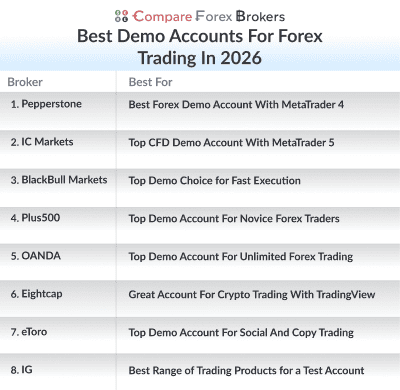
Opening a demo account with a Forex broker is recommended for new traders or those looking to test trading strategies with automation. I compared the top Forex demo accounts and paired them to different trader requirements.



Our broker reviews are reader supported and we may receive payment when you click on a partner site.
My top demo accounts based on the trading platform experience are:
- Pepperstone - Best Forex Demo Account With MetaTrader 4
- IC Markets - Great CFD Demo Account With MetaTrader 5
- BlackBull Markets - Good Demo Choice for Lightning Fast Execution
- Plus500 - Top Demo Account For With Risk Management
- OANDA - Top Demo Account For Unlimited Forex Trading
- Eightcap - Great Account to Test FX and Cryptocurrency Trading
- eToro - Top Demo Account For Social And Copy Trading
- IG Group - Best Range of Trading Products for a Test Account

| Broker Review | Our Rating | Regulation | Raw EUR/USD Spread | Raw GBP/USD Spread | Raw AUD/USD Spread | Commissions (USD Base) | Standard EUR/USD Spread | Standard GBP/USD Spread | Standard AUD/USD Spread | MetaTrader 4 | MetaTrader 5 | cTrader | Execution Speed | Minimum Deposit | Currency Pairs | Crypto CFDs | Retail Leverage | Prof. Leverage | Visit Broker |
|---|---|---|---|---|---|---|---|---|---|---|---|---|---|---|---|---|---|---|---|
 | 98 | ASIC, FCA, BaFin CySEC, DFSA | 0.10 | 0.20 | 0.10 | $3.50 | 1.10 | 1.20 | 1.10 |  | | | 77ms | $0 | 94 | 44 | 30:1 | 500:1 |  |
 | 90 | ASIC, FSA-S CySEC | 0.01 | 0.04 | 0.02 | $3.50 | 1.0 | 1.2 | 1.0 | | | | 134ms | $200 | 61 | 18 | 30:1 | 500:1 | |
 | 94 | FMA, FSA-S | 0.1 | 0.2 | 0.3 | $3.00 | 1.10 | 1.40 | 1.20 | | | | 72ms | $0 | 67 | 16 | 500:1 | 500:1 | |
 | 92 | MAS, CIRO, ASIC FCA, NFA/CFTC | - | 0.2 | 0.2 | - | 0.99 | 1.64 | 1.45 | |  | | - | $0 | 68 | 4 | | ||
 | 96 | FCA, ASIC, CySEC SCB, FSA-S, FSC-M | 0.0 | 0.1 | 0.2 | $3.50 | 1.0 | 1.0 | 1.2 | | | | 143ms | $100 | 56 | 130+ | 30:1 | 500:1 | |
 | 52 | ASIC, CySEC, FCA MAS, MFSA, ADGM GFSC, FSA-S | - | - | - | - | 1.0 | 2.0 | 1.0 | | | | 130ms | $200 (Australia), $50-$100 (EU) | 68 | 127 crypto coins + 106 other crypto options | 30:1 | 400:1 | |
 | 77 | ASIC, FCA, FMA | 0.16 | 0.59 | 0.29 | $6.00 | 1.13 | 1.66 | 1.01 | | | | 174ms | $0 | 97 | 30 | 30:1 | 200:1 | |
What is the best forex demo account?
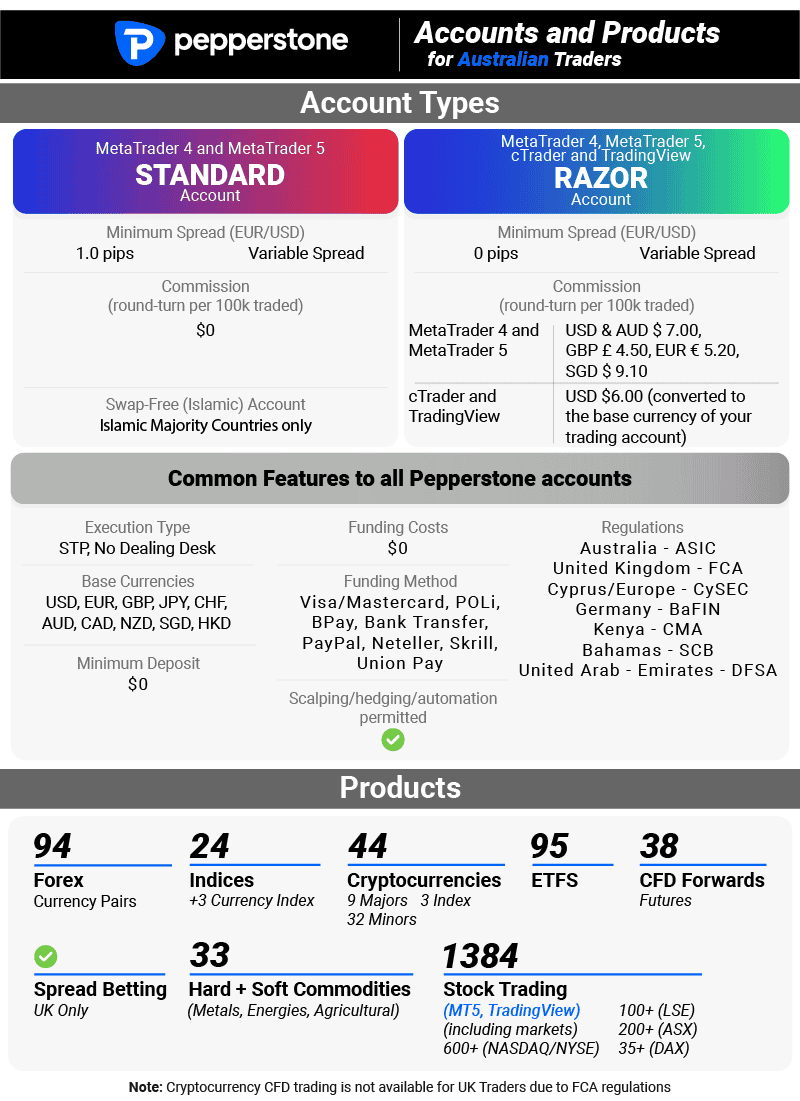
Pepperstone offers the best forex demo account, providing MT4 with 28 Smart Trader Tools and a 77ms execution speed. With RAW spreads from 0.10 pips across 94 currency pairs and no minimum deposit, Pepperstone delivers risk-free practice trading conditions. We also shortlisted other demo accounts based on their expiration periods and platform features.
1. Pepperstone - Best Forex Demo Account With MetaTrader 4

Forex Panel Score

Average Spread
EUR/USD = 0.1 GBP/USD = 0.2 AUD/USD = 0.1
Trading Platforms
MT4, MT5, cTrader, TradingView, Pepperstone Trading App
Minimum Deposit
$50
Why I Recommend Pepperstone
I liked how Pepperstone’s demo account simulates real trading conditions closely. I’ve traded on their live platform too, and the demo behaves the same way. The demo allows for easy replication of your go-to strategies and chart setups, offering a seamless transition to a live account when ready. If you’re after a demo account that truly prepares you for the live markets, Pepperstone should be your first port of call.
Pros & Cons
- Fastest Execution Times
- Unlimited virtual funds
- Four trading platforms
- Limited automation tools
- Demo account is limited to 30 days
- Educational resources are dated
Broker Details

Founded in Australia in 2010, Pepperstone is one of the leading MT4 brokers of all time. With this popularity, I decided to open a RAW spread demo account to explore Pepperstone’s features and services without spending on the experience.
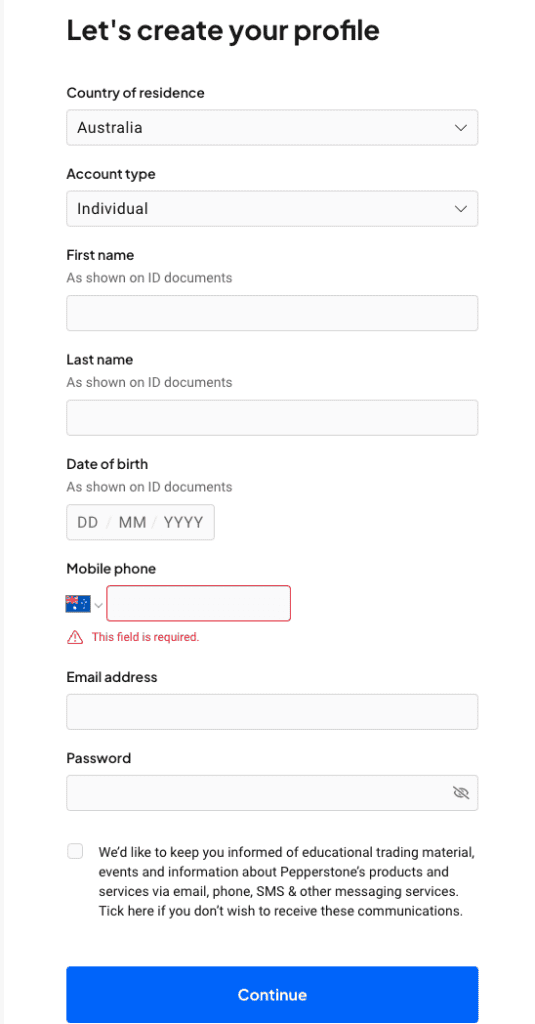
As a retail investor for many years, I can say that opening the demo account with this broker was easy; you need a few personal details like your name and email address. I liked that I didn’t need to key in elaborate financial details to set up the demo account or go through multiple questionnaires. This is my ultimate pet peeve with other brokers, making me do a lot of stuff before opening a demo account.
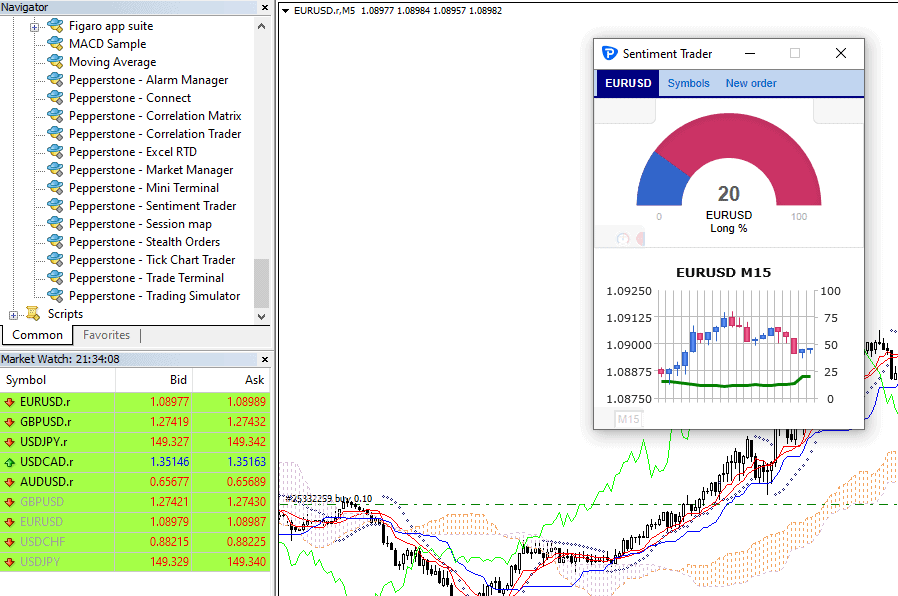
Pepperstone’s demo account allows you to access MetaTrader 4, an excellent trading platform with 30+ indicators built in and is fully customizable. With this extensive line-up, I think Pepperstone really is a solid choice for MetaTrader 4 users, providing third-party tools to enhance the platform with 28 smart tools to extend the functionality of MT4.
One feature that caught my attention is the sentiment indicator, which provides valuable insights into how Pepperstone’s clients are positioned in the markets. You can use the crowd’s wisdom to determine if you should take a long or short position.
While exploring the accounts, I ran a test to find if Pepperstone offers tight spreads. For the RAW account, I found that the actual spreads on major currency pairs were 0.0 pips. Intrigued by this finding, I did further investigations to see how frequently Pepperstone offers these zero-pip spreads.
My findings revealed that Pepperstone offered 0.0 pips on major pairs an impressive 100% of the time, meaning you would only pay the $3.50 commission per lot traded. With 0.0 pips on the broker’s majors 100% of the time, you can significantly reduce your trading costs, especially if you trade frequently on major currency pairs.
I also found that Pepperstone’s Standard account had wider spreads of 1.12 pips but no commission. Notably, both account types offer spreads lower than the industry averages for their respective categories.
Disclaimer: The results provided are based on my personal tests and findings and may not reflect the actual experience of all users. Trading conditions, including spreads and commissions, can vary and are subject to change.
| Zero Spread Testing | |
|---|---|
| Broker | Time At Minimum Spread |
| Pepperstone | 100% |
| City Index | 100% |
| Fusion Markets | 98.55% |
| ThinkMarkets | 97.93% |
| IC Markets | 97.83% |
| TMGM | 97.83% |
| FP Markets | 97.83% |
| Eightcap | 97.83% |
| Admirals | 95.60% |
| Blueberry Markets | 94.20% |
| GO Markets | 87.68% |
| BlackBull Markets | 86.96% |
Broker Screenshots
2. IC Markets - Top CFD Demo Account With MetaTrader 5

Forex Panel Score
Average Spread
EUR/USD = 0.01 GBP/USD = 0.04 AUD/USD = 0.02
Trading Platforms
MT4, MT5, cTrader, TradingView, IC Markets Mobile App
Minimum Deposit
$200
Why I Recommend IC Markets
I liked how IC Markets brings to the table features akin to Pepperstone, particularly when it comes to quick spreads and ECN-style execution and having extensive trading platforms. The broker has the four staple Forex trading platforms namely MetaTrader4, MetaTrader5, cTrader, and TradingView. The MT5 comes with standout features, more technical indicators and timeframe options, and a built-in economic calendar which you can take advantage of if you are a trend-following type of trader.
Another advantage that caught my eye is IC Markets’ excellent trading spreads, and if you are a trader looking to test strategies under real market conditions, this is the broker to go. However, I want to point that while IC Markets offers automation, social trading, and copy trading, these options are less extensive than those with Pepperstone. For this reason, I’ve ranked IC Markets second overall, but it’s still a strong option for those keen to test trades with great spreads on MT5.
Pros & Cons
- Fast execution speeds
- Unlimited virtual cash
- 64 forex pairs
- High minimum deposit
- Limited trading options
Broker Details
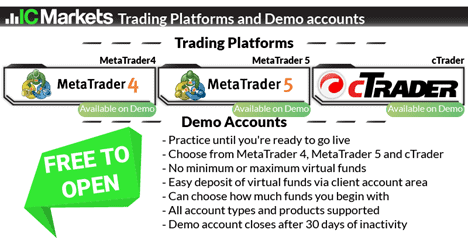
We found that IC Markets offers its demo account with MetaTrader 5, which doesn’t expire unless you fail to place a trade once every twenty days. We appreciate this feature as it allows you to practice and refine your strategies without the pressure of the account expiring.
During our tests, we explored the MetaTrader 5 platform provided by IC Markets. It offers a solid array of tools for technical analysis, including 38+ indicators, 15+ drawing tools, and three chart types.
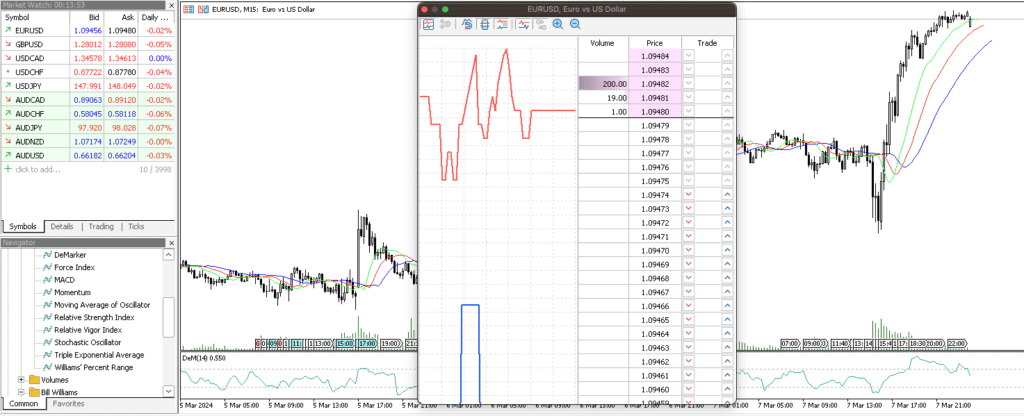
What stood out for us was the inclusion of the depth of market tool, letting you view the liquidity providers’ order books and see where other traders place their orders. We find this feature interesting because it provides a snapshot of where the money is currently concentrated and which side, buy or sell, is stronger.
While using the demo account, our analyst Ross to test IC Markets’ Standard account spreads for the major forex pairs and compare them to 14 other brokers we’ve tested. This allowed us to gauge the competitiveness of IC Markets’ pricing structure.
Ross found that IC Markets had the lowest average spread of 1.03 pips across its major pairs. We also found they offered the lowest EUR/USD and USD/JPY spreads, averaging 0.73 and 1.09 pips, respectively.
Remember, this is a commission-free account, so these spreads are exceptionally low compared to industry standards.
| EURUSD | SPREAD | USDJPY | SPREAD |
|---|---|---|---|
| IC Markets | 0.73 | IC Markets | 1.09 |
| Admiral Markets | 0.74 | CMC Markets | 1.17 |
| CMC Markets | 0.8 | TMGM | 1.26 |
| FXCM | 0.93 | FusionMarkets | 1.27 |
| TMGM | 1 | Admiral Markets | 1.32 |
| FusionMarkets | 1.01 | FXCM | 1.38 |
| OandA | 1.06 | FP Markets | 1.51 |
| City Index | 1.16 | Go Markets | 1.52 |
| EightCap | 1.16 | EightCap | 1.55 |
| FP Markets | 1.19 | OANDA | 1.55 |
| Pepperstone | 1.21 | Pepperstone | 1.55 |
| Blackbull Markets | 1.34 | Axi | 1.62 |
| Go Markets | 1.34 | City Index | 1.74 |
| Axi | 1.45 | FXPro | 1.87 |
| FXPro | 1.59 | Blackbull Markets | 2 |
Broker Screenshots
3. BlackBull Markets - Top Demo Choice for Lightning Fast Execution

Forex Panel Score
Average Spread
EUR/USD = 0.1 GBP/USD = 0.2 AUD/USD = 0.3
Trading Platforms
MT4, MT5, cTrader, TradingView, BlackBull Social, BlackBull Shares, BlakckBull Trade
Minimum Deposit
$0
Why I Recommend BlackBull Markets
I liked BlackBull Markets for its remarkable execution speeds, easily making it my top demo choice for traders after lightning-fast transactions. The platform provides considerable leverage, all backed by negative balance protection, giving you a solid safety net.
On top of that, there’s no minimum deposit for the broker’s ECN Standard account, which makes it easy to get started. While their ECN Prime has a $2,000 minimum deposit, which could be a hurdle for some, the speed and leverage may make it worthwhile.
Despite giving BlackBull Markets a final grade of 94 out of 100, I still consider this broker a compelling option, especially if you prioritize having fast execution speed in a demo account.
Pros & Cons
- Fast execution speeds
- Easy signup process
- Available demo platforms
- Demo expires quickly
- Leverage caps
- High minimum deposit
Broker Details
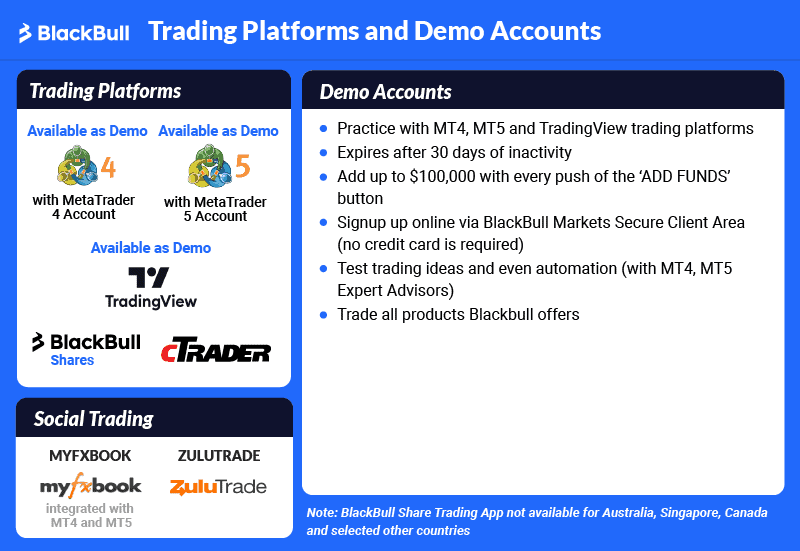
I appreciate having various trading platforms, including TradingView, MT4, MT5, and cTrader, with my broker. That variety lets me experiment with different interfaces and tools to find what fits my trading style, without risking real money.
BlackBull Markets, a broker founded in New Zealand in 2014 has an offering which I’ve never seen from any other broker I reviewed in the past. Depending on your chosen trading platform, the broker grants free subscription to TradingView Pro.
It’s not a secret that TradingView, in website or mobile app version, is everyone’s favorite charting partner for technical analysis and trading signals. With its 110+ indicators and drawing tools, you can do so much. From spotting trading opportunities to setting stop loss and take profit levels, everything is possible in this platform.
I looked into BlackBulls’ offer further and found that the cost of these upgrades is relatively low. I broke down the trading volume required for each tier of the TradingView plan below.
| TradingView Plan | Trading Volume |
|---|---|
| Essential Account | One lot traded per month |
| Plus Account | Five lots traded per month |
| Premium Account | Ten lots traded per month |
Our analyst, Ross Collins, conducted tests on the broker’s execution speeds and compared them across the industry. His findings were impressive, showing BlackBull Markets led the pack with a 72ms limit order speed and a 90ms market order speed, securing its position as the fastest broker.
| Broker | Overall | Limit Order Speed | Limit Order Rank | Market Order Speed | Market Order Rank |
|---|---|---|---|---|---|
| BlackBull Markets | 1 | 72 | 1 | 90 | 2 |
| Fusion Markets | 2 | 79 | 3 | 77 | 1 |
| Pepperstone | 3 | 77 | 2 | 100 | 5 |
| HugosWay | 4 | 104 | 7 | 94 | 3 |
| TMGM | 5 | 94 | 5 | 129 | 7 |
| FXCM | 6 | 108 | 8 | 123 | 6 |
| City Index | 6 | 95 | 6 | 131 | 8 |
| Axi | 8 | 90 | 4 | 164 | 16 |
| Eightcap | 9 | 143 | 12 | 139 | 10 |
I believe execution speed is crucial, particularly if you’re using fast-paced trading strategies or scalping, where milliseconds can mean the difference between profit and loss.
The excellent speed offered by BlackBull Markets can help you enter your trades faster while reducing the likelihood of slippage, saving you on trading costs over time.
4. Plus500 - Top Demo Account For With Risk Management

Forex Panel Score
Average Spread
EUR/USD = 0.8 GBP/USD = 1.6 AUD/USD = 1
Updated 27/03/2026
Trading Platforms
Plus500 Trading Platform
Minimum Deposit
$50
Plus500 disclaimer: CFD service. Your capital is at risk. 80% of retail CFD accounts lose money
Why I Recommend Plus500
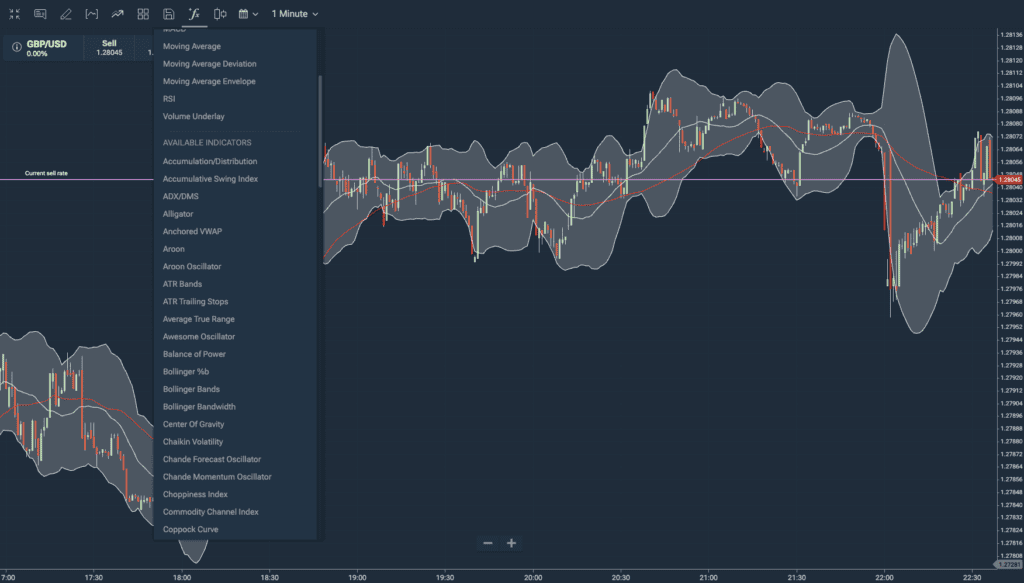
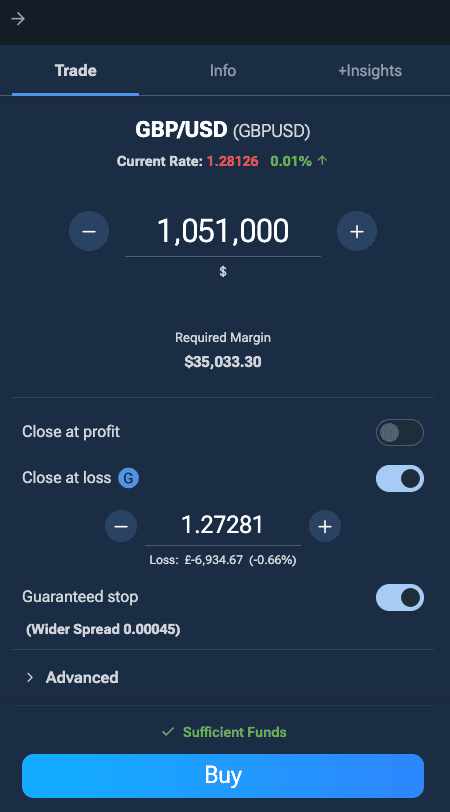
I appreciate Plus500’s emphasis on risk management, especially when using the demo account. The demo account will allow you to access the broker’s CFD education features and its Guaranteed Stop Loss Order (GSLO) which can be beneficial if you are new to trading.
Pros & Cons
- FREE unlimited account
- Risk management features
- Diverse range of CFDs
- Limited account types
- Restricted platform options
- Lacks advanced tools
Broker Details
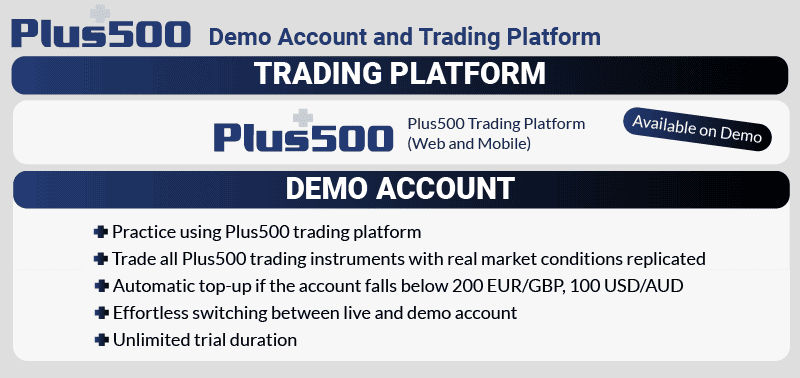
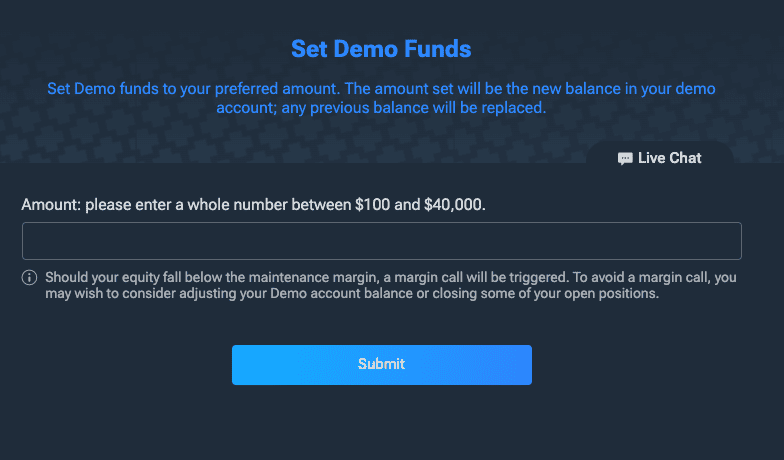
Plus500 is a broker founded in 2008 offering an unlimited time demo account with $40,000 in virtual funds. This is a notch higher compared to the average amount offered by the majority of brokers which is $10,000. I had greater flexibility to test different strategies and take larger positions which made the experience more realistic.
Using just the demo account, I also managed to explore the vast range of trading products; 68+ CFD forex pairs, 2000+ CFDs on shares, 57 indices, 25+ CFD crypto markets, and 30 CFD commodities. Having this extensive range provides you with good learning opportunities to refine your trading strategies in a risk-free environment.
I also want to mention that there is a feature where you can “deposit” new funds using the broker’s internal transfer system. This enhances the realism of the trading experience and serves as a practical tutorial on managing real funds.
One feature that sealed the deal for Plus500 as a top choice for novice forex traders is the guaranteed stop-loss orders, readily available on every order ticket that I opened. I found that this can protect your losses during volatile markets and avoid slippage which is crucial for risk management when you are still learning the ropes.
*Your capital is at risk ‘80% of retail CFD accounts lose money’
Broker Screenshots
5. OANDA - Top Demo Account For Unlimited Forex Trading

Forex Panel Score
Average Spread
EUR/USD = 0.99 GBP/USD = 1.64 AUD/USD = 1.45
Trading Platforms
MT4, TradingView, OANDA Trade (FxTrade)
Minimum Deposit
$0
Why I Recommend OANDA
I liked OANDA’s demo account for its comprehensive feature set, making it my top recommendation for those keen to experiment with automated trading. In my experience, OANDA’s platform has shown itself to be a strong contender for traders eager to dive into automated strategies. This makes the broker a highly viable option for those who want to simulate realistic trading conditions while testing out bots.
Pros & Cons
- Flexible leverage
- 70+ currency pairs
- No requotes or rejections
- Customer support is not 24/7
- No share CFDs
- Doesn’t offer ECN/STP
Broker Details
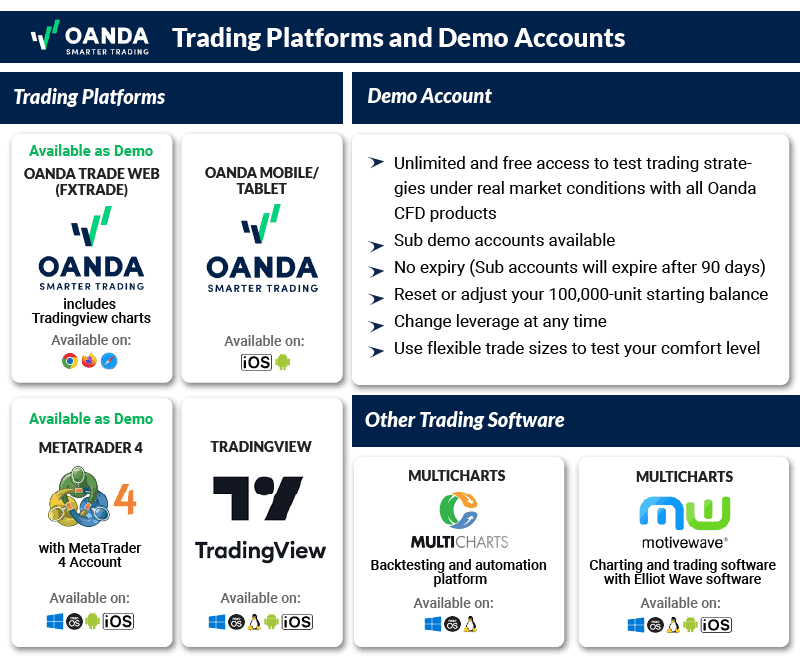
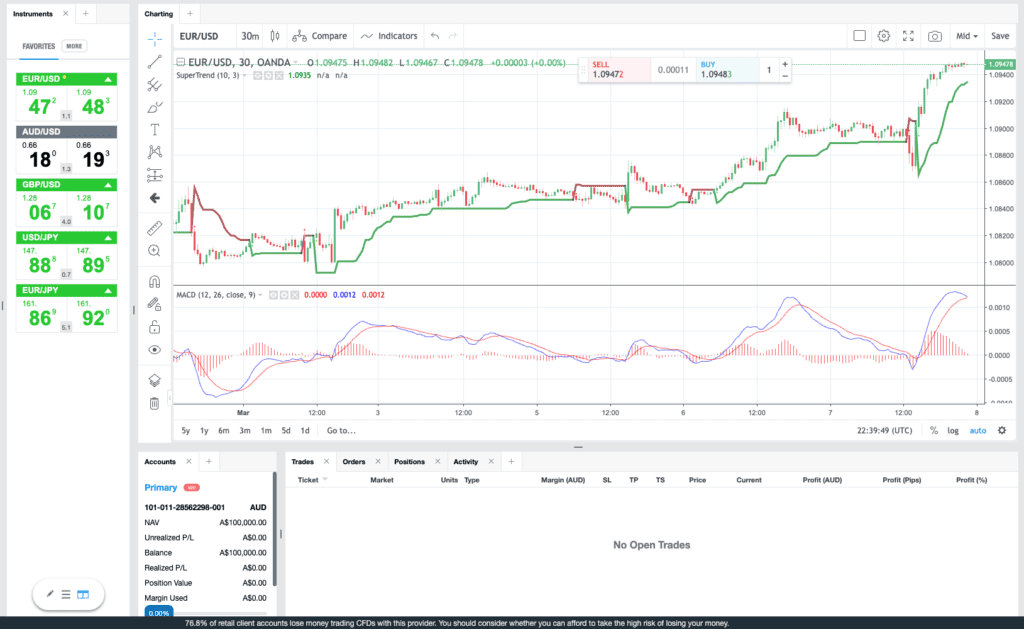
I was particularly impressed by having unlimited access to a demo account loaded with $100,000 in virtual funds on the OANDA Trade Platform. This offer will allow you to practice without the pressure of expiration or immediately running out of funds, and you will come to value this especially if you are still refining your strategies.
The integration of TradingView’s advanced charting within the OANDA Trade platform comes with 80+ indicators and 10+ chart types, and doing technical analysis in this setting turned out to be a wholesome experience for me.
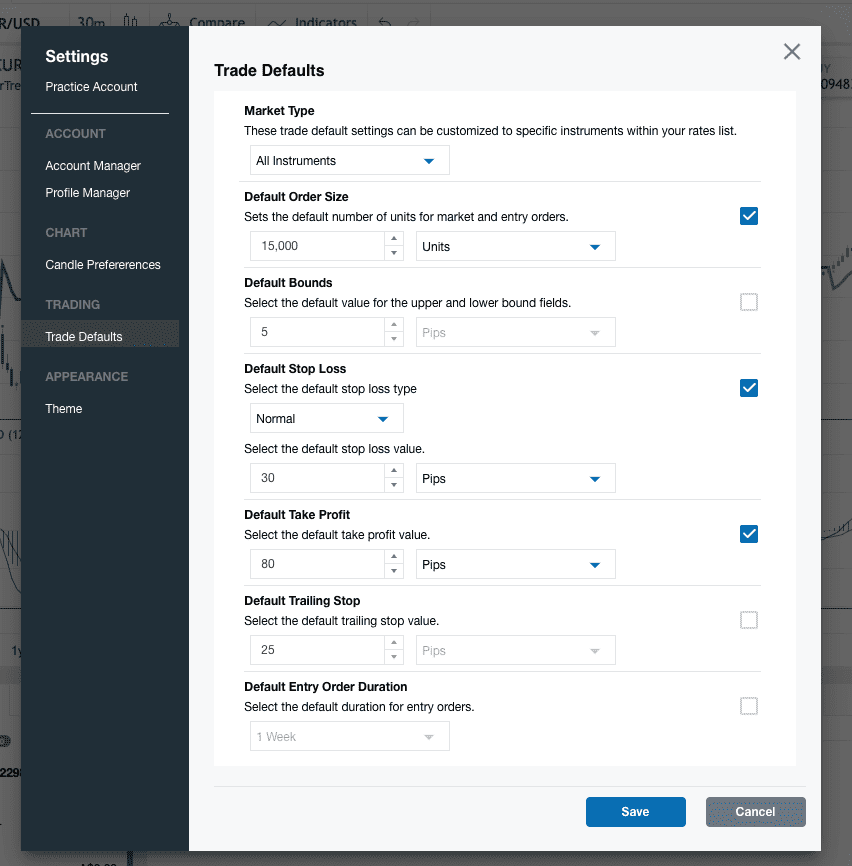
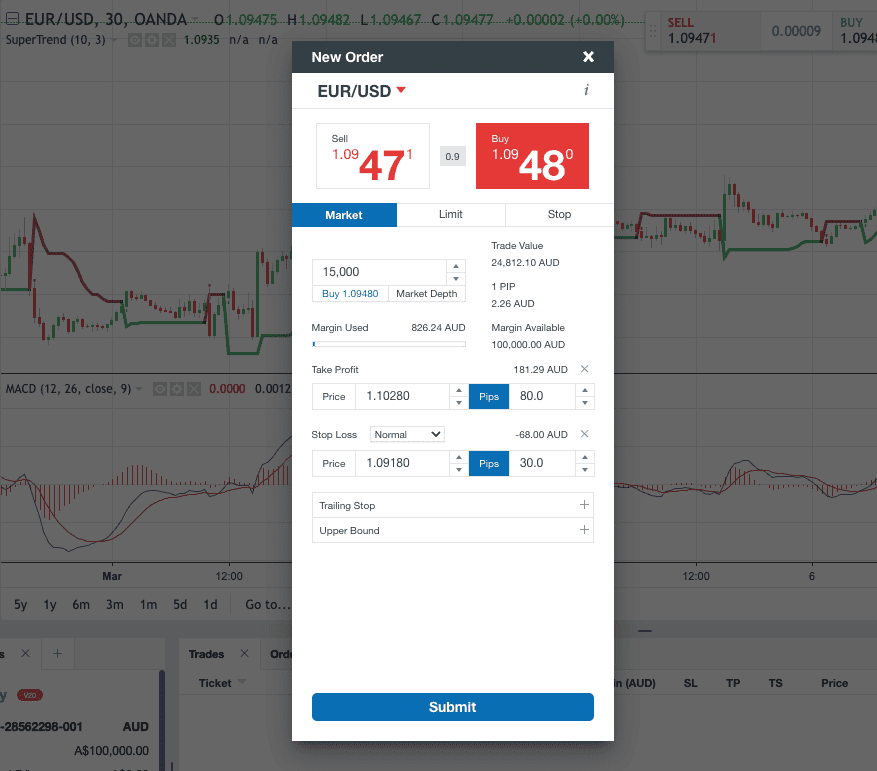
Another standout feature is the platform’s default trade ticket feature. This ensures that all future trade tickets automatically reflect the same settings by allowing you to pre-set your trade size, stop loss, and take profit levels. This will save time and minimize the risk of costly errors due to manual input mistakes. In my opinion, this is a small but a thoughtful detail that can significantly enhance your entire experience.
OANDA extends demo account offerings to other platforms, such as TradingView and MetaTrader 4, although take note that these have expiration dates. Nevertheless, getting to explore OANDA’s services across different trading environments could enrich your understanding of the tools and features each platform provides.
During my live spread test, the broker’s performance turned out to be excellent. The average spreads on EUR/USD is 0.6 pips, significantly lower than the industry average of 1.24 pips. That will be a good save there, especially when like to open many positions at once. I found this spread to be consistent across major currency pairs, with an average spread of 0.7 pips. This makes OANDA a highly competitive low-cost broker in the forex market.
| Broker | EUR/USD |
|---|---|
| OANDA | 0.6 |
| IC Markets | 0.62 |
| Eightcap | 1 |
| eToro | 1 |
| CMC Markets | 1.12 |
| IG | 1.13 |
| Pepperstone | 1.12 |
| Blackbull Markets | 1.2 |
| Plus500 | 1.7 |
| Industry Average | 1.24 |
Broker Screenshots
6. Eightcap - Great Account to Test FX and Cryptocurrency Trading

Forex Panel Score
Average Spread
EUR/USD = 0.0 GBP/USD = 0.1 AUD/USD = 0.2
Trading Platforms
MT4, MT5, TradingView
Minimum Deposit
$0
Why I Recommend Eightcap
I like Eightcap’s demo account and found it to be a great platform to test both FX and cryptocurrency trading. This Melbourne-based broker offers a range of cryptocurrency options on the practice account, making them a solid choice for Aussies keen to get a handle on crypto trading alongside forex.
Eightcap particularly shines as an alternative to eToro, especially for those looking to delve deeply into technical analysis and wants to do it with ease. The platform provides a user-friendly experience that aids in understanding both the forex and crypto markets.
Pros & Cons
- Comprehensive crypto selection
- No limit on virtual funds
- Seamless transition from demo to live account
- Limited demo platform options
- Incomplete MetaTrader 5 experience
- Has a minimum deposit
Broker Details
After opening my demo account with Eightcap, I was pleased to find that the platform supports MetaTrader 5 and TradingView, granting access to an impressive array of 141+ cryptocurrency markets. This range includes heavyweights like Bitcoin, Ethereum, and Litecoin, alongside other names such as Ripple and Cardano, offering one of the most extensive cryptocurrency selections I’ve encountered among forex brokers.
Eightcap’s technology has allowed me to backtest my strategy to test its performance in a 90-day timeframe. This means that the feature will allow you to see trade outcomes and find optimization opportunities even before you put them live. That’s a great risk management feature you are getting there, and this will save you a lot of cost moving forward.
| Broker | Cryptocurrency Markets |
|---|---|
| Eightcap | 141+ |
| eToro | 41 |
| Pepperstone | 19 |
| IC Markets | 18 |
| IG Group | 15 |
| Plus500 | 15 |
| BlackBull Markets | 11 |
| OANDA | 4 |
However, despite Eightcap’s strong choice in cryptocurrency, I noticed a limitation in its overall market variety. The broker provides access to 56 forex pairs, 19 indices, 360+ shares, and 16 commodities, and when compared to brokers like IG Group (17,000 markets), Eightcap’s offerings seem modest.
My tests revealed that Eightcap features competitive spreads, with an average of 0.2 pips on EUR/USD, slightly lower than the industry standard (0.22 pips).
RAW Spreads Tested By Ross Collins | |||||
|---|---|---|---|---|---|
 | 0.19 | 0.19 | 0.41 | 0.36 | 0.61 |
 | 0.22 | 0.23 | 0.17 | 0.27 | 0.16 |
 | 0.19 | 0.23 | 0.27 | 0.24 | 0.24 |
 | 0.22 | 0.42 | 0.62 | 0.25 | 0.56 |
 | 0.20 | 0.48 | 0.44 | 0.47 | 0.64 |
 | 0.44 | 0.68 | 0.90 | 0.64 | 0.75 |
 | 0.46 | 0.85 | 0.96 | 1.04 | 1.01 |
Avg. spreads are taken from each broker's website and updated monthly. Last update on 1 May 2026
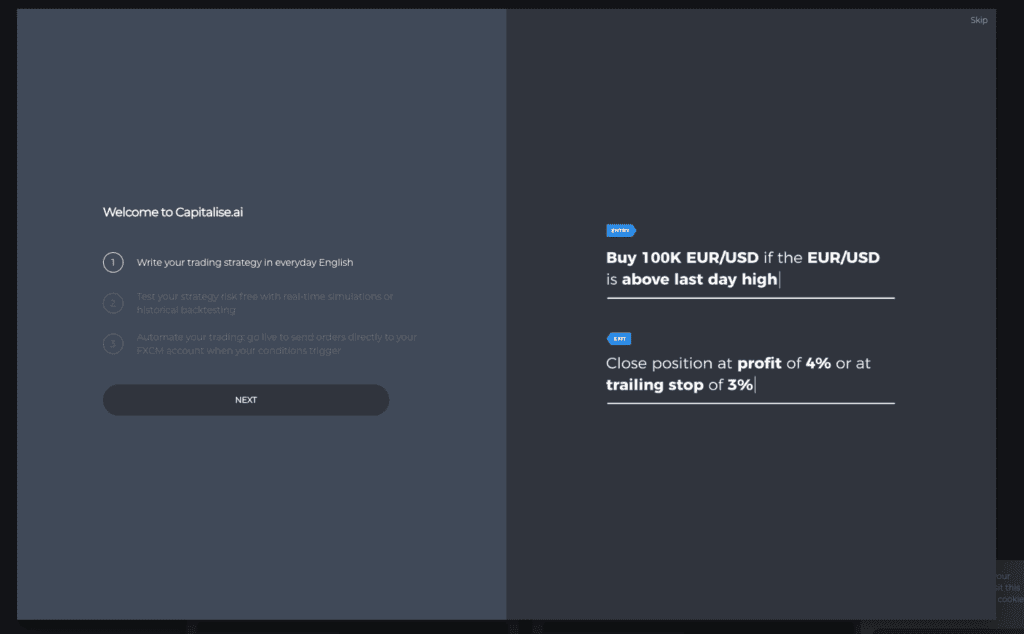
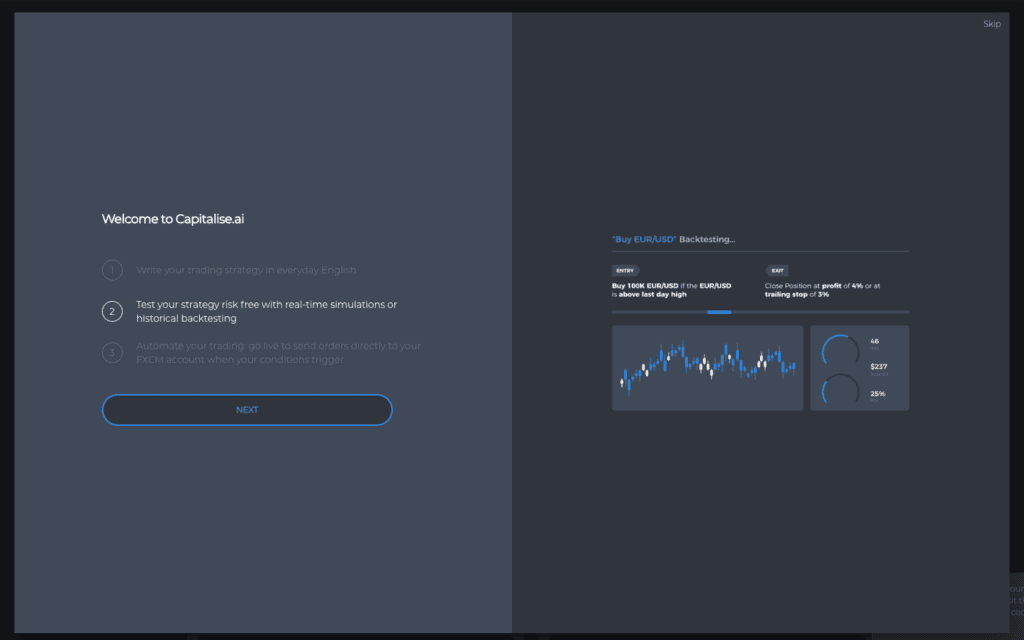
If you’re interested in automating cryptocurrency trading strategies without learning how to program them through complex programming, Eightcap’s partnership with Capitalse.ai is a standout feature. Available for free, even with a demo account, Capitalse.ai is a user-friendly, no-code platform that translates your trading strategy rules and parameters into automated systems.
After following their beginner-friendly tutorials, I found this tool remarkably easy to use, which allowed us to generate an automated strategy within minutes of starting the tutorial. This is especially appealing if you want to leverage the volatile crypto market with automated strategies, it allows you to apply these strategies to cryptocurrencies.

Broker Screenshots
7. eToro - Top Demo Account For Social And Copy Trading

Forex Panel Score
Average Spread
EUR/USD = 1 GBP/USD = 2 AUD/USD = 1
Trading Platforms
eToro
Minimum Deposit
$0
Why I Recommend eToro
I like eToro’s social media-style interface. In my opinion, this makes the broker an excellent choice if you are interested in learning from others in a dynamic community setting. The social trading platform simplifies the trading process, allowing you to follow and replicate the strategies from an extensive choice of seasoned traders.
This can be a real boon if you’re looking to bypass the intricacies of individual analysis and trade placements. Basically, eToro is a one-stop shop for those wanting a social twist to their trading experience.
Pros & Cons
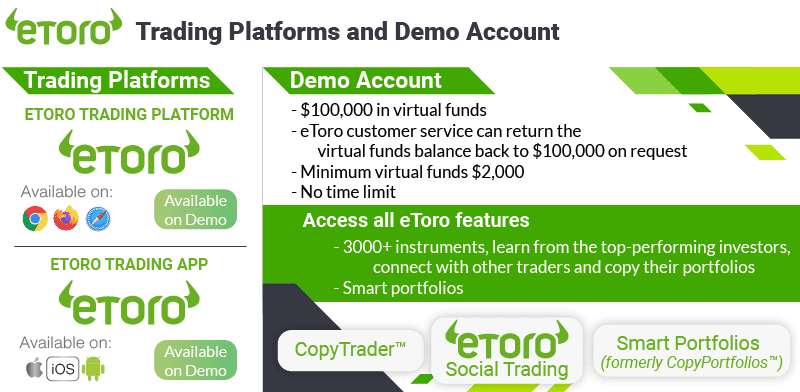
- 100,000 eToro virtual cash
- No time limitation
- No commission trading
- Slow customer support response
- Demo account limitations
- No support for third-party trading platforms
Broker Details
 eToro’s demo account stands out for its integration with the CopyTrader platform. That lets you forward-test traders before actually copying them with real money. I like that the broker comes an unlimited demo account that doesn’t expire, funded with a generous $100,000 virtual fund. This can set you up for a risk-free test of manual trading and social trading at no cost.
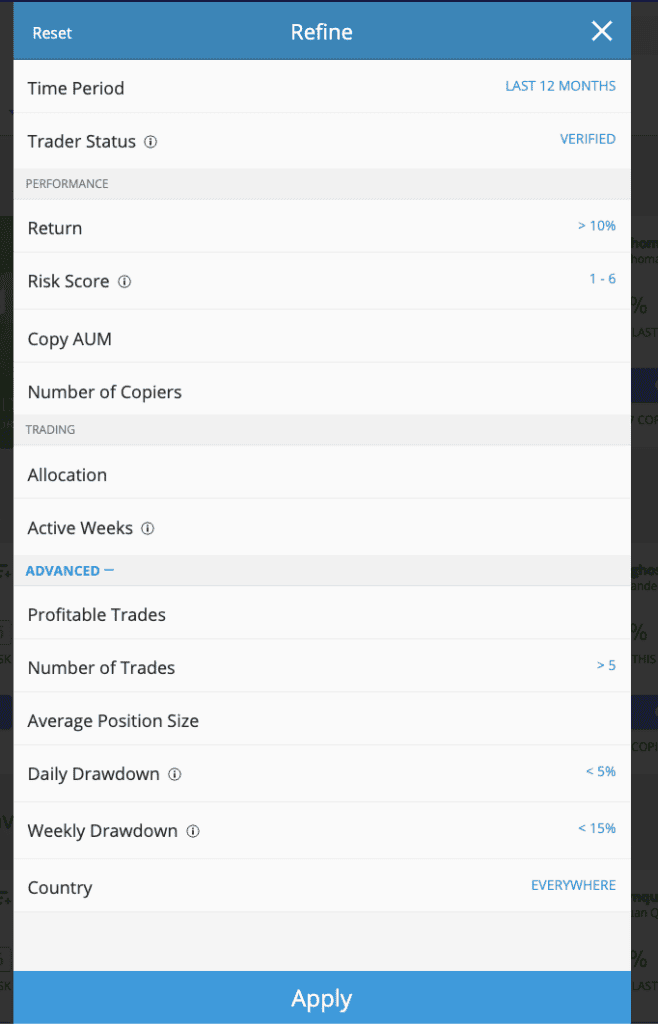
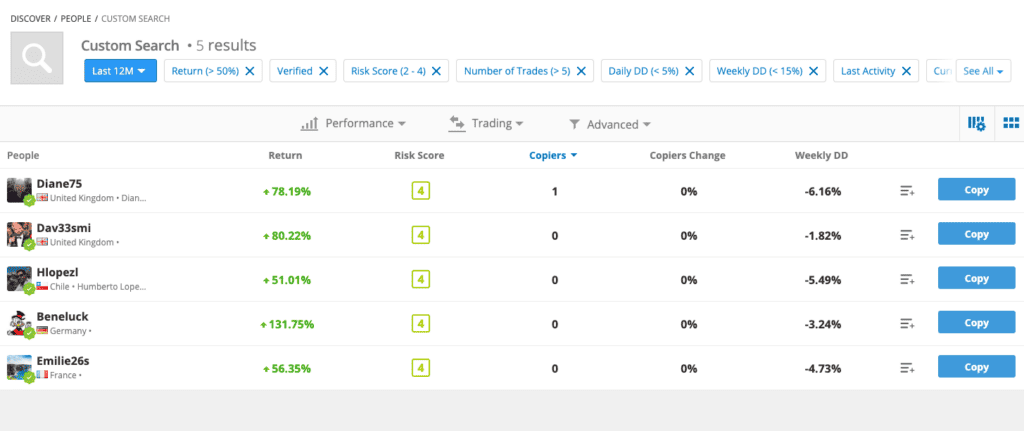
I appreciate having the CopyTrader feature in the demo account. This allowed me to learn the mechanics of selecting traders to copy without any financial risk. The platform’s advanced filtering capabilities with 14 different settings made it easy to sift through the 2 million+ trader profiles. Although narrowing my options to just five seemed limited at first, these turned out to be precisely aligned with my preferences. The filter’s effectiveness in tailoring copy trading experience to your specific goals is a top-notch little feature.
If you want to trade manually, you will have no problem. I found that the eToro’s platform allows you to do this and offers 68 forex pairs, 36 indices, 6,000+ stocks, and 68 commodities, in the selection.
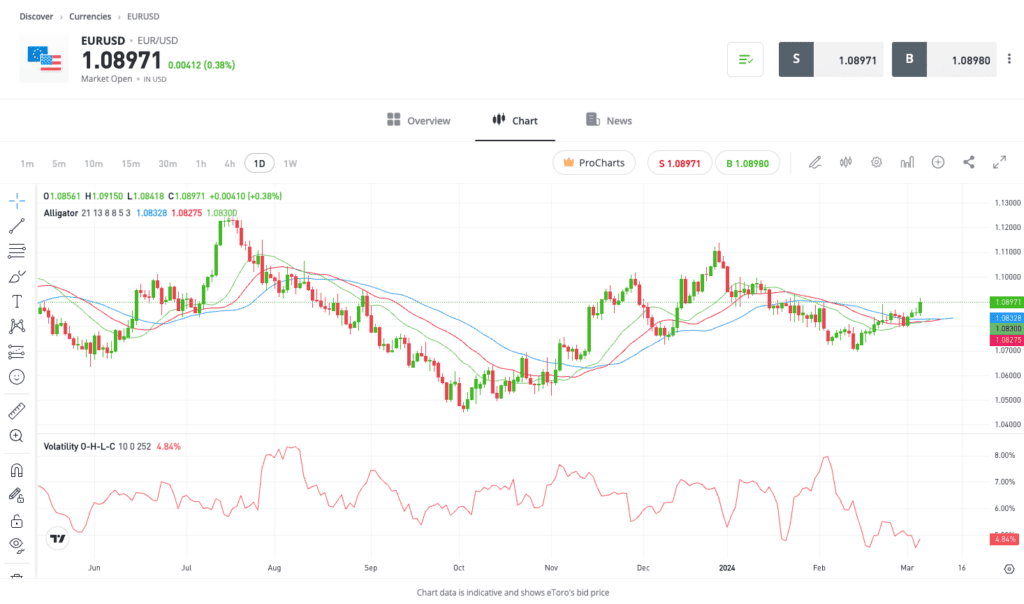
Moreover, if you want to leverage TradingView charts, the broker provides access to over 100 indicators, nine chart types, and eight timeframes, giving you a solid choice of analytical tools to develop your trading strategies.
Broker Screenshots
8. IG Group - Best Range of Trading Products for a Test Account

Forex Panel Score
Average Spread
EUR/USD = 0.16 GBP/USD = 0.59 AUD/USD = 0.29
Trading Platforms
MT4, TradingView, IG Trading Platform, L2 Dealer
Minimum Deposit
$200
Why I Recommend IG Group
I like IG Group for having an expansive range of trading instruments. This has easily made the broker my top pick if you are seeking diversity in a demo account.
It also helps that IG Group offers competitive spreads and top-notch customer service, which I find invaluable in any trading journey. If you’re looking to practice with forex, commodities, or other financial instruments, IG Group offers a demo account that lets you do that with great flexibility.
Pros & Cons
- Easy and fast account opening with no credit card required
- Two-year lifespan
- Access to ProRealTime
- Platform-based market limitations
- Customer service is limited over the weekend
- Lacks social trading tools
Broker Details
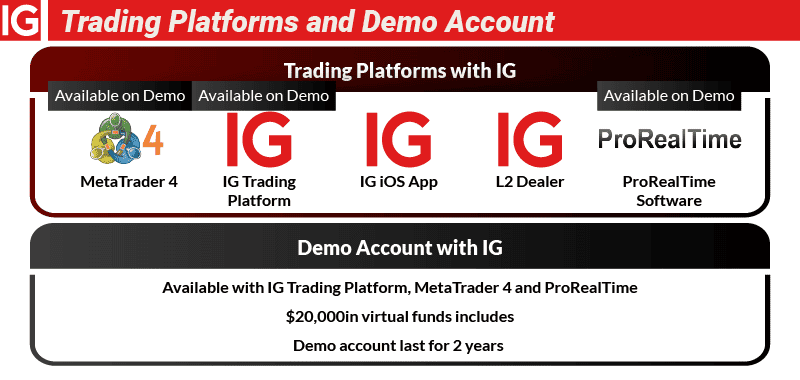
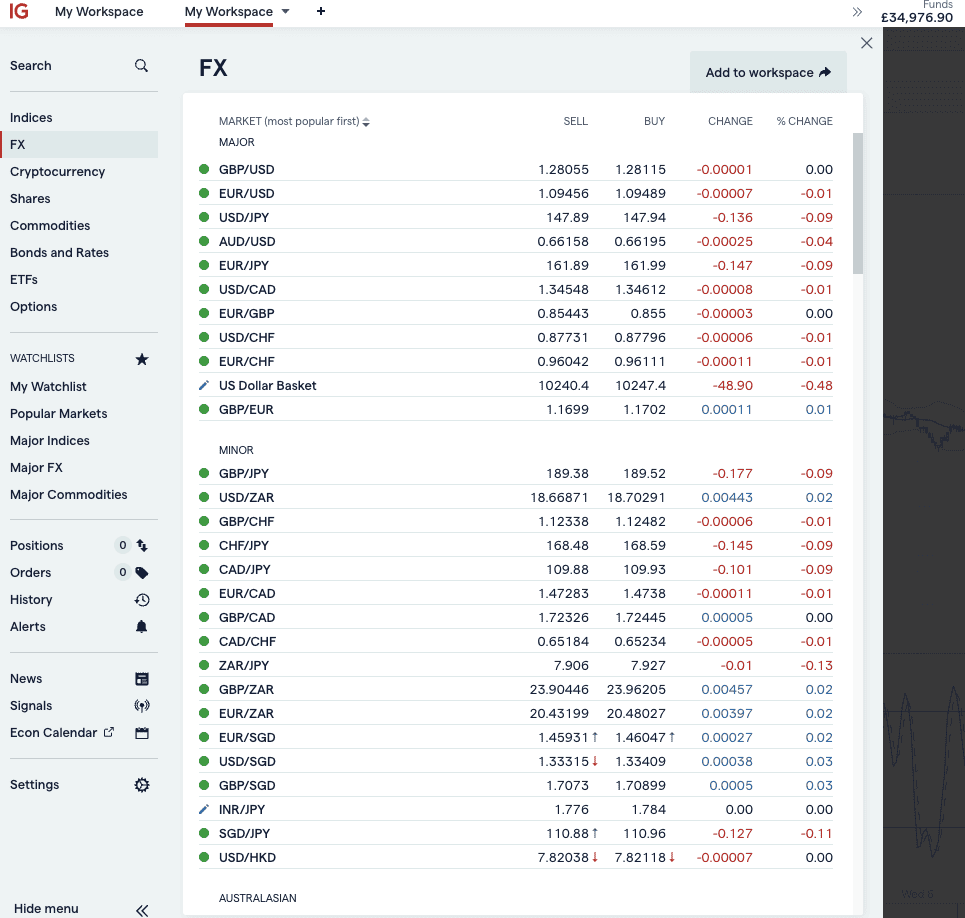
While exploring my IG Group demo account, I was very impressed by the extensive range of financial instruments available. The practice account covers 17,000 markets – the most I’ve found available from any broker. This includes a selection of 97 forex pairs, over 11,000 shares, 46 indices plus 14 index options, 42 commodities, 30 crypto + 1 crypto indice, and more than 530 ETFs.
IG Group’s demo account doesn’t expire and starts with a $10,000 balance. Although this might look like a tight budget at first, I found that you could top up this amount whenever necessary, providing you with practically unlimited virtual funds for practice trading.
During my testing, I also discovered that IG Group offers multiple trading platforms, each with a dedicated demo account. If you’re someone who likes having variety, this will allow you to test each platform individually and find the one that best suits your trading style.
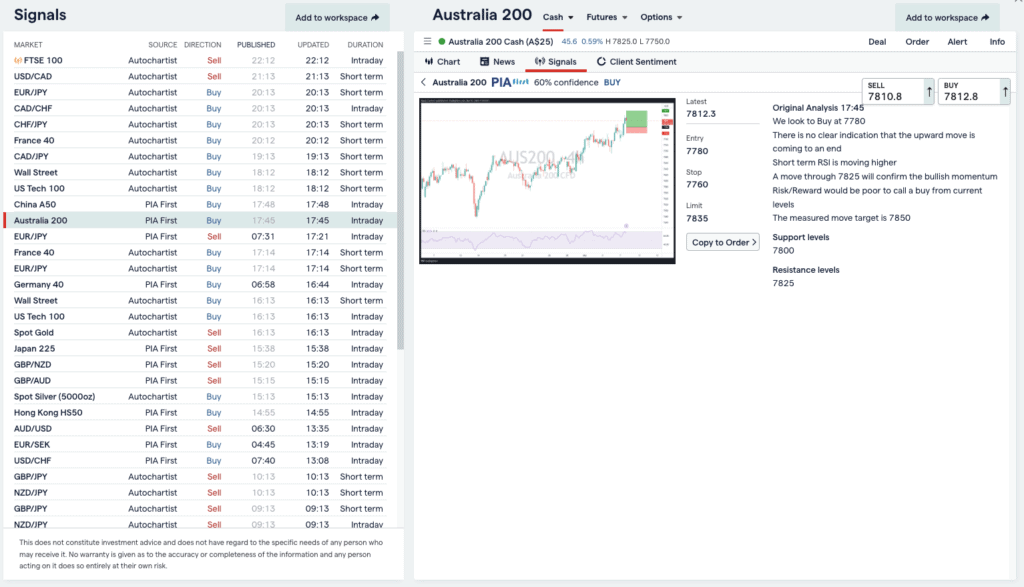
The IG Trading Platform, the broker’s flagship offering, is a decent web-based platform granting access to IG’s full market range. It has an impressive charting package, with over 28 indicators and trading signals from PIA First and AutoChartist. This is helpful for finding new trading ideas throughout the day.
Having MetaTrader 4 for automating trades is a cherry on top. I coded my own Expert Advisors to automate trading strategies on the platform, and the process is straightforward as usual. If you want a tool that automatically draws support and resistance levels and trend lines when following price action strategies, a feature called ProRealTime is available for that.
Lastly, there’s IG Group’s L2 Dealer platform. This provides direct market access and level II pricing, showing open and pending orders directly from liquidity providers. This will be an essential tool if you want to measure market sentiment before trading.
Broker Screenshots
Why You Should Use A Demo Account?
There are many reasons why you should use a demo account. I have explained what I think are the most important benefits below:
1. Learn To Trade Forex
You can learn about trading forex risk-free while using a demo account. With daily trading volume at $6.6 trillion, foreign exchange is the largest market, globally, and demo accounts let you get a feel for trading the forex markets.
This means you get a sense of how the market works regarding volatility, liquidity and general market behaviour.
2: Practice Trading
Demo accounts allow you to practice trading without risking your own money. This means that they allow you to become familiar with the brokerage’s trading software and get used to a live market environment.
What’s more, with a Demo Account, you can take the time to understand the platform’s features without the added pressure of managing real funds.
3: Backtest Forex Trading Strategies
Demo accounts allow you to backtest your Forex trading strategies. Backtesting means you can use a range of technical indicators to test a particular trading strategy and risk management tools such as stop-loss orders.
4: Test Signals And Robots
You can also utilise automated trading signals and robots on a demo account to test your trading strategies. Some of the best automated trading platforms include MetaTrader’s Trading Signals and Expert Advisors (EAs), Capitalise.ai for code-free automation and cTrader Automate.
5: Trial A New Broker
Lastly, demo accounts allow you to trial a new broker to see if they fit you. When using a demo account, you are essentially testing a certain broker’s performance based on its trading platform, spreads, execution speeds and overall platform experience.
Why Demo Accounts Are Good For Beginners
The main reason demo accounts are good for beginners is that they’re entirely free and carry no risk. As a beginner trader, you can practise trading, develop your skills, and test various strategies without worrying about losing real money.
Demo accounts can also benefit new traders because they allow you to become familiar with trading software and get a sense of how the market works.
Advantages of demo accounts for beginners:
- You don’t need to risk your own cash
- Simulates live trading for practice
- Help you decide if you like the broker or platform
- A good way to learn Forex and CFD trading
I rated OANDA as my best forex broker for beginners because it has a user-friendly trading platform, OANDA TradeFx and the ability to use guaranteed stop-loss orders (GSLOs) for risk management.
Most Popular Forex Brokers In Canada
Below is the full list of FMA regulated forex brokers and the popularity of these brokers based on CAN Google monthly searches.
| Brokers | Global Monthly Searches |
|---|---|
| Interactive Brokers | 33,100 |
| OANDA | 12,100 |
| Exness | 5,400 |
| XM | 5,400 |
| Capex | 5,400 |
| CMC Markets | 5,400 |
| Admirals | 4,400 |
| Fusion Markets | 4,400 |
| IC Markets | 3,600 |
| PU Prime | 3,600 |
| Eightcap | 3,600 |
| FBS | 2,900 |
| eToro | 2,400 |
| AvaTrade | 1,900 |
| Axi | 1,900 |
| HFM | 1,900 |
| FP Markets | 1,600 |
| Blueberry Markets | 1,600 |
| TD Ameritrade | 1,300 |
| startrader | 1,000 |
| Star Trader | 1,000 |
| Pepperstone | 1,000 |
| Go Markets | 1,000 |
| XTB | 880 |
| Trading 212 | 880 |
| FOREX.com | 880 |
| octa fx | 720 |
| FXCM | 720 |
| multibank group | 590 |
| Blackbull Markets | 590 |
| TMGM | 590 |
| Plus500 | 390 |
| Vantage Markets | 390 |
| SwissQuote | 390 |
| Roboforex | 390 |
| Hankotrade | 390 |
| FxPro | 320 |
| Saxo | 320 |
| Global Prime | 320 |
| Tickmill | 260 |
| Capital.com | 210 |
| FXTM | 210 |
| easyMarkets | 210 |
| Trade Nation | 210 |
| Tradersway | 210 |
| Hugosway | 210 |
| Alpari | 170 |
| KOT4X | 170 |
| IG Trading | 140 |
| Xtrade | 110 |
| Libertex | 110 |
| ATFX | 90 |
| Doo Prime | 90 |
| HANTEC | 90 |
| Trading.com | 90 |
| Markets.com | 90 |
| ThinkMarkets | 90 |
| Spreadex | 90 |
| Activtrades | 70 |
| HYCM | 50 |
| MiTrade | 50 |
| ACY Securities | 30 |
| City Index | 20 |
| Fondex | 20 |
| SpreadCo | 10 |
| IUX Markets | 10 |
| ACI Trading | 10 |
| gmi market | 10 |
| Go FX | 10 |
| Purple Trading | 10 |
| ATC Brokers | 10 |
| Ox Traders | 10 |
| Accendo Markets | 10 |
| Murren Trade | 0 |
 Interactive Brokers Interactive Brokers | 33,100 1st |
 OANDA OANDA | 12,100 2nd |
 Exness Exness | 5,400 3rd |
 XM XM | 5,400 4th |
 Capex Capex | 5,400 5th |
 CMC Markets CMC Markets | 5,400 6th |
 Admirals Admirals | 4,400 7th |
 Fusion Markets Fusion Markets | 4,400 8th |
 IC Markets IC Markets | 3,600 9th |
 PU Prime PU Prime | 3,600 10th |
Are The Spreads Live With A Demo Account?
Yes, spreads are live in a demo account. In fact, my colleague Ross Collins used a demo account when testing the spreads of different brokers.
We have tested spreads in various demo accounts using MT4, and the results are shown in the spread module below.
| Average RAW Spread From Test Done By Ross Collins | |||||||||||
|---|---|---|---|---|---|---|---|---|---|---|---|
| AUDUSD | Average Spread | EURUSD | Average Spread | GBPUSD | Average Spread | USDCAD | Average Spread | USDCHF | Average Spread | USDJPY | Average Spread |
| Fusion Markets | 0.09 | TMGM | 0.15 | CityIndex | 0.17 | CityIndex | 0.16 | Pepperstone | 0.39 | Fusion Markets | 0.22 |
| TMGM | 0.15 | Tickmill | 0.15 | Fusion Markets | 0.21 | Fusion Markets | 0.23 | Fusion Markets | 0.41 | IC Markets | 0.24 |
| Pepperstone | 0.19 | Fusion Markets | 0.16 | IC Markets | 0.27 | TMGM | 0.43 | CityIndex | 0.44 | ThinkMarkets | 0.25 |
| CityIndex | 0.23 | IC Markets | 0.19 | FP Markets | 0.31 | IC Markets | 0.45 | TMGM | 0.51 | CityIndex | 0.27 |
| IC Markets | 0.23 | Pepperstone | 0.19 | TMGM | 0.35 | Go Markets | 0.47 | Go Markets | 0.51 | TMGM | 0.33 |
| FP Markets | 0.31 | FP Markets | 0.2 | Pepperstone | 0.41 | Blueberry Markets | 0.5 | Tickmill | 0.52 | Pepperstone | 0.36 |
| Blueberry Markets | 0.32 | EightCap | 0.2 | EightCap | 0.44 | Tickmill | 0.5 | IC Markets | 0.57 | FP Markets | 0.39 |
| Go Markets | 0.37 | Admiral Markets | 0.21 | Blueberry Markets | 0.44 | FP Markets | 0.51 | Blueberry Markets | 0.63 | Blueberry Markets | 0.43 |
| Tickmill | 0.37 | CityIndex | 0.22 | Go Markets | 0.59 | ThinkMarkets | 0.56 | ThinkMarkets | 0.70 | Go Markets | 0.45 |
| ThinkMarkets | 0.42 | ThinkMarkets | 0.22 | Tickmill | 0.59 | Pepperstone | 0.61 | FP Markets | 0.71 | EightCap | 0.47 |
| EightCap | 0.48 | Blueberry Markets | 0.27 | ThinkMarkets | 0.62 | EightCap | 0.64 | EightCap | 0.76 | Admiral Markets | 0.58 |
| Axi | 0.67 | Go Markets | 0.38 | Admiral Markets | 0.73 | Axi | 0.74 | Axi | 0.94 | Axi | 0.64 |
| CMC Markets | 0.68 | Axi | 0.43 | CMC Markets | 0.90 | CMC Markets | 0.75 | CMC Markets | 0.94 | CMC Markets | 0.64 |
| Admiral Markets | 0.70 | CMC Markets | 0.44 | Axi | 0.95 | Blackbull Markets | 1.01 | Admiral Markets | 1.08 | Tickmill | 0.67 |
| Blackbull Markets | 0.85 | Blackbull Markets | 0.46 | Blackbull Markets | 0.96 | Admiral Markets | 1.46 | Blackbull Markets | 1.31 | Blackbull Markets | 1.04 |
Advantages vs Disadvantages Of Demo Account
While there are many advantages, there are also a few disadvantages of a demo account you need to be aware of which I have highlighted below.
- Risk-Free
- No Stress
- Practice Trading
- Get Used to Trading Platform
- Build Confidence
- Test Trading Strategies
- Trial a Broker
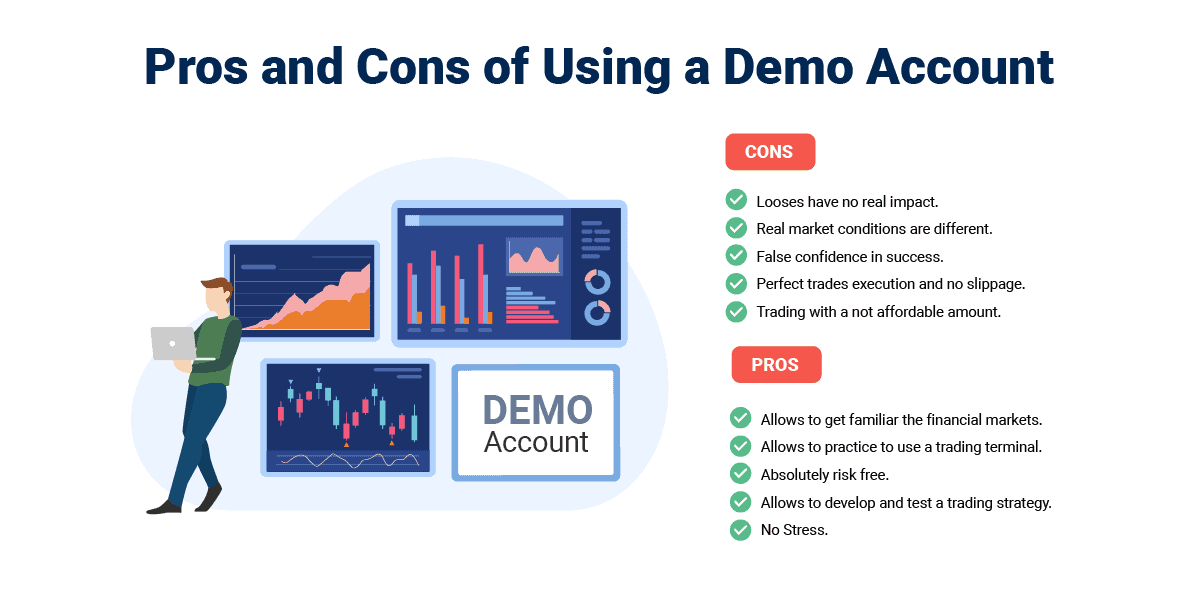
- Less Slippage Than Live Account
- Costs not Priced in (E.G. Commissions)
- Can Become Overconfident
- Difficult to Adjust to Live Account
Advantages
- Risk-Free Environment
One of the primary advantages of a demo account is the absence of financial risk. Traders can make mistakes and learn from them without facing the consequences of monetary losses.
- Learning the Basics
Demo accounts serve as effective learning tools for beginners, offering a platform to grasp fundamental concepts such as placing orders, analysing charts, and managing risk.
- Testing Trading Strategies
For both novice and experienced traders, demo accounts provide an environment to test and refine trading strategies. This experimentation can lead to a deeper understanding of your preferred approach to the market.
Disadvantages
- Less Slippage Than Live Account
Since real buyers and sellers do not fill demo accounts, they do not have partial fills, requotes or slippage.
- Costs Not Priced in
Most trading demo accounts don’t factor in trading costs such as commissions, which gives you a false sense of security in managing your overall costs.
- Overconfidence
Overconfidence can arise when using a demo account due to the lack of risk when using virtual money, particularly if you are successful while trading.
How To Find The Right Demo Account For You
While finding the right demo account for you is based on personal preferences, there are some key factors to consider, which I have summarised below.
1. Trading Platforms To Demo
Finding which trading platforms to demo is crucial in your assessment of which trading platform you prefer. MT4 is the most popular and widely offered trading platform amongst brokers. Other platforms I recommend on a demo account include IC Markets for MT5, Plus500 for beginner traders, and eToro for social/copy trading.
2. Demo Period Before Expiry
How long your demo account has before expiry is another key factor to decide upon. While most demo accounts expire after 30 days, some brokers offer longer, such as eToro, which has a no-expiration demo account.
3. Currency Pairs And Other Products
What currency pairs (including exotic, minor and Major Forex Pairs) and products a demo account offers need to match what products you prefer to trade. Most brokers will offer the most liquid forex markets in addition to shares, indices, commodities and cryptocurrencies.
4. Trading And Analysis Tools To Test
Demo accounts give you a chance to test out trading and analysis tools. If you want to test the best social trading platforms, you could do worse than giving eToro a go. For great technical analysis tools, you can try Pepperstone’s Smart Trader Tools on the MT4 platform.
5. How Much Virtual Funds
Different brokers offer different amounts of virtual funds in a demo account. Some, like eToro, offer $100,000 in a demo account, while others, like Plus500, offer unlimited funds.
6. Real-Time Quotes
Every demo account should track real-time quotes despite being a practice account. Using live data means replicating live market conditions like-for-like. If EUR/USD moves from 1.0831 to 1.0851, you should expect the same from your demo account.
7. Demo Account Capabilities
What demo account capabilities you have means how many features you can access compared with the broker’s live account. These include what trading tools you can access, how the platform performs, and what markets you can trade.
8. Regulation
Who a broker is regulated by is very important for trust reasons. Choosing an ASIC-regulated broker in Australia means the broker is both vetted and legally allowed to offer financial services to Australian traders.
Forex Demo Account vs Live Trading Accounts
Forex demo accounts and live trading accounts serve different purposes in the world of forex trading. I’ve laid out some key distinctions between the two:
Purpose:
- Demo Accounts: These are designed for practice and learning. You can use demo accounts to familiarise yourself with the financial markets trading platforms, test strategies, and gain experience without risking real money.
- Live Trading Accounts: These are used for actual trading with real money. As a trader, you will open a live account when you are confident in your skills and strategies and are ready to engage in the real market.
Risk:
- Demo Accounts: No financial risk is involved since these accounts use virtual money. It allows you to experiment and learn without the fear of losing your capital.
- Live Trading Accounts: Real money is at stake, so there is a higher level of risk. Losses and gains directly impact your financial position.
Psychological Impact:
- Demo Accounts: When trading with virtual funds, you may experience a different psychological mindset. Emotions like fear and greed may not be as pronounced as in live trading.
- Live Trading Accounts: Real money introduces a psychological aspect that can significantly affect decision-making. Emotions play a more significant role, and managing them becomes crucial.
Strategy Testing:
- Demo Accounts: You can test and refine your strategies in a risk-free environment.
- Live Trading Accounts: Strategies need to be adapted to actual market conditions, and risk management becomes paramount.
To sign up for a demo account requires a few simple steps, which I have laid out below:
- Choose a Forex broker to sign up with
- Visit the broker’s website and create a new account
- Choose the ‘Demo account’ option
- Enter your details if required
- Once confirmed, log in to your account and start trading
FAQ
Which Forex Demo Trading Account Is the Best?
Overall, I picked Pepperstone as offering the best Forex demo trading account using MT4. Indeed, Pepperstone has the best free forex trading platforms using the MetaTrader platforms.
I picked Pepperstone primarily because of its MT4 Smart Trader Tools package, which gives you access to 28 additional apps and indicators to enhance your technical analysis.
What Is A Forex Demo Account?
A Forex demo account is a type of account offered by brokers to simulate the real market environment so you can practice trading on their trading platform(s).
As such, a Forex demo account allows forex traders to simulate a live trading environment using virtual money so you are not risking your own money. It enables new traders to start free, online trading relatively quickly or for experienced traders to practice new strategies in a risk-free environment.
How Does A Demo Account Work?
Demo accounts are marketed to customers as a way to test a platform’s user experience and entice them to sign up with that broker.
Signing up for a free demo account is much like a live account; you will receive a welcome email with your login details and a link to install a platform such as MT4 on your PC or mobile. Once you log in to your demo account, you will be given a set number of virtual funds (sometimes unlimited) and a set number of days, usually 30 calendar days, to trade.
Most brokers offer full use of their platform, where you can trade their full range of markets and full range of trading tools to test your trading strategies in a simulated market environment.
Which Brokers Have Demo Account With MT4
According to my testing, the best MetaTrader 4 brokers include Pepperstone, BlackBull Markets and IC Markets. All brokers that offer the MT4 trading platform have an MT4 demo account. One thing that’s important to remember is that you can often keep a demo account once you join a broker or have signed up for their live account.
Do Forex Demo Mimic Real Trading Conditions?
Forex demo accounts use live data as they aim to simulate a live trading environment. The main difference is that liquidity provider do not fill your orders, so you won’t get slippage
How long should I be demo trading?
How long you trade on a demo account depends on when the demo account expires. Generally, most brokers only offer demo accounts for 30 days before expiration. There are some demo accounts; however, some provide a 90-day expiration or are even unlimited. That means you can trade on a demo account as long as necessary.
Are Demo Accounts Free?
Forex brokers usually make demo accounts free to attract you as a client. Many (but not all) allow you to use their demo account without providing your funding account details or uploading documentation proving who you are (such as a copy of your passport).
Only when you convert to a real money account will these details need to be provided.
Do Forex Demo Accounts Use Real Money?
No, Forex demo accounts give you virtual funds to trade with, not real money. How much virtual money you can trade with you depends on the broker, with some even offering an unlimited amount in their demo account.
Can I open a demo account on TradingView?
Yes, most TradingView brokers provide demo accounts to practice with. These brokers include Pepperstone, BlackBull Markets and City Index.
To do this, you must first download and register the demo account from your chosen broker’s website. Next, select the broker in the bottom Trading Panel of your chart and log in using your broker’s demo account credentials.
Do Demo Accounts Expire?
Yes, most demo accounts expire after 30 days. Some accounts may last longer, such as eToro, which offers an unlimited demo account. Many brokers allow you to keep the demo account if you sign up.
Can You Use Leverage With A Demo Account?
Yes, you can use leverage with a demo account. Brokers allow you to use the same leverage limits found with a live trading account. The best high-leverage Forex brokers that let you trade on a demo account include Pepperstone, BlackBull Markets and IC Markets.
Do Demo Accounts Use ECN?
Yes, demo accounts use ECN (Electronic Communication Network) pricing to familiarise yourself with trading without risking real money. The best ECN brokers in Australia include Pepperstone, Eightcap and IC Markets.
What Should I Look For In A Forex Demo Account?
The most important element when looking for the best forex demo accounts is to consider the platforms offered. You will be using the trading platform to trade, so it helps to choose a platform you are comfortable using. Traders generally have a personal preference for MetaTrader 4, MetaTrader 5, or cTrader trading platforms.
The second factor to consider is how well the demo account can replicate real trading of the CFD and forex markets. This includes access to how similar the spreads are to real markets, available leverage, customer service, and risk management tools. Like choosing the best forex platform for you when forex trading, having the right features within the platform to suit your forex strategy can be critical to future success.
A third factor is execution speed, which helps traders make fast trades with reduced slippage in higher volatility markets that can carry high risk. A demo account should simulate real trading conditions. This means taking spreads from real markets so you can learn how CFDs work in the real world.
The final factor is the expiration date of the demo account and how much virtual currency is available. Some demo accounts are only valid for one month, while others are unlimited.
Why Are Demo Accounts So Important?
Trading financial instruments such as forex and shares is a high-risk investment, especially if you are exploring different forex and CFD markets for the first time. Forex and CFD markets, such as cryptocurrency, are high-risk environments. Therefore, traders should be cautious when taking on highly leveraged positions. Leverage is a complex instrument, so it’s important to understand there are risks of losing more money than you originally deposited in your trading account. Getting experience trading using a demo account is important to be well-equipped to deal with the volatility and the high-risk nature of financial markets before signing up for a real account or live account.

Learning to trade forex can be achieved with research as well as utilising forex brokers’ educational tools such as webinars, FAQs, eBooks, and online courses. However, the most effective way is to practice trading via a demo account, allowing you to develop strategies and your trading style. Demo accounts allow users to familiarise themselves with various markets and trading platforms. Virtual money accounts are suitable for levels of experience, and I encourage you to practice trading with a forex broker listed above prior to trading with real money.
Background To Our Forex Demo Review
This demo account review was compiled and published in 2016 and was updated at the start of 2026. The dedicated staff at Compare Forex Brokers put it together and spent significant time researching the industry. As the market changes rapidly and brokers continue to offer new features all the time, please validate all information read above with the Forex broker’s dedicated website. We aim to update our analyses frequently, but sometimes inconsistencies can be found.


Ask an Expert
How long should I use a forex demo account?
You should use one to practice with until you are certain your skills are up to scratch for live trading and even then you should keep using one to keep practicing and get better. Keep in mind some brokers only allow demo accounts for a limited time.
Are forex demo accounts accurate?
Yes, demo accounts use live data sourced from liquidity providers. SO they are accurate in this sense however you will not get slippage with a demo account since your orders are not filled by real counter-parties but by software.
Does MT4 demo account expire?
This will depend on the broker, some brokers limit the demo account period with MT4 to 30 or 90 days while other have no expiry date as long as you remain active on it within 30 days or sign up for a live account with the broker.
How do i join my demo account
The broker will have a link to sign up to a demo account on their website.
Are there hidden changes when moving from demo to live? Like higher spreads or deposits?
no, spreads are the same on both demo and live account.