
What is the best forex trading app for Android?
Pepperstone offers the best forex trading app for Android, providing MT4 and MT5 mobile apps with a 77ms execution speed. With RAW spreads from 0.10 pips and $3.50 commissions across 94 currency pairs, Pepperstone delivers seamless mobile trading with no minimum deposit. We also shortlisted other Android apps based on their mobile interface quality and feature sets.
Broker comparison table
| Rank | Broker | Score | Regulation | EUR/USD raw | EUR/USD standard | Commission | Min. deposit | Platforms | Leverage | Visit |
|---|---|---|---|---|---|---|---|---|---|---|
| 1 |  Pepperstone Pepperstone | 93.5 | ASIC, FCA, BaFin CySEC, DFSA | 0.1 | 1.10 | $3.50 | $0 | MetaTrader 4, MetaTrader 5, cTrader | 30:1 | Visit |
| 2 |  IC Markets IC Markets | 89 | ASIC, FSA-S CySEC | 0.1 | 0.1 | $3.50 | $200 | MetaTrader 4, MetaTrader 5, cTrader | 30:1 | Visit |
| 3 |  ThinkMarkets ThinkMarkets | 70 | FCA, FSCA ASIC, FSA-S, CySEC,DFSA | 0.11 | 1.10 | $3.50 | $0 | MetaTrader 4, MetaTrader 5 | 30:1 | Visit |
| 4 |  FXCM FXCM | 68.6 | ASIC, FCA, CySEC CIRO, BaFin, FSCA | 0.30 | 0.7 | $4.00 | $50 | MetaTrader 4 | 30:1 | Visit |
| 5 | Plus500 | 58.8 | ASIC, FCA, CySEC, MAS, CIRO, CFTC, FMA, DFSA, EFSA, JFSA, CMA, FSCA, FSA-S, SCB, Bappebti | not published | not published | not published | $100 | Proprietary | not published | Visit |
| 6 |  FxPro FxPro | 58.5 | FCA, CySEC, DFSA SCB, FSC-M, FSCA, FSA-S | 0.64 | 1.44 | $3.50 | $0 | MetaTrader 4, MetaTrader 5, cTrader | 30:1 | Visit |
| 7 |  eToro eToro | 54.9 | ASIC, CySEC, FCA MAS, MFSA, ADGM SEC, GFSC, FSA-S | - | 1.0 | - | $50 (Australia), $50-$100 (EU) | - | 30:1 | Visit |
| 8 |  Charles Schwab Charles Schwab | 51.2 | SEC, NFA/CFTC FINRA | - | 1.4 | - | $2000 | - | 50:1 | Visit |
Some of the abbreviations on this page are expanded to the regulator's full name: a broker regulated by ASIC is regulated by the Australian Securities and Investments Commission; by FCA, the Financial Conduct Authority; by DFSA, the Dubai Financial Services Authority; by CIRO, the Canadian Investment Regulatory Organization.
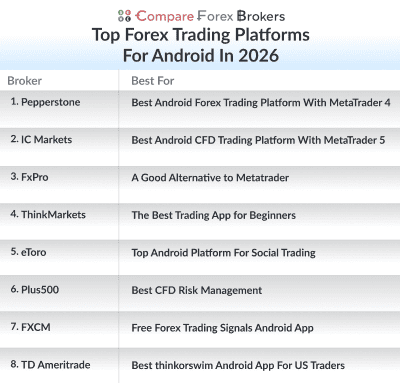
Our list of the best forex trading apps for android devices:
Ordered by our overall rating, highest first.
- Pepperstone - Best Android Forex Trading Platform With MetaTrader 4
- IC Markets - Best Android CFD Trading Platform With MetaTrader 5
- ThinkMarkets - The Best Trading App for Beginners
- FXCM - Free Forex Trading Signals Android App
- Plus500 - Best CFD Risk Management
- FxPro - A Good Alternative to Metatrader
- eToro - Top Android Platform For Social Trading
- TD Ameritrade - Best thinkorswim Android App For US Traders
Broker reviews
1. Pepperstone
Average spread
EUR/USD = 0.1 GBP/USD = 0.2 AUD/USD = 0.1
Platforms
MT4, MT5, cTrader, TradingView, Pepperstone Trading App
Minimum deposit
$0
Why We Recommend Pepperstone
We liked how Pepperstone offers top-notch trading tools paired with an intuitive user interface, making it a standout choice for Android devices. The fully-featured MetaTrader platform supports all trading strategies, ensuring traders have all they need at their fingertips. Moreover, Pepperstone is a trustworthy broker that allows users to trial their services using a demo account loaded with USD 50,000 in virtual cash.
Pros & cons
- Best MT4 trading for Android
- Tight spreads on the Razor account
- Great mobile charting features
- Lacks full trading tools on mobile
- Unable to use EAs on mobile
- Out of date education resources
Broker Details
After our thorough analysis, we concluded that Pepperstone emerged as the top forex trading app for Android devices and smartphones. The MetaTrader app seamlessly combines robust trading tools, a user-friendly interface, and an extensive market availability. Notably, we also named Pepperstone our best forex broker in 2026, considering its spreads, impeccable customer service, and its exemplary MT4 trading app.
The Best Choice For MT4

At CompareForexBrokers, we firmly believe that multi-regulated Forex broker Pepperstone offers the finest MetaTrader 4 (MT4) forex app for Android users.
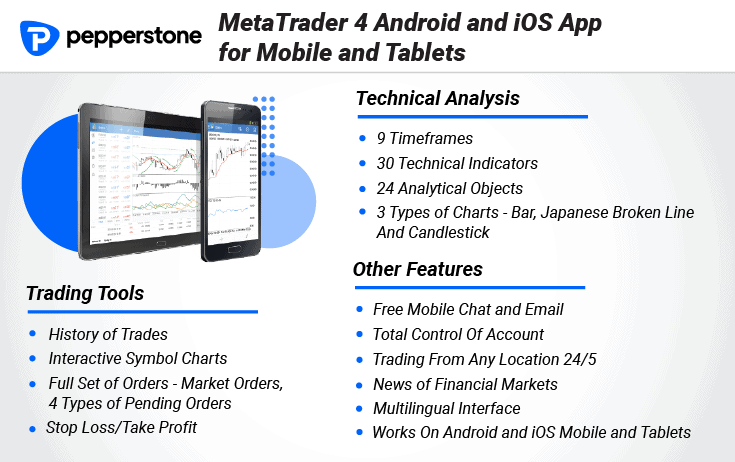
For a start, the MetaTrader 4 app itself is a user-friendly, versatile trading platform with real-time charts and access to in-depth financial news and analytics. As a Pepperstone client, you’ll also get access to 30 technical indicators, 24 analytical objects and 9 time frames, along with other trading tools.
Secondly, and perhaps our highlight, Pepperstone gives you access to 28 additional Smart Trader tools (13 Expert Advisors and 15 indicators) to enhance your trade execution and risk management with MT4.
Last of all, Pepperstone allows Android users to access over 180 financial instruments structured in several asset classes (currency pairs, commodity CFDs, stock index CFDs, shares, currency indexes and cryptos like Bitcoin).
Competitive MT4 Tested Spreads
Choosing Pepperstone’s Razor Account gives users access to competitive spreads.
Ross Collins, our Chief Technology Researcher, tested the average RAW account spreads for 15 of the top brokers and found that Pepperstone’s RAW account averaged 0.36 pips. That put Pepperstone in the top five and helped earn the broker our ‘Best Overall’ designation in a number of categories.
Fast Execution Speeds with MT4
Another area Pepperstone excels in as an MT4 broker is its execution speeds.
Our 2026 execution test used Expert Advisors on MetaTrader 4 demo accounts, which were not funded accounts, at 36 brokers over two 30-hour periods, and measured the average time in milliseconds from placing a limit or market order to its execution, with network latency (ping) subtracted.
Our 2026 execution test found Pepperstone executed limit orders in 77 ms, ranking 2nd of 36 on limit orders, and market orders in 100 ms, ranking 10th of 36 on market orders. We consider anything under 100 ms fast, so Pepperstone's limit order time sits under that yardstick while its market order time lands right on it. Faster execution helps you reduce slippage, the cost of a trade executing at a worse price than you expected.
How to Download MT4 with Pepperstone
You can download the MetaTrader 4 for Android directly from the Google Play Store app and is one of the most popular and best forex trading apps, with downloads worldwide and nearly 10 million installs.
Pepperstone’s MT4 mobile app for Android devices requires Android 5.0 or later. If you are using Android’s main competitor, Apple, you will need an iPhone, iPad or iPod touch with iOS 12.0 or later to use the iOS mobile equivalent.
2. IC Markets
Average spread
EUR/USD = 0.01 GBP/USD = 0.04 AUD/USD = 0.02
Platforms
MT4, MT5, cTrader, TradingView, IC Markets Mobile App
Minimum deposit
$200
Why We Recommend IC Markets
IC Markets is our pick for CFD trading on Android. It’s perfectly tailored for both novices and seasoned traders, with their MT5 program meeting the unique needs of each group. The Android version of IC Markets’ mobile MetaTrader 5 app features an easy-to-navigate interface, seamless one-click trading, a plethora of chart layout customisation options, and advanced charting and analysis tools.
Pros & cons
- Provides DMA access
- Low trading spreads
- No fees for deposits or withdrawals
- $200 minimum deposit required
- Different fees for MT5 and cTrader
- Drawing tools on MT5 are limited
Broker Details

Our team at Compare Forex Brokers found the MetaTrader 5 (MT5) Android app powered by IC Markets to be the best platform for trading CFDs. The MT5 trading app caters to both beginner and advanced traders. Our review takes into account the unique needs of both types.
Top MetaTrader 5 Android Experience
Having been trusted by over 5 million users, this MT5 app is a favourite, ranking as the second most popular forex trading app by installation count. To fully utilise IC Markets’ MT5 mobile platform, you will need Android 4.0 or later.
Just like the desktop version, the MetaTrader 5 (MT5) is a multi-asset mobile trading platform. The MT5 mobile application supports both netting and hedging accounts, meaning you can hold multiple positions for the same financial instrument should you wish to.
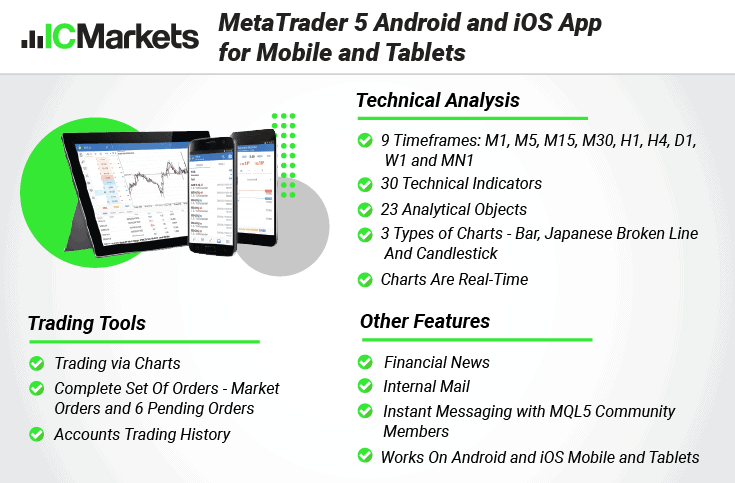
Where MT5 ups the ante over MT4 with more trading tools (including 39 popular technical indicators and 44 graphical objects and 21 timeframes) and access to centralised trading (I.E. more markets to trade). We relished the opportunity to trade IC Markets’ full product range of 2100+ financial instruments across seven distinct financial markets, backed by Depth of Market (DoM) from IC Markets’ trusted liquidity providers.
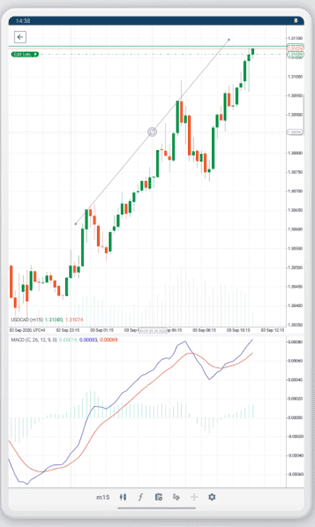
We especially liked how the app’s clean, straightforward interface made it easy to trade directly from charts and revise orders. When trading on the go, you don’t want to struggle and squint to track your positions or worry that a slip of the thumb will dramatically, unintentionally alter your trading strategy.
A simple drop-down menu makes it easy to toggle between positions, price alerts and orders. We were also impressed that the ‘Overview’ dashboard includes Depth of Market data.
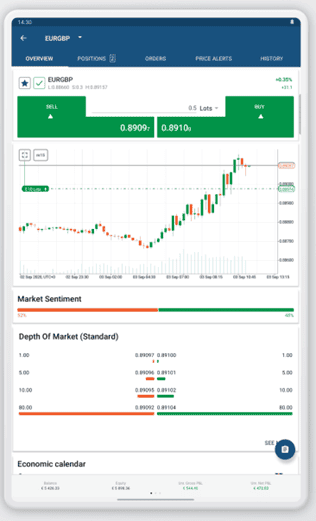
Tight Spreads, 0.32 Pips on Average
One of the main benefits of choosing IC Markets is that this broker offers some of the best spreads on the market.
According to our research, IC Markets RAW account holders enjoy a respectable average spread of 0.32 pips. IC Markets even snagged the top spot for standard account average spreads at just 1.06 pips. (Compare that to our lowest-performing broker: 2.22 pips)
Low spreads will save you trading costs, and this can be significant if you are a high-volume trader.
| Raw Account Spreads | EUR/USD | GBP/USD | EUR/GBP | USD/SGD | AUD/USD |
|---|---|---|---|---|---|
 | 0.01 | 0.04 | 0.27 | 0.85 | 0.02 |
 | 0.1 | 0.41 | 0.37 | 1.38 | 0.38 |
 | 0.10 | 0.20 | 0.20 | 1.00 | 0.10 |
 | 0.10 | 0.20 | 0.20 | 1.40 | 0.10 |
 | 0.16 | 0.59 | 0.54 | 2.00 | 0.29 |
 | 0.20 | 0.60 | 0.50 | 10.00 | 0.40 |
 | 0.00 | 0.50 | 0.40 | 3.50 | 0.90 |
 | 0.10 | 2.00 | 0.60 | 3.10 | 0.50 |
 | 0.00 | 0.00 | 0.20 | 1.80 | 0.00 |
Avg. spreads are taken from each broker's website and updated monthly. Last update on 1 Sep 2026
3. ThinkMarkets
Average spread
EUR/USD = 0.11 GBP/USD = 0.4 AUD/USD = 0.3
Platforms
MT4, MT5, TradingView, ThinkTrader
Minimum deposit
$0
Why We Recommend ThinkMarkets
ThinkTrader, previously known as Trade Interceptor, is our pick for beginners and for experienced traders who trade on the move. ThinkMarkets offers the app a user-friendly interface, seamless performance, and standout features. The app removes common hurdles that novices face, which is why ThinkMarkets is the broker on this page I point beginners to.
Pros & cons
- Cloud-based account syncing across all devices
- 40+ chart drawing objects
- Trading Ideas via TrendRisk Scanner tool
- Has a long learning curve
- Cannot use ThinkZero account with ThinkTrader
- Minimum $500 deposit for some services
Broker Details
For those seeking a simple trading experience, ThinkMarkets’ proprietary app, ThinkTrader is the perfect fit for beginners.
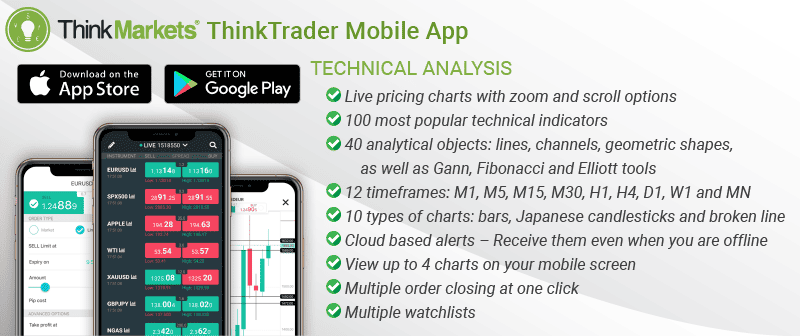
ThinkTrader Has Good Risk Management And Education Features
For those who prefer on-the-go trading, the ThinkTrader app boasts a contemporary design, seamless interface, and distinct features.
The reason ThinkTrader stood out to us, however, is its risk management features and extensive educational resources.
In terms of risk management, we liked the quad screen display (4 charts on one screen), cloud-based alerts (important market updates without being logged on) and the ability to close all open orders instantly via the positions tab.
Our highlight, however, has to be the cutting-edge TrendRisk Scanner, a valuable trading signals tool that scans financial markets for high-probability trades. We liked the touch of having the assets ordered by risk/reward ratio to give us the profit potential of each market.
And as for education, ThinkTrader’s three-tiered trading tutorials (categorised into novice, intermediate, and advanced) are complemented by exhaustive guides that delve into technical indicators, oscillators, and chart patterns.
To help you trade forex successfully, beginners can also find an extensive glossary containing terms structured in key categories such as Foreign Exchange, Economics, Analysis, Trading and more.
Finally, ThinkMarkets has provided free downloadable trading guides for clients with different trading experiences and skills.
About ThinkTrader Android Mobile App
Developed in-house by the experts at ThinkMarkets, ThinkTrader is available for free download from the Google App Store.
The ThinkTrader mobile app for Android devices and smartphones requires Android 6 or later. At the same time, the mobile trading app for iPhone, iPad or iPod touch requires iOS 13.6 or later. This Forex app is available for download on Apple’s App Store as well as on Google Play.
4. FXCM

Average spread
EUR/USD = 0.3 GBP/USD = 0.9 AUD/USD = 0.4
Platforms
MT4, TradingView, Trading Station
Minimum deposit
$50
Why We Recommend FXCM
We’ve spent ample time with the Trading Station Android app by FXCM and can confirm it’s a top choice for traders seeking free forex trading signals. Beyond its user-friendly layout, the app provides tailored signals, a free trial period, and handy SMS notifications. What further elevates it is it offers a swift entry to the Forex and CFD markets.
Pros & cons
- Well-designed mobile app
- Excellent ecnomic calendar
- Access free trading signals
- Lacks a varied range of forex products
- Expensive withdrawal fees via bank transfer
- No automated trading features
Broker Details
From our experience, Trading Station by FXCM shines by offering stellar trading opportunities, especially with the unique trading signals from FXCM Plus. The app has tools to steer you towards success, bolstered by valuable market data and insights via FXCM’s proprietary Speculative Sentiment Index (SSI).
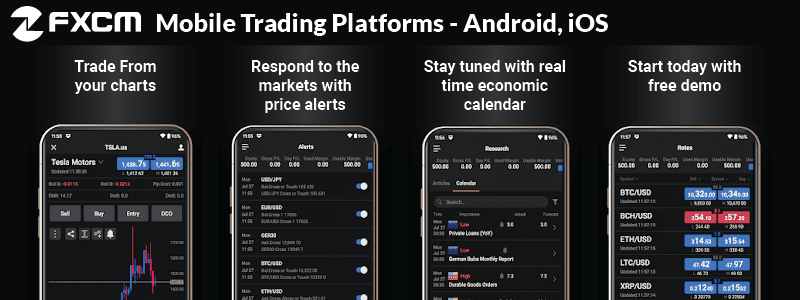
The Best Free Forex Signals App for Android Devices
In our quest to discover top-notch forex apps, we stumbled upon the Trading Station by FXCM. It stands out by drawing its strength from an intuitive interface, personalised signals, a free trial, and the bonus of SMS notifications.
FXCM’s proprietary trading platform, Trading Station Mobile, has a simple, intuitive interface and offers powerful trading tools for easy access to Forex and CFD markets.
One aspect that particularly piqued our interest was the broker’s trading signal service.
FXCM’s trading signals service provides trade ideas that can be applied in live currency trading. After subscribing to that service, you will receive suggested entry prices and a clear plan to exit an active position (analysis with stop and limit orders) for as many as 39 currency pairs.
However, a word of caution to fellow retail traders, these trading signals shouldn’t be mistaken for investment advice. Making trading decisions based purely on these signals rests squarely on your shoulders, and it’s crucial to tread carefully.
About FXCM Android Mobile App
The FXCM app for Android is the in-house trading platform developed by the experts at FXCM. The FXCM mobile app has over 500k installs on the Google App Store from the UK to Colombia.
FXCM’s mobile trading app for Android devices requires Android 7.0 or later. At the same time, the mobile app for iPhone, iPad or iPod touch requires iOS 9.2 or later.
5. Plus500

Average spread
EUR/USD = 0.8 GBP/USD = 1.4 AUD/USD = 1.0Updated 27/03/2026
Platforms
Plus500 Trading Platform
Minimum deposit
$100
Why We Recommend Plus500
After exploring the Plus500 app, we genuinely believe it stands out for its stellar CFD risk management tools on Android. The app’s comprehensive risk management features, encompassing multiple stop losses, funds protection, mobile alerts, and GSL, rightfully earn it the top spot in this category. Plus, traders can benefit from live price quotes and commission-free share trading (other fees apply), all from the convenience of their mobile devices.
Pros & cons
- Good range of trading indicators
- Offers guaranteed stop-loss orders
- +Insights provides good sentiment analysis
- Cannot use any other trading platforms
- Inactivity fee charged after 3 months
- No automated trading tools
Broker Details
When weighing up the risk management tools, from diverse stop losses to client money protection and mobile alerts, Plus500’s proprietary platform stands tall. The app presents a rich array of financial markets, live price quotes, and the allure of commission-free share trading from our mobile devices.
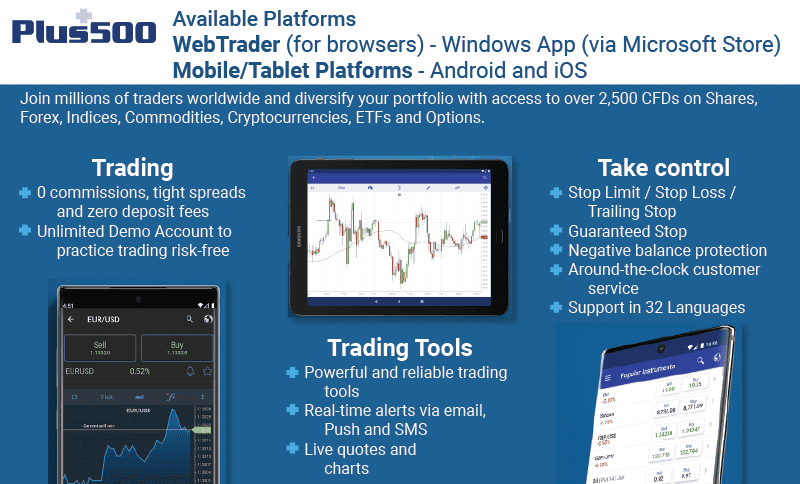
The Best Risk Management Tools
Plus500’s Android app is one of the better apps for tools that manage the risk of high leverage.
Safeguarding trading positions against unexpected market twists is paramount for retail traders. To this end, we appreciated also the Plus500 mobile app’s risk management features, which included stop limit, stop loss and trailing stop orders (at no additional costs).
What particularly stood out to us, however, was it’s guaranteed stop loss orders (GSLOs), which not all broker apps offer. For an additional charge, utilising GSLOs ensures an absolute limit on your potential losses and also minimises the risk of slippage.
What we found, however, is that Plus500 allows GSLOs on some financial instruments only and will apply an additional spread.
Negative Balance Protection
Plus500 also maintains segregated client accounts and provides the regulatory-required negative balance protection for retail traders.
In addition, Plus500 assures that all client funds are kept in a segregated bank account, as the brokerage strictly complies with the Cyprus Securities and Exchange Commission’s client funds legislation.
The broker also assures that client funds are not used for hedging purposes and are not passed through to hedging counterparties.
About Plus500 App
As an in-house mobile trading app, the Plus500 platform can be found on the Google App Store and currently has more than 5 million installs, half as much as the MT4 Android App. You can even try the platform for free to do demo trades.
Plus500’s mobile trading app for Android devices requires Android 5.0 or later.
*Your capital is at risk ‘76% of retail CFD accounts lose money’
6. FxPro
Average spread
EUR/USD = 0.64 GBP/USD = 0.54 AUD/USD = 0.54
Platforms
MT4, MT5, cTrader, FxPro Trading Platform
Minimum deposit
$100
Why We Recommend FxPro
After giving cTrader a whirl, we genuinely believe it’s a stellar alternative to the MetaTrader platform, especially when powered by FxPro. Users can seamlessly manage their accounts and tap into fund management services within the FxPro Direct App. What sets cTrader for Android apart is its dedicated section for price alerts, letting traders efficiently manage push notifications. This user-centric approach makes cTrader a worthy contender in the world of forex trading apps.
Pros & cons
- cTrader has a solid choice of indicators
- Offers DMA access
- Competitive spreads
- Inactivity fees
- Learning curve needed for some features
- Weak educational resources
Broker Details
In our books, FxPro’s cTrader takes the cake when considering an alternative to MetaTrader. The FxPro Direct App streamlines account management and offers consolidated fund management solutions. A cherry on top is the dedicated tab within the cTrader Android app for managing push notifications for price alerts, a feature missing in the MT4 app.
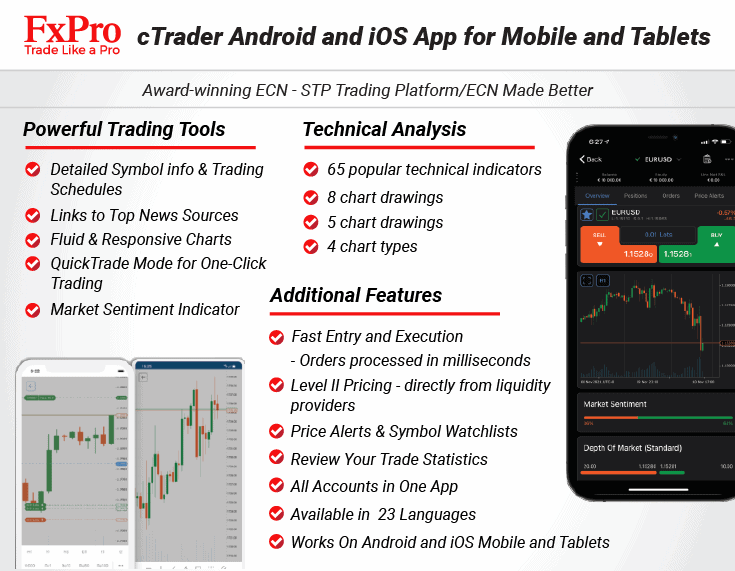
cTrader is the Best Android Alternative to MT4
In our experience, cTrader, available through FxPro, is a strong MT4 alternative for Android enthusiasts. While the lion’s share of traders tend to gravitate towards MetaTrader 4, its simplistic design and basic feature set don’t cater to everyone’s tastes.
As a pioneer in introducing cTrader to its users, FxPro’s cTrader mobile app offers a lot in terms of features and benefits for Forex traders.
First of all, you get access to the full market depth. This means you get access to all available bid and ask prices at different volumes.
Secondly, we also appreciate that the trading platform’s Smart Order Routing ensures that FxPro clients receive the best available price in 100% of the cases.
Lastly, you have access to a full suite of technical analysis tools and advanced charting options, including 57 technical indicators, 5 chart types, and 26 time frames.
About cTrader Android Mobile App
The cTrader App for Android devices is the mobile trading version of the cTrader desktop by Spotware Systems Ltd. Listed in the Google Play Store, cTrader for Android has 100,000+ downloads on unique devices.
cTrader mobile trading app details:
- App size: 35.0 Mb
- Current Version: 4.8.54458
- Requires Android: 5 and up
- Reviews: 4.6-star review out of 5 stars with over 7000 total reviews
The cTrader mobile app for Android devices requires Android 5 or later. At the same time, the mobile trading app for iPhone, iPad or iPod touch requires iOS 12.0 or later.
7. eToro
Average spread
EUR/USD = 1.0 GBP/USD = 2.0 AUD/USD = 1.0
Platforms
eToro
Minimum deposit
$50
Why We Recommend eToro
eToro’s app is our pick for social trading on Android. eToro is celebrated globally for its forex social signals. Android users, in particular, will appreciate the blend of innovation and simplicity the app offers, coupled with an unmatched customer experience.
Pros & cons
- Intuitive interface to make copy trading easy
- Research top-performing traders to copy
- Trade a wide range of markets
- Limited range of technical indicators
- Charting is basic compared to other platforms
- Charges $5 to withdraw funds
Broker Details
If copy trading is your game, eToro’s Android app is a definitive must-have.
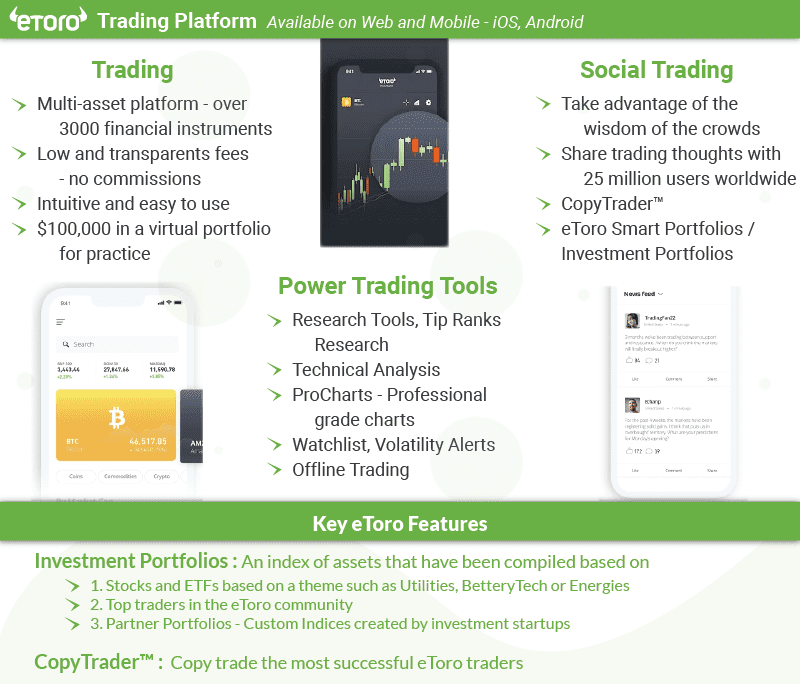
The Best Android Mobile Social Trading Solution
When talking about standout social trading platforms on Android, eToro undoubtedly tops the list. With a reputation bolstered by its emphasis on forex social signals, it ensures a premier customer experience for its Android user base.
To us, however, the jewel in eToro’s crown has to be its CopyTrader feature. For those of us who might be taking baby steps into trading or lack extensive experience, this feature lets us peer into the strategies of seasoned traders, mirroring their moves in real time.
Apart from its advanced filtering and search tools, one feature of CopyTrader that stood out to us was the ease with which we could copy expert traders on the platform.
All you have to do is click copy and choose the amount to invest. There is also an option to stop copying if your copy value falls below a set amount, like a stop-loss order.
Other features we admired include the ProCharts, a a professional-grade technical analysis tool and the TipRanks Research tab, which provides market insight from investors and leading analysts from top financial institutions worldwide.
With a whopping 10 million downloads across over 140 nations on the Google store, the eToro Android app is one of the most popular on the market.
eToro’s mobile app for Android devices requires Android 5.0 or later, while the app for iPhone, iPad or iPod touch requires iOS 10.0 or later.
eToro Earns High Scores for Its Social Trading Experience
When talking about standout social trading platforms on Android, eToro undoubtedly tops the list. With a reputation bolstered by its emphasis on forex social signals, it ensures a premier customer experience for its Android user base.
Want to give it a whirl? eToro’s trading platform can be readily installed from the Google Play Store. It flaunts a whopping 5 million downloads across over 140 nations to further vouch for its popularity.
eToro’s mobile app for Android devices requires Android 5.0 or later, while the app for iPhone, iPad or iPod touch requires iOS 14.0 or later.
8. TD Ameritrade

Average spread
EUR/USD = N/A GBP/USD = N/A AUD/USD = N/A
Platforms
Thinkorswim
Minimum deposit
$0
Why We Recommend TD Ameritrade
After navigating TD Ameritrade’s thinkorswim Android mobile software, we can confidently say it’s the cream of the crop for US traders. The platform furnishes a comprehensive trading suite suitable for stocks, futures, options, ETFs, currencies and beyond. Adding value, it delivers zero commissions on stock trading, real-time price quotes, CNBC news feeds, customisable charts, and a vast array of over 300 analytical tools and indicators.
Pros & cons
- Excellent range of technical indicators
- Live chat support via mobile app
- Syncs with desktop platform on the go
- Doesn’t offer all trading products available
- Limited trading tools compared to desktop
- Not the most user-friendly interface
Broker Details
Overall, thinkorswim by TD Ameritrade offers all the trading features that will suit U.S. traders, including zero commissions, a broad range of assets to trade and a huge array of trading tools to enhance your trading. Compared to other mobile applications, the thinkorswim app strives to offer its users a competitive trading environment.
Best Android Trading Platform for US Traders
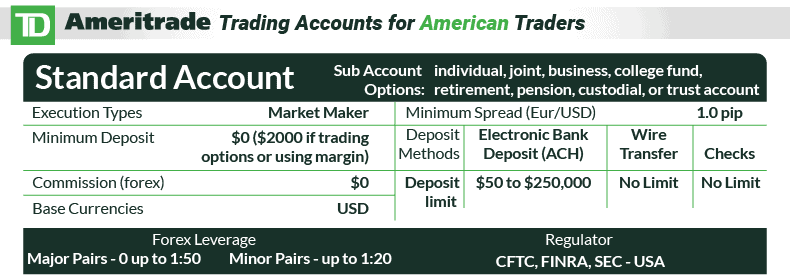
thinkorswim by TD Ameritrade is our top recommendation for the best Android trading app for US traders.
The reason for this includes access to a broad spectrum of stocks, futures, options, ETFs, and currencies, which U.S. traders will appreciate. This includes being one of the world’s premier brokerage trading entities, offering comprehensive access to the US stock market, including free level 2 market data (showing orders below best bid or above best offer) and low trading fees.
Additionally, thinkorswim stands out with enticing offerings such as zero commission on stock trading, real-time price quotes, live CNBC news feeds, customizable charts, and a mind-boggling array of over 300 analysis tools and indicators.
Indeed, there are so many great features to thinkorswim that we can’t list them all.
To us, however, it is the enriched user experience that we appreciated the most, with thoughtful details like easily customizable layouts & workspaces and live help that is built into the app.
How to choose a forex trading app for Android?
In our trading experience, these are the most important factors to consider when choosing a forex trading app for Android:
- Trust: You want to choose the app of a forex broker that is regulated by multiple regulatory bodies, such as ASIC in Australia and the FCA in the UK.
- Trading Platform: Choose an Android trading app based on your preferred trading platform, such as MetaTrader 4, MetaTrader 5, TradingView, or cTrader.
- Trading Tools: The app you choose should have the necessary trading tools such as technical indicators, drawing tools, and economic calendars.
- Market Range: It should offer a decent number of forex pairs and other tradable markets like Pepperstone.
- Demo Accounts: Choose an app that offers a free demo trading account so you can test its functionality with various trading strategies before investing any money.
What are the features of a good Forex trading app for Android users?
Essential features of the Best Forex Trading Apps for Android include a good UI, robust charting tools, and reliable performance. Let’s take a clear look at these features:
- User-Friendly Interface: Intuitive, responsive and well-organised layout for quick access to essential functions.
- Real-Time Quotes and Charts: Accurate and up-to-date currency pair quotes and customisable charts with various timeframes.
- Fast Order Execution: Swift and reliable order execution with multiple order types (market orders, limit orders, stop orders, etc.).
- Risk Management Tools: Stop-loss and take-profit orders to manage risk.
- News and Analysis: Real-time financial market news updates and technical analysis tools.
- Performance and Reliability: Look for apps with stable performance and minimal downtime.
Which Android Trading Platform Offers the Lowest Spreads?
One of the Android trading platform with the Lowest Spread Forex Brokers is IC Markets.
Ross Collins’s spread tests covered RAW accounts at 15 MT4 brokers. IC Markets averaged 0.19 pips on EUR/USD against the average of 0.27 pips for the 15 brokers, and 0.32 pips across six major pairs, joint third of the 15 with TMGM.
Pepperstone also had low RAW spreads starting from just 0.1 pips for the EUR/USD forex currency pair.
Here’s how IC Markets and Peppersotne compare to the rest of the brokers:
| RAW Account Spread Comparison | EUR/USD | AUD/USD | AUD/JPY | EUR/GBP | EUR/JPY |
|---|---|---|---|---|---|
| 0.10 | 0.10 | 0.90 | 0.20 | 1.20 |
| 0.01 | 0.02 | 0.50 | 0.27 | 0.30 |
| 0.1 | 0.38 | 0.64 | 0.37 | 0.73 |
 | 0.11 | 0.30 | 0.47 | 0.40 | 0.44 |
 | 0.30 | 0.40 | 1.10 | 0.70 | 0.80 |
 | 0.00 | 0.00 | 0.70 | 0.00 | 0.00 |
 | 0.44 | 0.57 | 1.04 | 0.71 | 0.90 |
 | 0.50 | 0.60 | 1.10 | 0.80 | 1.30 |
Avg. spreads are taken from each broker’s website and updated monthly. Last update on 1 Sep 2026
Pros and Cons of Forex Trading On Android App
The biggest advantages and disadvantages of mobile trading for us are as follows:
- Trade on the go.
- Access to real-time market news
- Intuitive app interface
- Swift order placement and execution with only a few clicks
- Instant alerts on market volatility and order status
- Detailed analysis may be challenging on smaller screens
- Wifi and mobile data can be less stable
- It is less customisable than the desktop counterpart
- Some advanced tools may be unavailable on mobile apps
- Older phones might not work well with new trading apps
If the small screen cramps your analysis, our best forex trading platforms comparison covers the desktop and web platforms by trading style, and it includes a section on mobile apps.
Background To Deciding The Android Best Trading Platform
The trading app you choose might vary from trader to trader. At the end of the day, you need to find an online trading platform that suits your individual needs, financial goals and trading style. Different Android trading apps are built to suit the needs of different types of traders.
For example, if you’re looking for an easy-to-use trading app, you can opt for the MetaTrader 4 App powered by Pepperstone or Trade Interceptor powered by ThinkMarkets. Also, trading apps like MetaTrader 5 and cTrader are great for multi-asset trading and automated alerts.
The best free trading app for Forex signals is Trading Station by FXCM, but if you like more interaction and copy trading solutions, you can opt for the eToro Android app. Meanwhile, risk-averse traders can enjoy a safer trading environment with the Plus500 app. For US traders, thinkorswim is our top trading app pick for 2026.
Note: FCA regulatory changes in 2021 no longer allow brokers in FCA regulation to offer cryptocurrency products for trading. For brokers like Pepperstone, sign up to the branch regulated by the body that licenses brokers in your market rather than Pepperstone UK.
FAQs
Can I forex trade from my Android?
Does MetaTrader support Android?
What markets can I trade on my Android app?
Can I do copy trading from my Android app?
Can I receive forex trading signals on my Android app?
Can I use Expert Advisors (EA) on my Android app?
About the author

Justin Grossbard is the Co-Founder and CEO of CompareForexBrokers, which he established with Noam Korbl in 2014. He has over 20 years of professional experience in online marketing and holds a Master's in Marketing from Monash University.
Our reviews are reader-supported. We may receive payment when you click a link to a partner site. Learn how we make money.